AI agent for freight brokers
Spot Quote Rate Agent
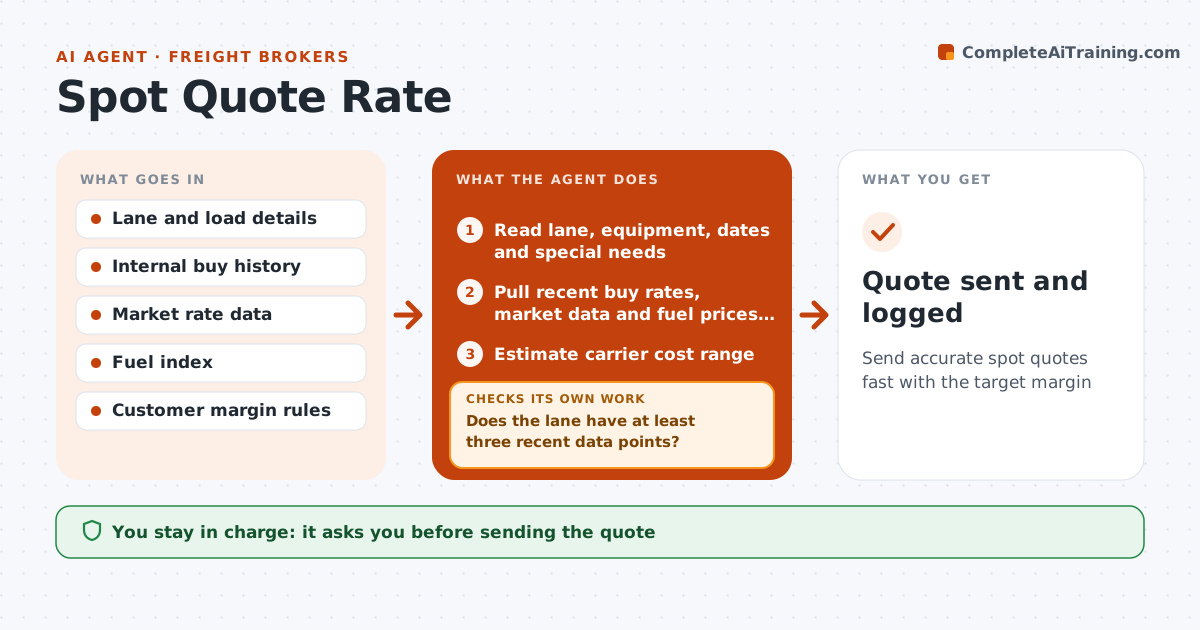
Send accurate spot quotes fast with the target margin
What it does
Shippers ask for spot quotes all day and expect answers in minutes, but a rushed quote can lose the load or lose money. This agent takes the lane, equipment, dates and special needs, then pulls recent buy rates the brokerage paid on the lane, current market data and fuel prices. It weights internal buys from the last 30 days highest and estimates the likely carrier cost range. Lanes with fewer than three recent data points get a wider range and a note to call two carriers first. It adds the customer's margin and checks the quote against past quotes and wins for that customer and lane. If it is more than 15% off, it rechecks inputs such as lane matching and data dates and rebuilds. The broker approves every quote before it is sent. Edge case: thin-data lanes get a wider range and a carrier call note.
How it works
Follow the arrows from top to bottom. The orange dashed arrow is the loop: when a check fails, the agent goes back and tries again.
Read the steps as a list
- Quote request received
- Read lane, equipment, dates and special needs
- Pull recent buy rates, market data and fuel prices for the lane
- Estimate carrier cost range
- Does the lane have at least three recent data points?If not: widen the range and note that two carriers should be called first. Back to step 3.
- Add customer margin to build the quote
- Is the quote within the normal range of past quotes for this customer and lane?If not: recheck lane matching and data dates, then rebuild the estimate. Back to step 3.
- Broker approves the quoteThe agent waits here for your OK.
- Quote sent and logged
How it decides
Cost estimate comes from recent internal buys weighted over market data, then the customer margin is added and checked against past wins.
- Weight internal buys from the last 30 days highest
- Lanes with under three data points get a wider range
- Quotes above 15% off past wins need a note
Make it yours
Every agent is a starting point. You choose these settings for your own situation.
- Margin rules per customer
- Data lookback window (default 30 days)
- Out-of-range threshold (default 15%)
- Quote format
What keeps you in control
It always asks you first
- Sending the quote
Hard limits
- Never quotes below cost
- Never sends without approval
It stops when
- Done: quote sent
- Stop: lane or equipment unclear
Set it up
We guide you through the set-up, step by step
Members get the full set-up guide for this agent. No technical skills needed: you copy, paste and upload.
- One set of instructions to paste into your AI, with the clicks for ChatGPT, Claude, Microsoft 365 Copilot, Gemini and Grok
- The agent then walks you through connecting your own data, one source at a time
- A downloadable copy with the flow chart, the rules and the full guide