AI agent for film composers
Spotting Session Cue Sheet Agent
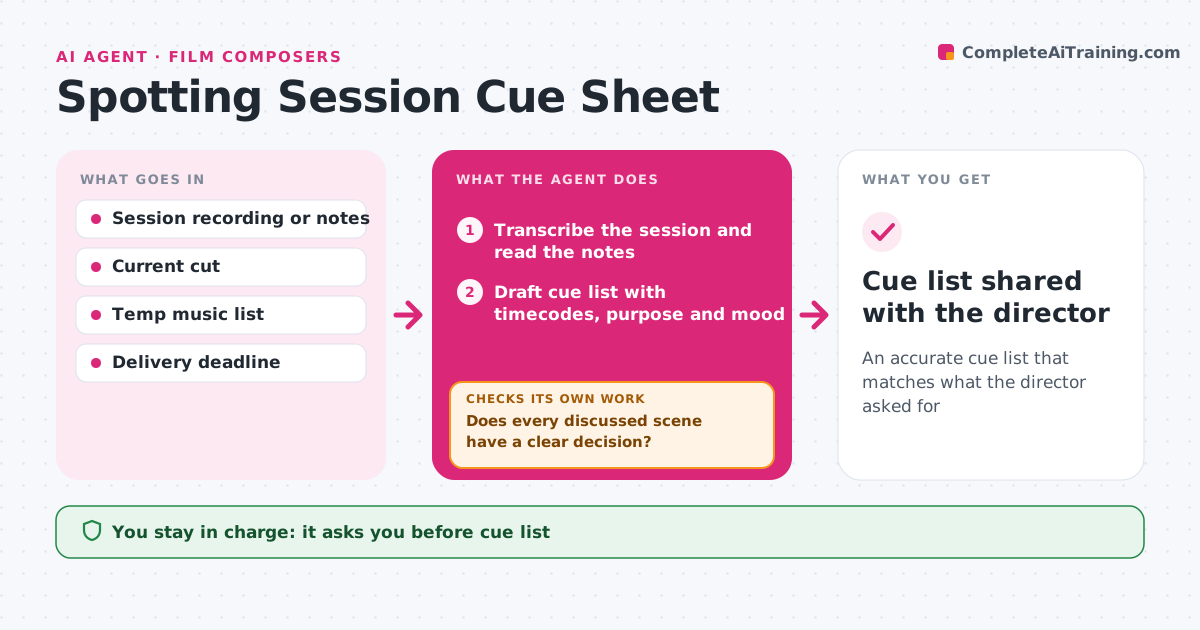
An accurate cue list that matches what the director asked for
What it does
After a spotting session, composers need a precise list of every cue, but notes from a long session are messy and some decisions stay vague. This agent takes the session recording or notes and the current cut. It drafts a cue list with each cue's number, start and end timecode, length, scene, purpose, mood words the director used and any temp music references. Then it checks each cue against the picture: starts and ends land on sensible points, cues do not overlap without intent, and every scene discussed has a decision. Unclear items become questions for the director. It schedules writing based on cue length and deadlines. The composer approves the cue list before writing. Edge case: a scene where the director said maybe no music is marked as an open decision.
How it works
Follow the arrows from top to bottom. The orange dashed arrow is the loop: when a check fails, the agent goes back and tries again.
Read the steps as a list
- Spotting session ends
- Transcribe the session and read the notes
- Draft cue list with timecodes, purpose and mood
- Check cue points and overlaps against the picture
- Does every discussed scene have a clear decision?If not: draft questions for the director. Back to step 3.
- Plan writing schedule by cue length
- Composer approves the cue listThe agent waits here for your OK.
- Cue list shared with the director
How it decides
It ties each cue to the director's words and the picture, and asks when either is unclear.
- 'Maybe' cues are open decisions
- Overlapping cues need a stated reason
- Writing time is planned per minute of music
Make it yours
Every agent is a starting point. You choose these settings for your own situation.
- Cue numbering
- Writing minutes per day
- Mood vocabulary
- Sheet format
What keeps you in control
It always asks you first
- Cue list
- Questions sent to the director
Hard limits
- Never sends questions without approval
- Never shares temp music externally
It stops when
- Done: cue list approved
- Stop: cut not locked enough to spot
Set it up
We guide you through the set-up, step by step
Members get the full set-up guide for this agent. No technical skills needed: you copy, paste and upload.
- One set of instructions to paste into your AI, with the clicks for ChatGPT, Claude, Microsoft 365 Copilot, Gemini and Grok
- The agent then walks you through connecting your own data, one source at a time
- A downloadable copy with the flow chart, the rules and the full guide