AI agent for competitive intelligence analysts
Stakeholder Intelligence Request Intake Agent
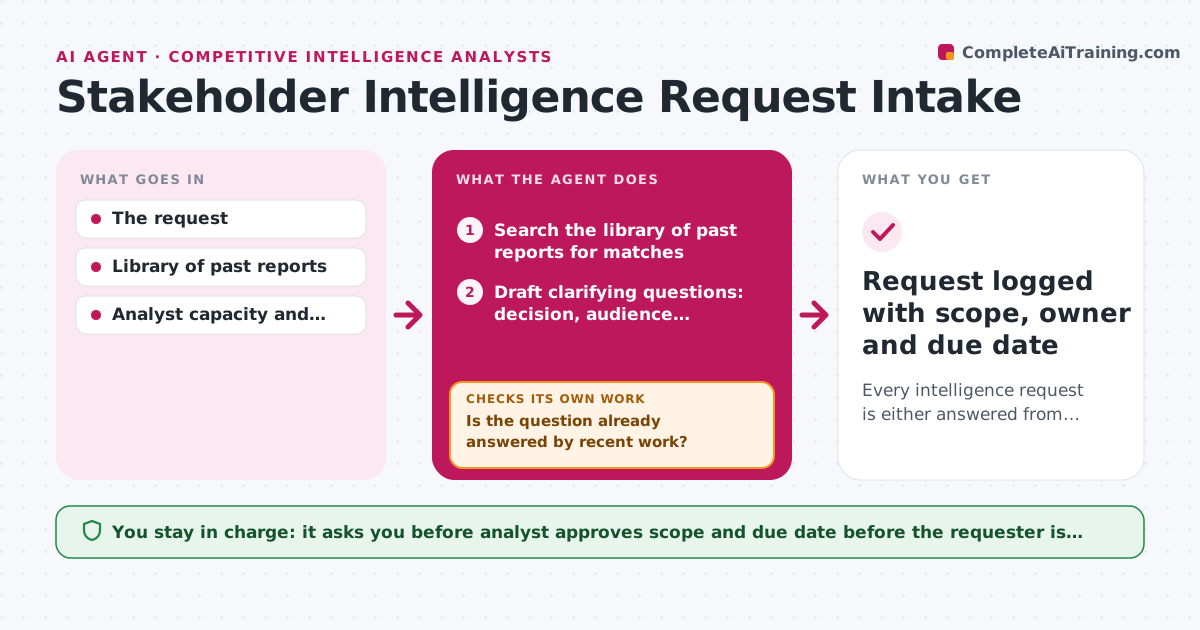
Every intelligence request is either answered from past work or scoped to a named decision before work starts.
What it does
A message says find out what Competitor Z is doing, and three days later the analyst learns the sales lead only needed a price comparison for one deal. This agent handles each new request when it arrives. It checks past work to see if the question is already answered, drafts clarifying questions about the decision the answer will inform, and sizes the effort. If the reply does not name a decision, it sends the request back and waits. Once clear, it proposes scope and a due date. The analyst approves them before the requester is told. Edge case: a request matches a report from two months ago, so the agent offers an updated version instead of new work.
How it works
Follow the arrows from top to bottom. The orange dashed arrow is the loop: when a check fails, the agent goes back and tries again.
Read the steps as a list
- New intelligence request arrives
- Search the library of past reports for matches
- Is the question already answered by recent work?If not: search again with synonyms and related competitors before treating it as new. Back to step 2.
- Draft clarifying questions: decision, audience, deadline
- Send the questions to the requester through the analyst
- Does the answer name a decision the work will inform?If not: ask again with an example, and park the request after two tries. Back to step 4.
- Size the effort in hours using similar past requests
- Propose scope, format and due date against analyst capacity
- Analyst approves scope and due date before the requester is toldThe agent waits here for your OK.
- Request logged with scope, owner and due date
How it decides
It reuses past work when a report under 90 days old covers the question. Requests with no named decision are returned for clarification.
- Reuse a past report if it is under 90 days old and covers the same competitor.
- Park a request after 2 unanswered clarification attempts.
- Size effort as small under 2 hours, medium up to 8, large above 8.
- Push low-priority requests to the next free week when capacity is full.
Make it yours
Every agent is a starting point. You choose these settings for your own situation.
- Report reuse age limit (default 90 days)
- Clarifying question list
- Effort size bands
- Intake channels watched
What keeps you in control
It always asks you first
- Analyst approves scope and due date before the requester is told
Hard limits
- Do not send replies without the analyst's approval
- Never share a report outside its approved audience
It stops when
- Done: request answered from past work or logged with approved scope.
- Stop: no reply after 2 clarification attempts, so the request is parked.
Set it up
We guide you through the set-up, step by step
Members get the full set-up guide for this agent. No technical skills needed: you copy, paste and upload.
- One set of instructions to paste into your AI, with the clicks for ChatGPT, Claude, Microsoft 365 Copilot, Gemini and Grok
- The agent then walks you through connecting your own data, one source at a time
- A downloadable copy with the flow chart, the rules and the full guide