AI agent for civil engineers
Stormwater Calculation Check Agent
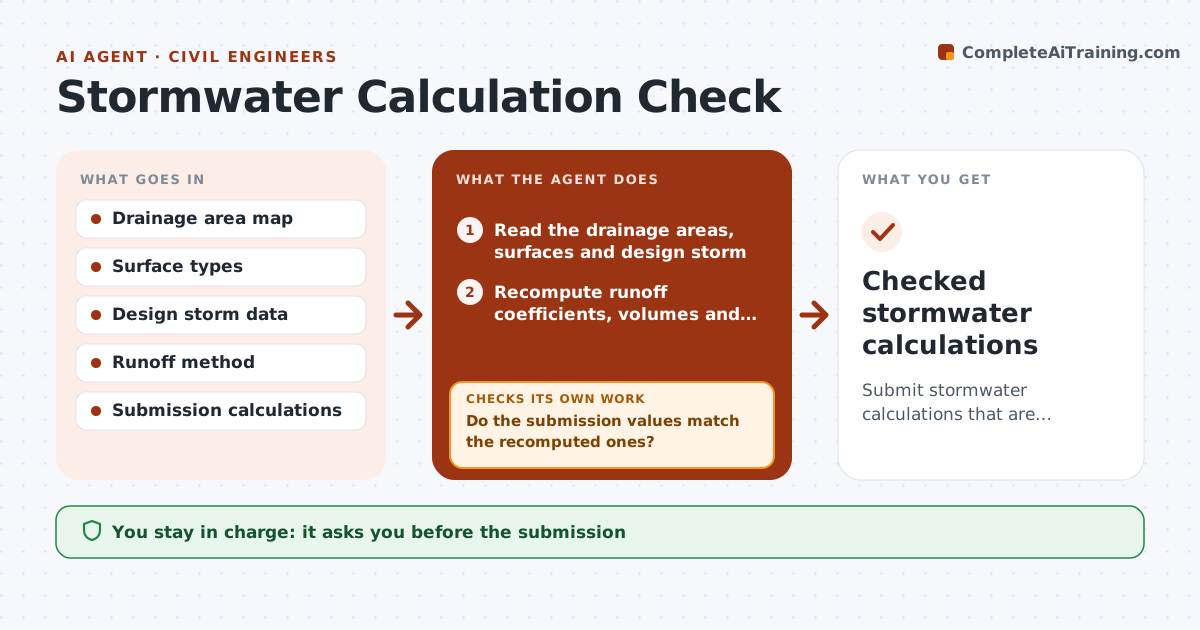
Submit stormwater calculations that are internally consistent and meet the peak flow limit.
What it does
A stormwater submission is returned for a wrong runoff coefficient or a mismatched area, which wastes weeks. This agent recomputes the runoff volumes from the drainage areas and surface types, using your design storm and the local method, and compares them with the design submission. It flags differences. It also compares pre and post development peak flow and reworks the basin sizing when the limit is exceeded, then checks again. After corrections, it reruns everything. You approve the submission. Edge case: the site area in the report differs from the survey by 0.2 acre, and the agent traces the mistake to a missing parcel.
How it works
Follow the arrows from top to bottom. The orange dashed arrow is the loop: when a check fails, the agent goes back and tries again.
Read the steps as a list
- Stormwater report is nearly ready
- Read the drainage areas, surfaces and design storm
- Recompute runoff coefficients, volumes and peak flows
- Compare the recomputed values with the submission
- Do the submission values match the recomputed ones?If not: List each difference with its likely cause. Back to step 4.
- Correct the values in a working copy and recompute the report
- Compare pre and post development peak flow
- Is post development peak flow within the limit?If not: Resize the basin or outlet and recompute. Back to step 7.
- Do all values now agree and meet the limits?If not: Return to the differences still open. Back to step 4.
- Engineer approves the submissionThe agent waits here for your OK.
- Checked stormwater calculations
How it decides
It recomputes every number from areas and surfaces, then compares each to the report. It resizes the basin when post development peak flow exceeds the limit.
- A difference over 2% in any volume is flagged (default)
- Post development peak must not exceed pre development
- Area totals must match the survey
- Basin sizing is rerun after any area change
Make it yours
Every agent is a starting point. You choose these settings for your own situation.
- Design storm
- Runoff method
- Difference threshold (default 2%)
- Peak flow limit
- Basin shape rules
What keeps you in control
It always asks you first
- The submission
Hard limits
- Never signs the submission
- Never changes the design storm
- Shows all assumptions
It stops when
- Done: values agree and limits are met
- Stop: no feasible basin size; engineer rethinks the design
Set it up
We guide you through the set-up, step by step
Members get the full set-up guide for this agent. No technical skills needed: you copy, paste and upload.
- One set of instructions to paste into your AI, with the clicks for ChatGPT, Claude, Microsoft 365 Copilot, Gemini and Grok
- The agent then walks you through connecting your own data, one source at a time
- A downloadable copy with the flow chart, the rules and the full guide