
Learning path
Learning AI as a Landscape Architect
Landscape architects juggle site notes, plant lists, budgets, and client updates. This path shows you how to use AI for each part of that work, in plain steps.

Your path
Everything in the Landscape Architect AI kit, in the order that makes sense. Members tick off each step and see their progress.
Set up your AI
We guide you through each click.
Let skills do your everyday tasks
Connect your apps and pick your AI apps
Hand whole tasks to AI agents
Build your own tools
Keep growing
Everything for landscape architects
All the courses, certifications, AI tools, MCP servers and apps for landscape architects, most relevant first. Open any list to see more.
Take the prompt courses
A short framework course to learn how to ask, then 9 lessons with ready-to-use prompts for landscape architects.
Start with this framework: how to talk to AI
RISEN fits landscape architects because it turns multi-step deliverables, such as a park grading and planting specification, into clear sequential prompts.
Then your prompt course for landscape architects- 1Site Analysis & Planning3 prompts
- 2Concept & Design Development3 prompts
- 3Plant Selection & Schedules3 prompts
- 4Client Communication & Proposals3 prompts
- 5Cost Estimating & Budgets4 prompts
- 6Environmental Impact & Sustainability3 prompts
- 7Coordination With Engineers4 prompts
- 8Renderings & Visual Communication2 prompts
- 9Site Visits & Installation Oversight2 prompts
Watch the video courses or add them to your Favorites for later
92 video courses our AI picked for landscape architects, most useful first. Save the ones you want to watch later with the heart.
Favorites are saved to your account: sign in or get your AI kit first.
Show all 92 video courses
Get certified, or add certifications to your Favorites
Every course ends in an exam and a certificate you can add to LinkedIn. Save the certifications you are aiming for with the heart.
Favorites are saved to your account: sign in or get your AI kit first.
More certifications for landscape architectsShow all 24 certifications
Try the AI tools for landscape architects
1 AI tools our AI matched to the work of landscape architects, best fit first. Each review shows what it does, its alternatives and the jobs it suits.
Favorites are saved to your account: sign in or get your AI kit first.
Connect your AI to the apps landscape architects use
MCP servers let ChatGPT, Claude or Copilot look things up and get work done in other apps, like your email, calendar or bookkeeping software. These 12 fit the work of landscape architects best, well-known apps first.

Google Search MCP server (AceDataCloud)
by AceDataCloudLets your AI run Google searches for web, images, news, videos, places and maps, and hand you the results.
ResearchNo install
Bing Search MCP server
by leehanchungLets your AI search the web, news, and images through Microsoft Bing while you chat.

GIS MCP server
by mahdin75Let your AI do map and location maths: distances, areas, buffers, map layers and coordinate changes.
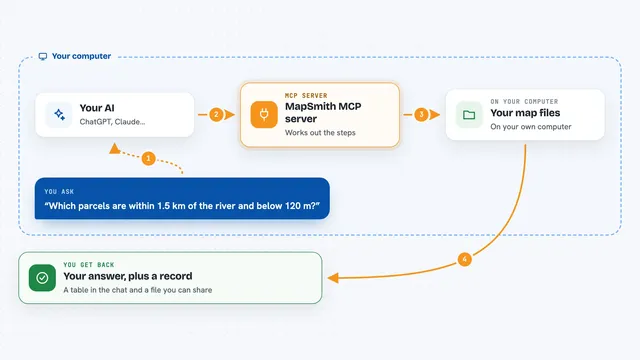
MapSmith MCP server
by mapsmith-aiAsk your AI to run map and terrain analysis on your own data, and get an answer plus a record of every step.

Brave Search MCP server
by braveLets your AI search the web, news, images, and places through Brave Search.

DuckDuckGo Search MCP server
by zhsamaLets your AI search the web through DuckDuckGo and bring back results for you.
Show all 12 MCP servers

emem MCP server
by Vortx-AILets your AI look up signed facts about real places, like elevation, water and vegetation, with receipts you can check.
ResearchNo install
Google Custom Search MCP server
by A1-x-TechLets your AI search the web and images through your own Google Programmable Search Engine.

Web Search MCP server
by pskill9Lets your AI search the web through Google and bring back titles, links, and short descriptions.
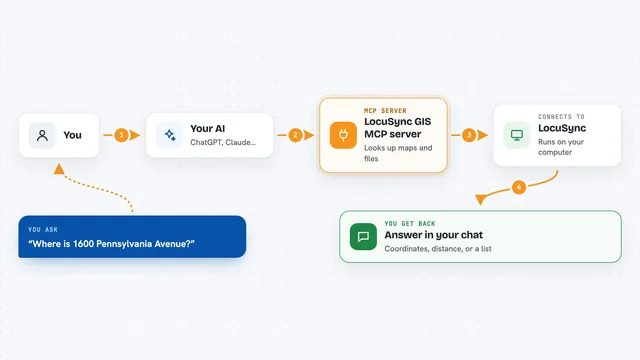
LocuSync GIS MCP server
by matbel91765Let your AI look up addresses, map routes, check elevations, and work with map files for you.
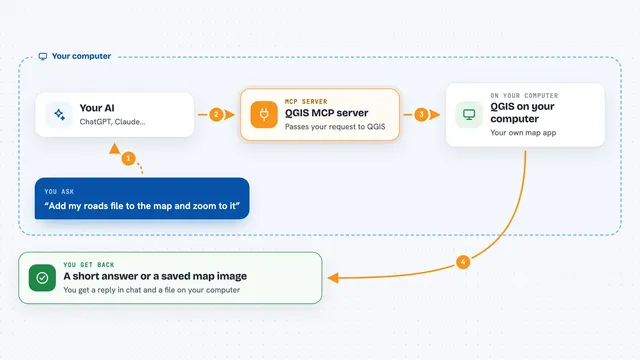
QGIS MCP server
by jjsantos01Let your AI create QGIS maps, add layers and run map tools for you.
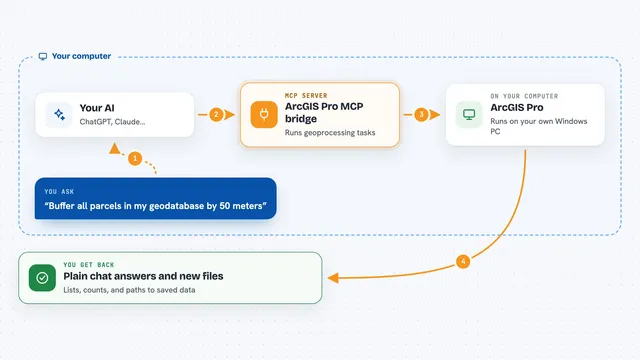
ArcGIS Pro MCP bridge
by muendLets your AI run ArcGIS Pro geoprocessing tasks on your own Windows machine, safely.





























































































About this learning path
6 topicsAI for Landscape Architects: A Practical Learning Path
You already read a site, weigh a budget, and explain a planting plan to someone who has never heard of a rain garden. AI does not replace any of that. It takes the writing, the sorting, and the first drafts off your desk so the design thinking gets more of your day.
This path starts with the basics of getting an AI tool set up and connected to the work you already do. Then it walks through prompts built for landscape architecture, followed by short video courses chosen for your role and the certificates that come with them.
Why AI Matters Now
Clients ask for faster turnarounds and clearer sustainability stories. Studios that use AI well are answering those requests without adding evening hours. The tools are already in the room, whether or not your firm has a policy for them yet.
Knowing how to use them on purpose, with your own judgment in charge, is what separates a helpful draft from a mess you have to redo.
What the Path Includes
You begin with setup questions: which tool to use, what to keep private, and how to describe your role so the answers fit your work. From there you connect your AI to your own notes, standards, and project files.
Then come the prompts, one for each stage of a project, from site analysis through installation oversight. Short video courses picked for landscape architecture follow, and each one ends with a certificate you can keep.
Where Your Time Comes Back
The slow parts of the week are usually the writing parts: proposals, plant schedules, cost breakdowns, meeting notes. AI drafts those in minutes, and you edit.
A planting schedule that took an afternoon becomes a task you finish before lunch, leaving room for the site visit you actually wanted to make.
Protecting Your Professional Judgment
AI can suggest plants that do not belong in your climate, or a cost figure that is simply wrong. You are the one who checks.
The path teaches you how to ask for sources, how to keep client names and site addresses out of public tools, and how to keep your stamp and your reputation on solid ground.
How to Start This Week
Pick one task you dislike, most people choose client updates or cost breakdowns, and run one prompt on it. Compare the draft to what you would have written.
Then try a second task. Small, repeated use is how this becomes a habit that holds up on a deadline.
Frequently asked questions
Do I need to know anything about AI to start?
No. The path begins with plain setup questions and shows you where to click. If you can write an email, you can use these tools.Will AI design the landscape for me?
No. It writes, sorts, and suggests. The design decisions, the plant choices that fit the site, and the judgment about what a client can afford stay with you.Is my project information safe?
That depends on the tool and your settings. The path covers what to leave out, how to turn off training on your data, and when to keep work on your own machine.How long does the path take?
Most people move through it over a few weeks, a little at a time between projects. You can go faster or slower, and you keep access to the lessons.