AI agent for journalists
Story Archive Linking Agent
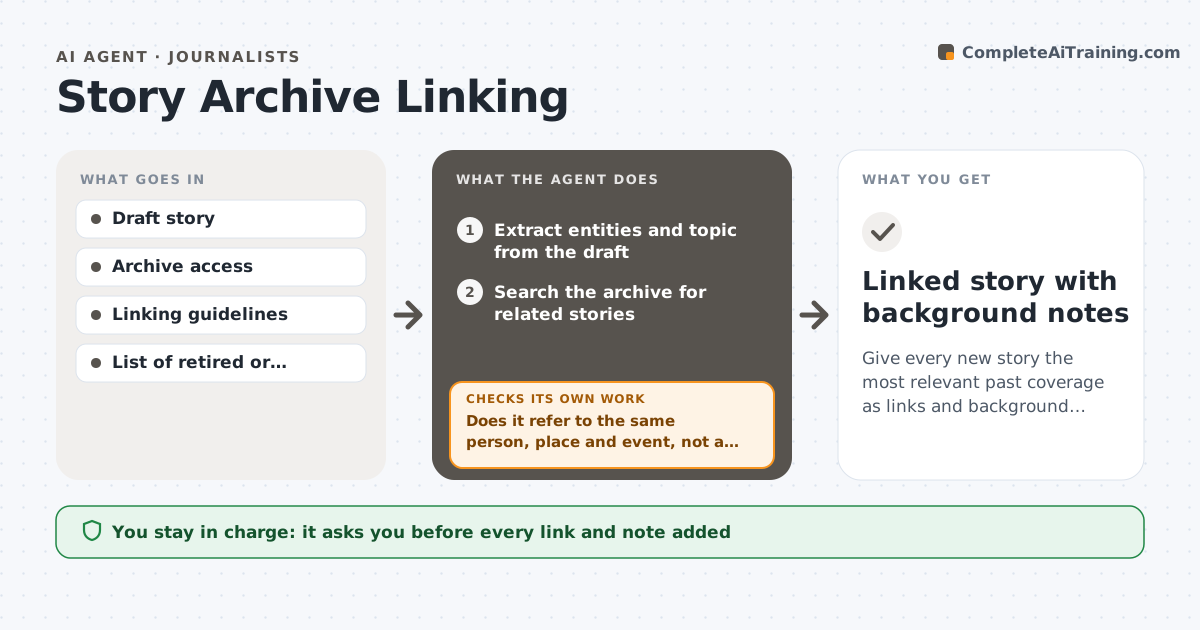
Give every new story the most relevant past coverage as links and background, with outdated items flagged.
What it does
A news site holds years of reporting, but a new story seldom links to the earlier coverage that gives readers context. This agent reads a new draft, extracts its people, places, organizations and topic, and searches the archive for related past stories. It reads each candidate and checks that it is truly relevant, not just sharing a name, and whether its facts are still accurate or have been overtaken. It proposes links and short background notes, flags outdated pieces that need an update note, and rechecks after the editor edits. It never adds a link on its own. The editor approves what is added. Edge case: two people with the same name are separated by place and date before any link is proposed.
How it works
Follow the arrows from top to bottom. The orange dashed arrow is the loop: when a check fails, the agent goes back and tries again.
Read the steps as a list
- New draft submitted
- Extract entities and topic from the draft
- Search the archive for related stories
- Read each candidate and check relevance
- Does it refer to the same person, place and event, not a namesake?If not: discard it or ask the editor if unsure. Back to step 3.
- Check whether the old facts are still accurate
- Propose links and a short background note for each
- Editor approves what is addedThe agent waits here for your OK.
- Read the edited story and verify links work
- Do all added links resolve and fit the edited text?If not: adjust the proposal and recheck. Back to step 6.
- Linked story with background notes
How it decides
It proposes a link when the archive item shares the key entities and topic and is not superseded. It excludes retired stories and flags old items whose facts have changed.
- Propose at most 5 links per story
- Exclude stories on the retired list
- Flag an old story for an update note when key facts changed
- Separate namesakes by place and date
Make it yours
Every agent is a starting point. You choose these settings for your own situation.
- Maximum links (default 5)
- Archive scope and date range
- Retired story list
- Background note length
- Namesake rules
What keeps you in control
It always asks you first
- Every link and note added
- Any update note on an old story
Hard limits
- Never add or edit links without approval
- Never link to retired stories
It stops when
- Done: links approved and verified
- Stop: archive search is unavailable
Set it up
We guide you through the set-up, step by step
Members get the full set-up guide for this agent. No technical skills needed: you copy, paste and upload.
- One set of instructions to paste into your AI, with the clicks for ChatGPT, Claude, Microsoft 365 Copilot, Gemini and Grok
- The agent then walks you through connecting your own data, one source at a time
- A downloadable copy with the flow chart, the rules and the full guide