AI agent for journalists
Story Impact and Follow-up Tracker Agent
A running record of a story's impact with sourced developments and a follow-up plan
What it does
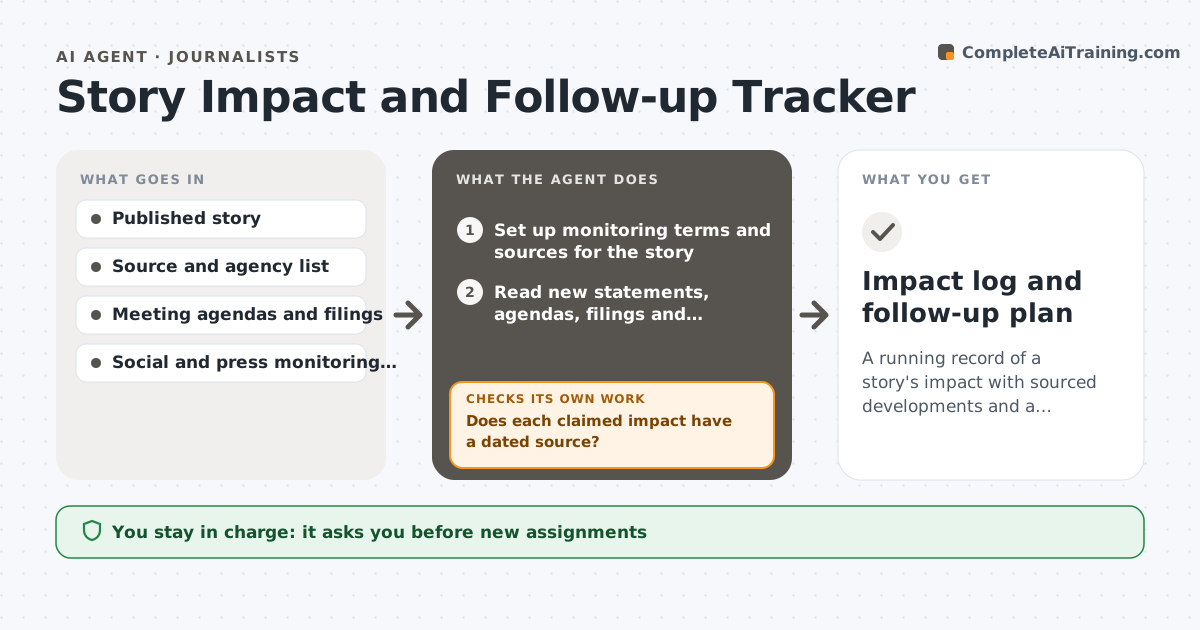
Many stories end at publication, and the reporter never learns whether they changed anything. This agent tracks reactions, official responses, hearings, policy changes and corrections after a story runs. It checks sources such as statements, meeting agendas and court filings, and flags developments that could be new angles. It drafts a follow-up plan and revisits it weekly. It checks that each claimed impact is backed by a source. The editor approves any new assignment. Edge case: an official denies the story's findings, so the agent notes the denial as a development and lists documents that could test it.
How it works
Follow the arrows from top to bottom. The orange dashed arrow is the loop: when a check fails, the agent goes back and tries again.
Read the steps as a list
- Story published
- Set up monitoring terms and sources for the story
- Read new statements, agendas, filings and coverage
- List developments with dates and sources
- Does each claimed impact have a dated source?If not: remove the claim or find a source. Back to step 3.
- Flag developments that suggest follow-up angles
- Draft the follow-up plan
- Editor approves new assignmentsThe agent waits here for your OK.
- Recheck sources the following week
- Has anything changed or a deadline passed since the last review?If not: update the record and plan. Back to step 3.
- Impact log and follow-up plan
How it decides
An impact entry needs a dated source. A development becomes a follow-up angle if it has new facts or contradicts a claim.
- Log only developments with a source and date
- Treat a denial or contradiction as a follow-up angle
- Check scheduled meetings within 30 days
- Stop weekly checks after 8 quiet weeks
Make it yours
Every agent is a starting point. You choose these settings for your own situation.
- Monitoring length (default 8 weeks)
- Sources and agencies
- Alert terms
- Review day
What keeps you in control
It always asks you first
- New assignments
- Public claims of impact
Hard limits
- Never contacts sources
- Never claims credit without evidence
It stops when
- Done: eight weeks pass or story is closed
- Stop: editor ends tracking
Set it up
We guide you through the set-up, step by step
Members get the full set-up guide for this agent. No technical skills needed: you copy, paste and upload.
- One set of instructions to paste into your AI, with the clicks for ChatGPT, Claude, Microsoft 365 Copilot, Gemini and Grok
- The agent then walks you through connecting your own data, one source at a time
- A downloadable copy with the flow chart, the rules and the full guide