AI agent for school administrators
Student Discipline Documentation Agent
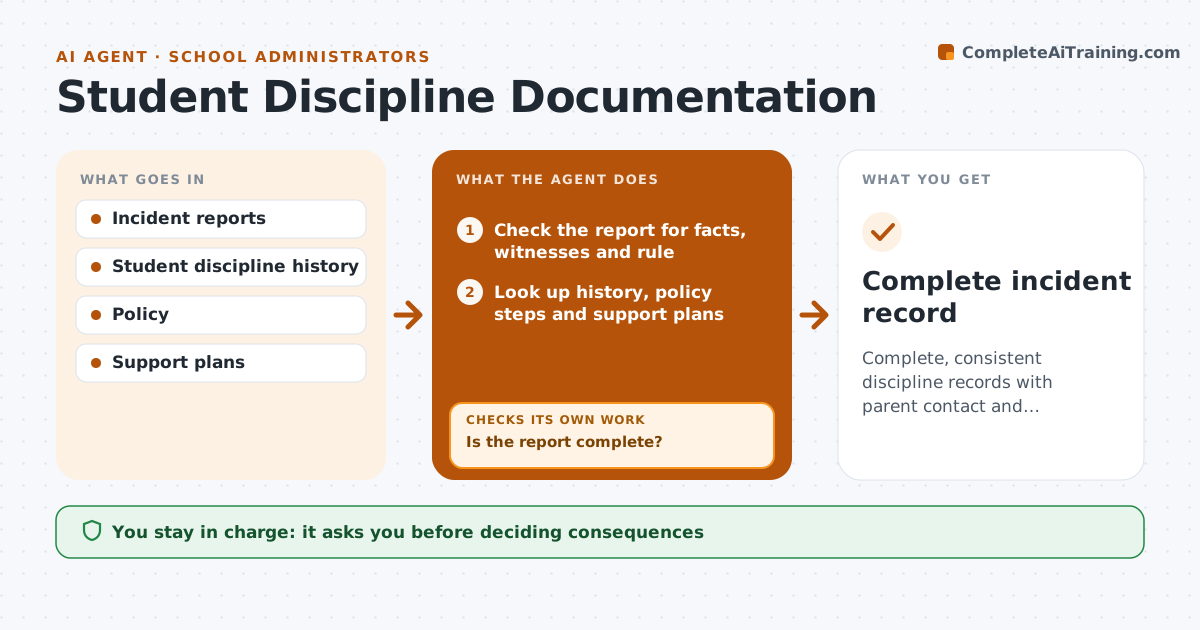
Complete, consistent discipline records with parent contact and follow-up
What it does
Each discipline incident needs a record, parent contact, a consistent consequence and follow-up, and these steps are easy to miss. This agent reads incident reports from staff and checks they include the facts, witnesses and the policy rule involved. If pieces are missing, it asks the reporting staff member and checks again. It looks up the student's past incidents and the policy's consequence steps. Students with a support plan need the plan's rules checked before any consequence. It drafts a suggested consequence and a parent letter. It then tracks parent contact and any follow-up meeting until both are logged. The administrator decides the consequence and approves the letter.
How it works
Follow the arrows from top to bottom. The orange dashed arrow is the loop: when a check fails, the agent goes back and tries again.
Read the steps as a list
- Incident report submitted
- Check the report for facts, witnesses and rule
- Is the report complete?If not: ask the staff member for missing details. Back to step 2.
- Look up history, policy steps and support plans
- Draft suggested consequence and parent letter
- Administrator decides and approves the letterThe agent waits here for your OK.
- Track parent contact and follow-up
- Complete incident record
How it decides
It suggests consequences by policy step based on past incidents and flags students with support plans.
- Support plans checked first
- Consequence follows policy steps
- Parent contact within one school day
Make it yours
Every agent is a starting point. You choose these settings for your own situation.
- Policy steps
- Letter templates
- Follow-up timing
What keeps you in control
It always asks you first
- Deciding consequences
- Sending parent letters
Hard limits
- Never decides consequences
- Keeps records private
It stops when
- Done: record complete
- Stop: safety concern; follow safeguarding process
Set it up
We guide you through the set-up, step by step
Members get the full set-up guide for this agent. No technical skills needed: you copy, paste and upload.
- One set of instructions to paste into your AI, with the clicks for ChatGPT, Claude, Microsoft 365 Copilot, Gemini and Grok
- The agent then walks you through connecting your own data, one source at a time
- A downloadable copy with the flow chart, the rules and the full guide