AI agent for 3d artists
Subdivision and Retopology Budget Agent
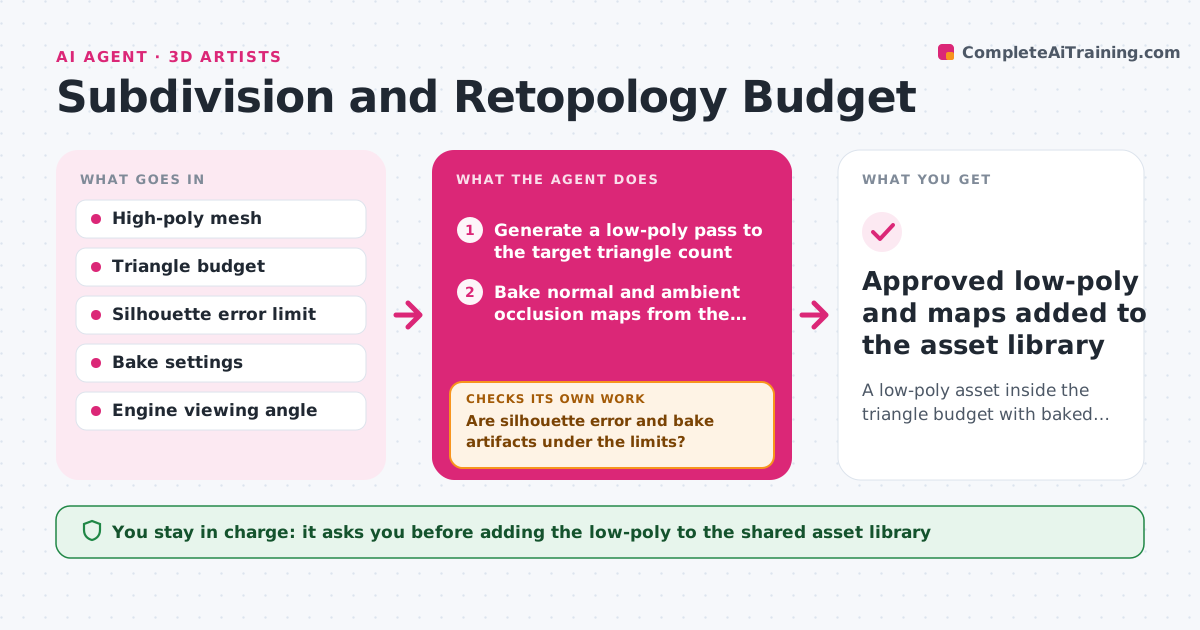
A low-poly asset inside the triangle budget with baked maps that match the source
What it does
Retopology passes often go over the triangle budget or lose the details that make an asset read well. This agent takes the high-poly mesh and builds a low-poly pass to the target triangle count. It bakes normal and ambient occlusion maps from the high-poly source, then compares silhouette and baked detail against the original. If silhouette error or bake artifacts exceed limits, it adjusts edge flow, spends more triangles where the silhouette needs them and moves bake cages, then bakes again. It also checks the final triangle count against the budget after every change. When both checks pass, or after six rounds, it stops and reports what it could not fix. The artist approves the final low-poly before it enters the asset library. Edge case: a thin blade that bakes with ghosting is split into separate cage parts.
How it works
Follow the arrows from top to bottom. The orange dashed arrow is the loop: when a check fails, the agent goes back and tries again.
Read the steps as a list
- High-poly mesh approved for real-time
- Generate a low-poly pass to the target triangle count
- Bake normal and ambient occlusion maps from the high-poly
- Compare silhouette and bake detail against the source from standard angles
- Are silhouette error and bake artifacts under the limits?If not: adjust edge flow and bake cages, then re-bake. Back to step 2.
- Re-count triangles against the budget
- Is the triangle count within the budget?If not: remove loops from low-value areas and re-run the bake. Back to step 2.
- Artist reviews the low-poly and bakesThe agent waits here for your OK.
- Approved low-poly and maps added to the asset library
How it decides
The pass is accepted when triangles are within budget and silhouette error and bake artifacts are under the limits. Triangles move toward silhouette-critical areas first.
- Spend triangles on silhouette edges before surface detail
- Fail the bake when ghosting or skewing covers more than 2% of the surface
- Reject any pass over the triangle budget
- Stop after six rounds and report the remaining issues
Make it yours
Every agent is a starting point. You choose these settings for your own situation.
- Triangle budget per asset type
- Silhouette error limit (default 2%)
- Maps to bake
- Maximum rounds (default 6)
What keeps you in control
It always asks you first
- Adding the low-poly to the shared asset library
- Spending more triangles than the budget
Hard limits
- Never overwrites the high-poly source
- Never exceeds the stated triangle budget
It stops when
- Done: budget met, limits passed, artist approved
- Stop: six rounds without passing, report sent to the artist
Set it up
We guide you through the set-up, step by step
Members get the full set-up guide for this agent. No technical skills needed: you copy, paste and upload.
- One set of instructions to paste into your AI, with the clicks for ChatGPT, Claude, Microsoft 365 Copilot, Gemini and Grok
- The agent then walks you through connecting your own data, one source at a time
- A downloadable copy with the flow chart, the rules and the full guide