AI agent for medical writers
Subject Matter Expert Review Cycle Agent
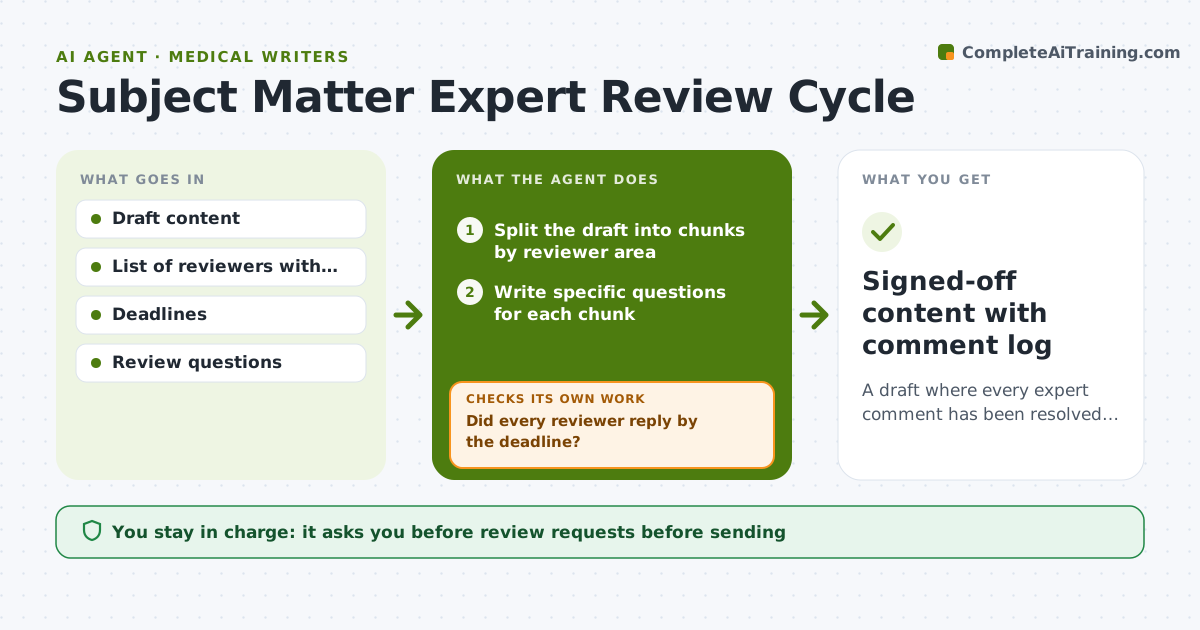
A draft where every expert comment has been resolved and the content is signed off.
What it does
Review rounds drag on because experts get the whole draft and answer late or vaguely. This agent splits the draft into review chunks and sends each expert only the parts they own, with specific questions such as, Is the dosage table correct for adults? It tracks replies, chases late ones, and applies accepted edits to a working copy. Then it checks that every comment was resolved, accepted, declined or answered. Edge case: two experts give opposing advice on the same paragraph, so the agent flags the conflict for the designer. The designer approves final content.
How it works
Follow the arrows from top to bottom. The orange dashed arrow is the loop: when a check fails, the agent goes back and tries again.
Read the steps as a list
- Draft ready for expert review
- Split the draft into chunks by reviewer area
- Write specific questions for each chunk
- Designer approves the review requestsThe agent waits here for your OK.
- Send chunks and track replies
- Did every reviewer reply by the deadline?If not: send a polite reminder and offer a shorter question. Back to step 5.
- Apply accepted edits to a working copy
- Is every comment resolved?If not: chase the open comments or flag conflicts. Back to step 5.
- Designer approves final contentThe agent waits here for your OK.
- Signed-off content with comment log
How it decides
It assigns each section to the matching reviewer and only applies edits that are accepted, listing conflicts for the designer.
- Chase a late reviewer once at 2 days and once at the deadline.
- Opposing comments go to the designer, not auto-resolved.
- Only apply edits the reviewer marked as required or accepted.
- Keep a log of declined comments with reasons.
Make it yours
Every agent is a starting point. You choose these settings for your own situation.
- Reminder timing
- Reviewer areas
- Question style
- Which comments are required
- Output format
What keeps you in control
It always asks you first
- Review requests before sending
- Final content sign-off
- Any declined expert comment
Hard limits
- Do not email reviewers without approval.
- Do not edit the master draft directly.
It stops when
- Done: all comments resolved and signed off
- Stop: a reviewer is unreachable after two chases, so the agent asks the designer for a replacement
Set it up
We guide you through the set-up, step by step
Members get the full set-up guide for this agent. No technical skills needed: you copy, paste and upload.
- One set of instructions to paste into your AI, with the clicks for ChatGPT, Claude, Microsoft 365 Copilot, Gemini and Grok
- The agent then walks you through connecting your own data, one source at a time
- A downloadable copy with the flow chart, the rules and the full guide