AI agent for operations managers
Subrogation File Assembly Agent
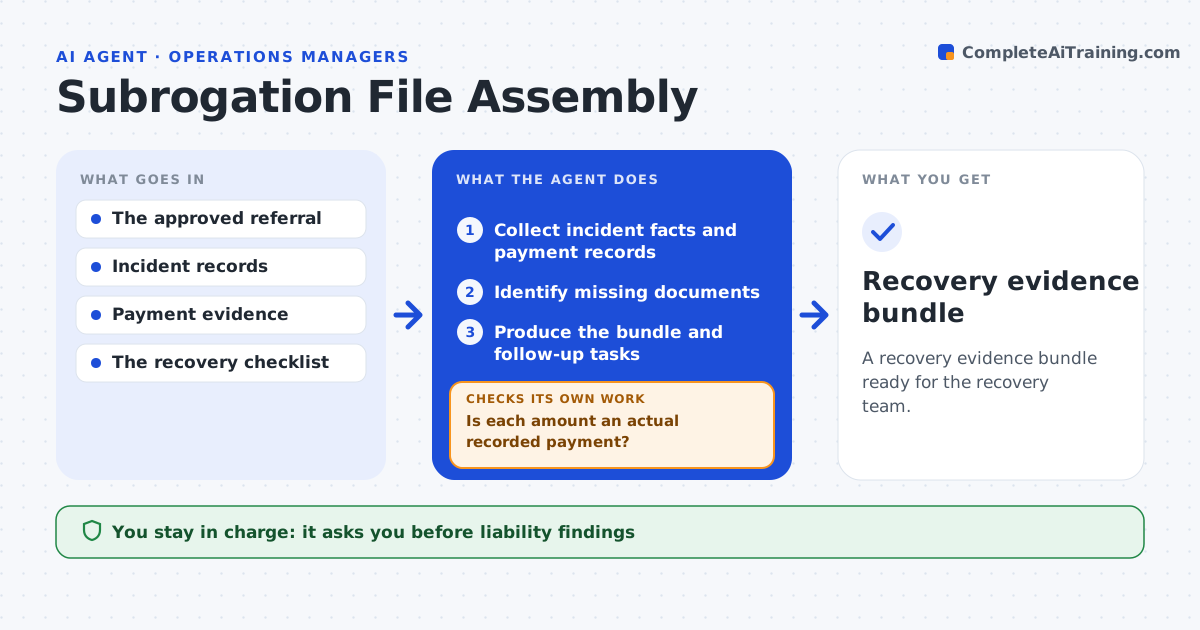
A recovery evidence bundle ready for the recovery team.
What it does
Recovery (subrogation) chances stall because the evidence is spread across claim notes, payment records and incident reports. When a claim is referred for recovery, this agent collects the incident facts with their sources and the payment records. It checks each amount against the payment system. Only amounts with a recorded payment count toward the paid-loss total. Reserves, estimates and proposed amounts are kept in a separate list. It identifies missing documents, such as a third party's contact details or a repair invoice, without drawing conclusions about who is liable. It then produces an evidence bundle and follow-up tasks. The recovery team decides whether to send a demand. Edge case: a $4,800 repair estimate is in the file but was never paid, so it stays out of the paid total.
How it works
Follow the arrows from top to bottom. The orange dashed arrow is the loop: when a check fails, the agent goes back and tries again.
Read the steps as a list
- Referral approved
- Collect incident facts and payment records
- Is each amount an actual recorded payment?If not: keep it separate as proposed. Back to step 2.
- Identify missing documents
- Produce the bundle and follow-up tasks
- Recovery team decides on demandsThe agent waits here for your OK.
- Recovery evidence bundle
How it decides
It retrieves the next missing checklist item and counts only verified payments.
- Only amounts with a recorded payment count as paid loss.
- Never infer liability; record facts with sources only.
- Claims below the minimum amount are noted but not bundled.
Make it yours
Every agent is a starting point. You choose these settings for your own situation.
- Payment system used to verify amounts
- Required documents per loss type
- Minimum paid amount worth pursuing (default $1,000)
- Who decides on demands (default recovery team)
What keeps you in control
It always asks you first
- Liability findings
- Recovery demands
- Sharing claimant information
Hard limits
- No demands sent.
It stops when
- Done: bundle complete.
Set it up
We guide you through the set-up, step by step
Members get the full set-up guide for this agent. No technical skills needed: you copy, paste and upload.
- One set of instructions to paste into your AI, with the clicks for ChatGPT, Claude, Microsoft 365 Copilot, Gemini and Grok
- The agent then walks you through connecting your own data, one source at a time
- A downloadable copy with the flow chart, the rules and the full guide