AI agent for law students
Summer Associate Work Product Review Agent
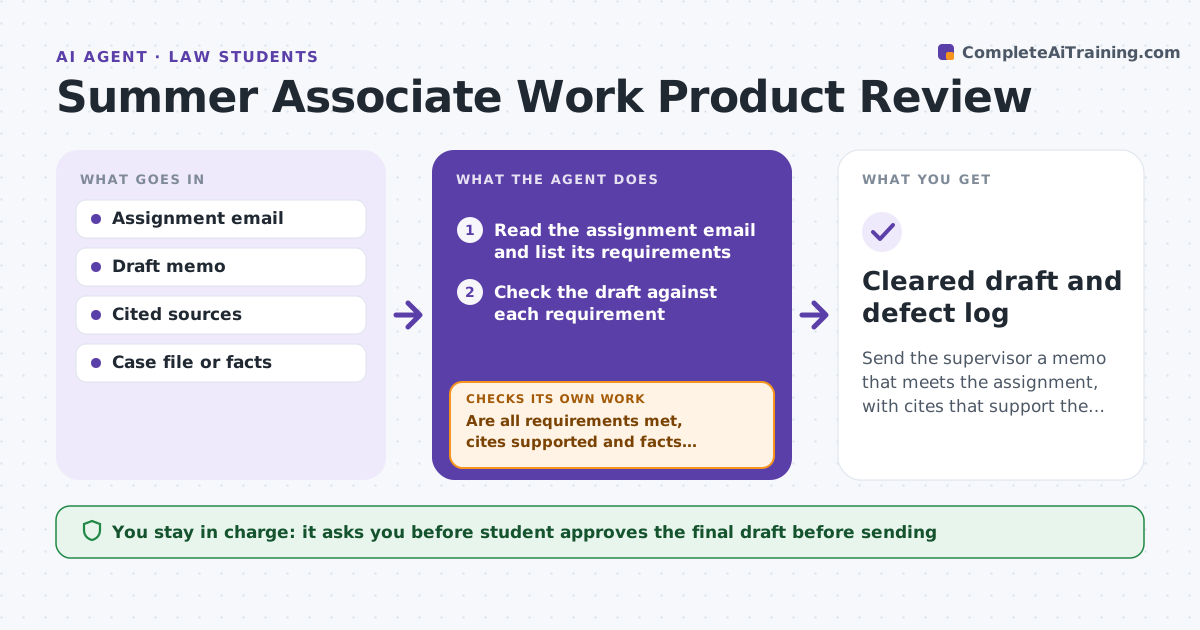
Send the supervisor a memo that meets the assignment, with cites that support the points and facts that match the file.
What it does
Summer associates lose ground when a memo comes back with wrong cites or when it misses what the assignment asked for. Before a draft goes to a supervisor, the agent checks each requirement in the assignment email, tests whether each cite really supports the point it is used for, and checks the facts against the file. It lists defects, the student fixes them, and the agent re-checks until the draft passes. It does not write the memo. The student approves what is sent. Edge case: the assignment asks for a one page answer with a recommendation, and the draft has analysis but no clear recommendation, so that requirement is marked unmet.
How it works
Follow the arrows from top to bottom. The orange dashed arrow is the loop: when a check fails, the agent goes back and tries again.
Read the steps as a list
- Student finishes a draft
- Read the assignment email and list its requirements
- Check the draft against each requirement
- Open each cited source and compare with the point it supports
- Compare the facts with the file
- Are all requirements met, cites supported and facts correct?If not: List each defect with where it is and what the source says. Back to step 3.
- Wait for the student to fix the draft
- Re-run the checks on the revised draft
- Is the draft clean after the revision?If not: Return the remaining defects and repeat. Back to step 3.
- Student approves what is sent to the supervisorThe agent waits here for your OK.
- Cleared draft and defect log
How it decides
A requirement is met when the draft addresses it directly. A cite passes when the source says what the draft claims. A fact passes when the file supports it.
- A cite that does not support its point is a defect
- A requirement not clearly addressed is unmet
- A fact not found in the file is marked unsupported
- Stop after 3 rounds and tell the student to ask the supervisor
Make it yours
Every agent is a starting point. You choose these settings for your own situation.
- Number of review rounds (default 3)
- Cite format to check
- Source databases allowed
- Length limit of the assignment
What keeps you in control
It always asks you first
- Student approves the final draft before sending
Hard limits
- Never writes or rewrites the memo
- Never shares confidential case material outside the matter
It stops when
- Done: draft meets every requirement
- Stop: three rounds used, so the student asks the supervisor
Set it up
We guide you through the set-up, step by step
Members get the full set-up guide for this agent. No technical skills needed: you copy, paste and upload.
- One set of instructions to paste into your AI, with the clicks for ChatGPT, Claude, Microsoft 365 Copilot, Gemini and Grok
- The agent then walks you through connecting your own data, one source at a time
- A downloadable copy with the flow chart, the rules and the full guide