AI agent for food scientists
Supplier Certificate of Analysis Check Agent
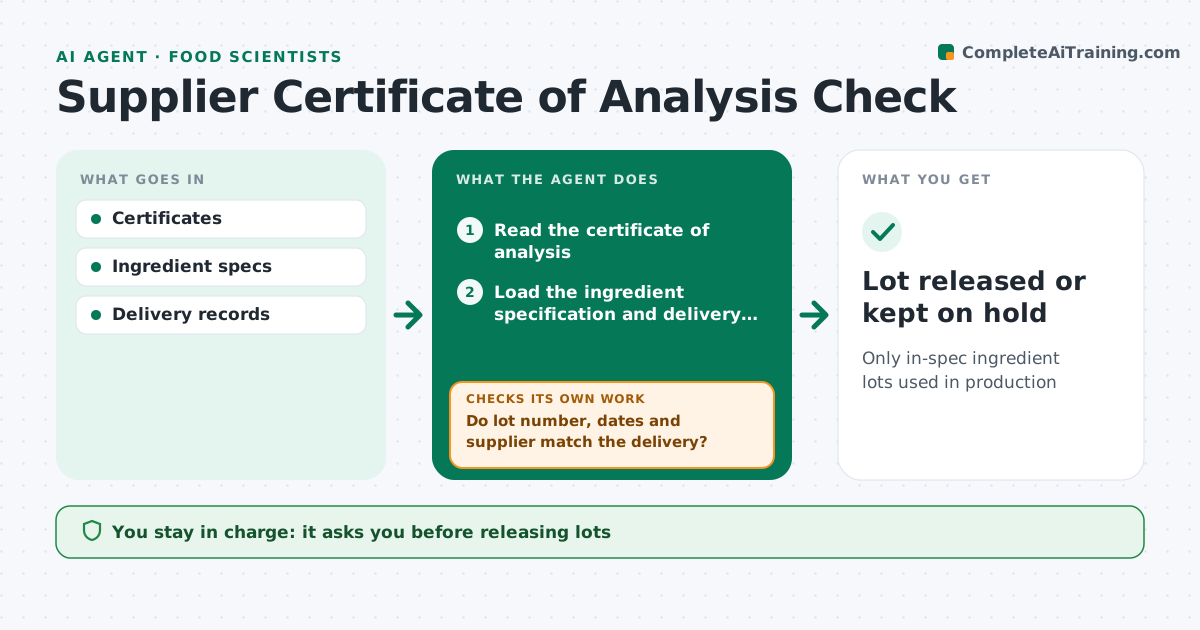
Only in-spec ingredient lots used in production
What it does
Each ingredient lot arrives with a certificate of analysis, and checking them by hand is slow and easy to rush. This agent reads each certificate and first checks that the lot number, dates and supplier match the delivery. If they do not, it holds the lot and asks the supplier for the correct certificate. It then matches the certificate to the ingredient specification and checks that every required test is present and within limits. Missing or out-of-spec results put the lot on hold, and the agent requests the missing data or a retest. It also tracks supplier trends over time, such as results drifting toward a limit. You approve every lot release and any supplier corrective action. Edge case: a certificate that uses a different test method is flagged so someone can review whether the methods are equivalent.
How it works
Follow the arrows from top to bottom. The orange dashed arrow is the loop: when a check fails, the agent goes back and tries again.
Read the steps as a list
- Delivery received
- Read the certificate of analysis
- Load the ingredient specification and delivery record
- Compare each test result and method with the spec
- Do lot number, dates and supplier match the delivery?If not: ask the supplier for the correct certificate and hold the lot. Back to step 2.
- Are all required tests present and in spec?If not: hold the lot and request missing results or a retest. Back to step 4.
- Update the supplier trend record
- Food scientist approves lot releaseThe agent waits here for your OK.
- Lot released or kept on hold
How it decides
It accepts lots only when all required tests are present and in spec.
- Hold out-of-spec lots
- Flag different test methods
- Track supplier trends
Make it yours
Every agent is a starting point. You choose these settings for your own situation.
- Specs
- Hold rules
- Trend window
- Supplier contacts
What keeps you in control
It always asks you first
- Releasing lots
- Supplier corrective actions
Hard limits
- Never releases lots itself
It stops when
- Done: lot released
- Stop: supplier does not respond
Set it up
We guide you through the set-up, step by step
Members get the full set-up guide for this agent. No technical skills needed: you copy, paste and upload.
- One set of instructions to paste into your AI, with the clicks for ChatGPT, Claude, Microsoft 365 Copilot, Gemini and Grok
- The agent then walks you through connecting your own data, one source at a time
- A downloadable copy with the flow chart, the rules and the full guide