AI agent for food scientists
Supplier Change Notice Impact Agent
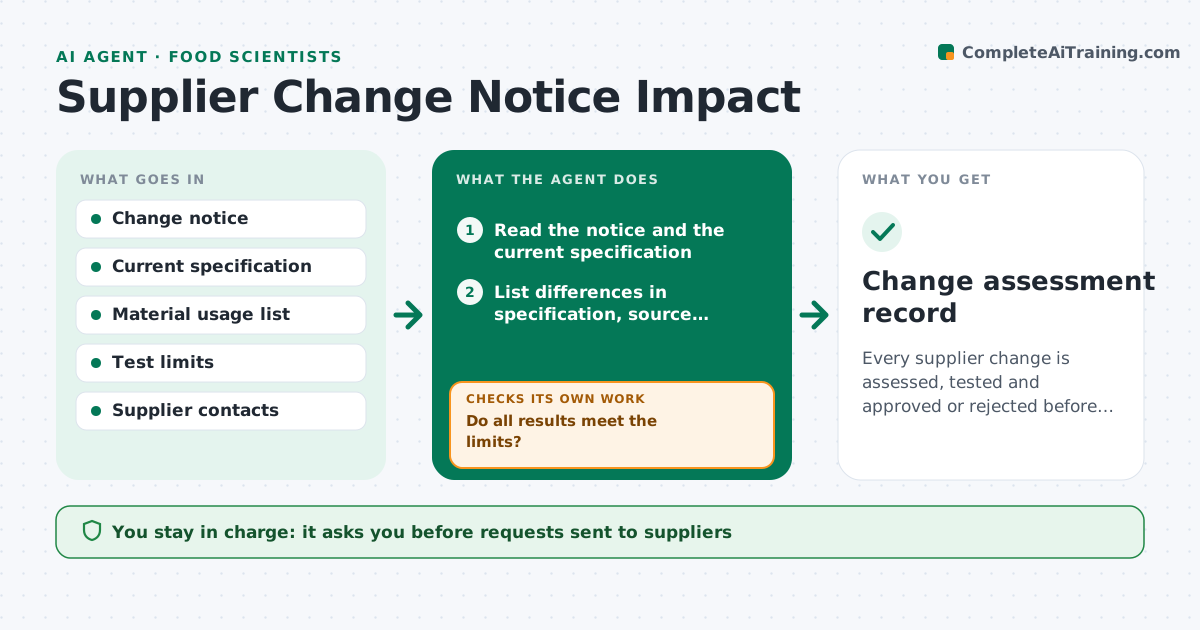
Every supplier change is assessed, tested and approved or rejected before the new material enters production.
What it does
A supplier quietly changes the source of a raw material, and three months later a batch drifts. This agent reads each supplier change notice when it arrives. It compares the new specification, source or process with the current one, lists the differences, and identifies every product and process that uses the material. It asks for test lots from the supplier through a drafted request and, when results arrive, checks them against your limits for the properties that matter. If a result fails, it reports which products are affected and suggests added tests. You approve any qualification or rejection. Edge case: a change notice that does not list a spec change but mentions a new site is still treated as a source change.
How it works
Follow the arrows from top to bottom. The orange dashed arrow is the loop: when a check fails, the agent goes back and tries again.
Read the steps as a list
- Supplier change notice received
- Read the notice and the current specification
- List differences in specification, source, process and site
- Find all products and processes using the material
- Draft a request for test lots to the supplier
- Engineer approves the requestThe agent waits here for your OK.
- Read the test results against the limits
- Do all results meet the limits?If not: list failing properties, extend tests on affected products and request more lots if needed. Back to step 4.
- Do the trial runs on affected products pass?If not: hold qualification and suggest adjustments or a supplier discussion. Back to step 4.
- Engineer approves qualification or rejectionThe agent waits here for your OK.
- Change assessment record
How it decides
It rates the risk by what changed: grade, source, process or site, and by how critical the material is to the products that use it.
- New manufacturing site: treat as a source change with full testing
- Critical material in a high-value product: require three lots
- Spec change within current limits: single lot test
- No response from the supplier in 10 days: send a reminder and flag the risk
Make it yours
Every agent is a starting point. You choose these settings for your own situation.
- Risk classes by material
- Number of lots required (default 2)
- Test limits
- Reminder interval in days
- Contacts by supplier
What keeps you in control
It always asks you first
- Requests sent to suppliers
- Final qualification decision
Hard limits
- Never approve a material for use
- Never contact suppliers without approval
It stops when
- Done: change qualified or rejected
- Stop: supplier withdraws the change
Set it up
We guide you through the set-up, step by step
Members get the full set-up guide for this agent. No technical skills needed: you copy, paste and upload.
- One set of instructions to paste into your AI, with the clicks for ChatGPT, Claude, Microsoft 365 Copilot, Gemini and Grok
- The agent then walks you through connecting your own data, one source at a time
- A downloadable copy with the flow chart, the rules and the full guide