AI agent for supplier relationship managers
Supplier Chargeback and Dispute Resolution Agent
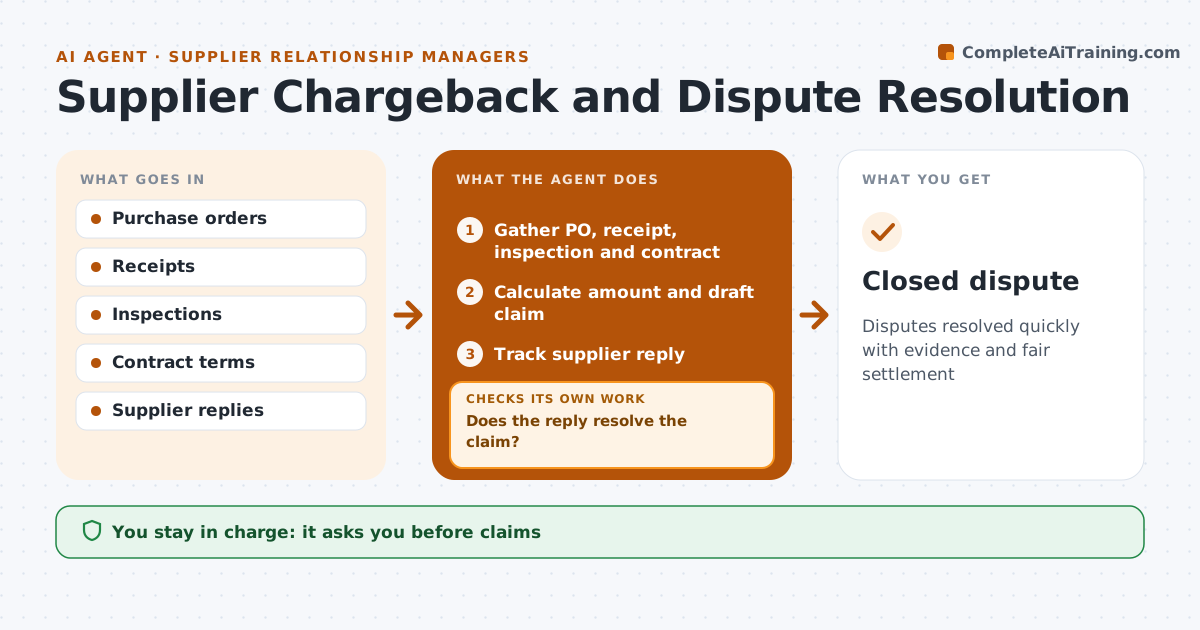
Disputes resolved quickly with evidence and fair settlement
What it does
Disputes with suppliers about short shipments, damage or wrong prices can drag on for months because evidence is scattered. This agent gathers the evidence for each dispute: purchase order, receipt, inspection notes, photos and contract terms. It calculates the amount owed and drafts a clear claim. It tracks the supplier's reply and compares their evidence with yours line by line. If the reply does not close the gap, it drafts the next step under the dispute process in the contract. A partial credit offer is compared with the full claim and the cost of continuing before it is suggested for acceptance. It tracks credits until they post. The manager approves every claim and settlement.
How it works
Follow the arrows from top to bottom. The orange dashed arrow is the loop: when a check fails, the agent goes back and tries again.
Read the steps as a list
- Dispute opened
- Gather PO, receipt, inspection and contract
- Calculate amount and draft claim
- Manager approves sending claimThe agent waits here for your OK.
- Track supplier reply
- Does the reply resolve the claim?If not: draft the next escalation step and wait. Back to step 5.
- Manager approves settlementThe agent waits here for your OK.
- Closed dispute
How it decides
It calculates the claim from records and moves to the next contract step when the supplier's reply does not cover it.
- Follow contract dispute steps
- Compare partial offers with full claim
- Evidence required
Make it yours
Every agent is a starting point. You choose these settings for your own situation.
- Dispute steps
- Amount limits
- Reply deadlines
What keeps you in control
It always asks you first
- Claims
- Settlements
Hard limits
- Never accepts settlements
It stops when
- Done: settled
- Stop: legal step needed; hand to legal
Set it up
We guide you through the set-up, step by step
Members get the full set-up guide for this agent. No technical skills needed: you copy, paste and upload.
- One set of instructions to paste into your AI, with the clicks for ChatGPT, Claude, Microsoft 365 Copilot, Gemini and Grok
- The agent then walks you through connecting your own data, one source at a time
- A downloadable copy with the flow chart, the rules and the full guide