AI agent for sustainability managers
Supplier Emissions Data Collection Agent
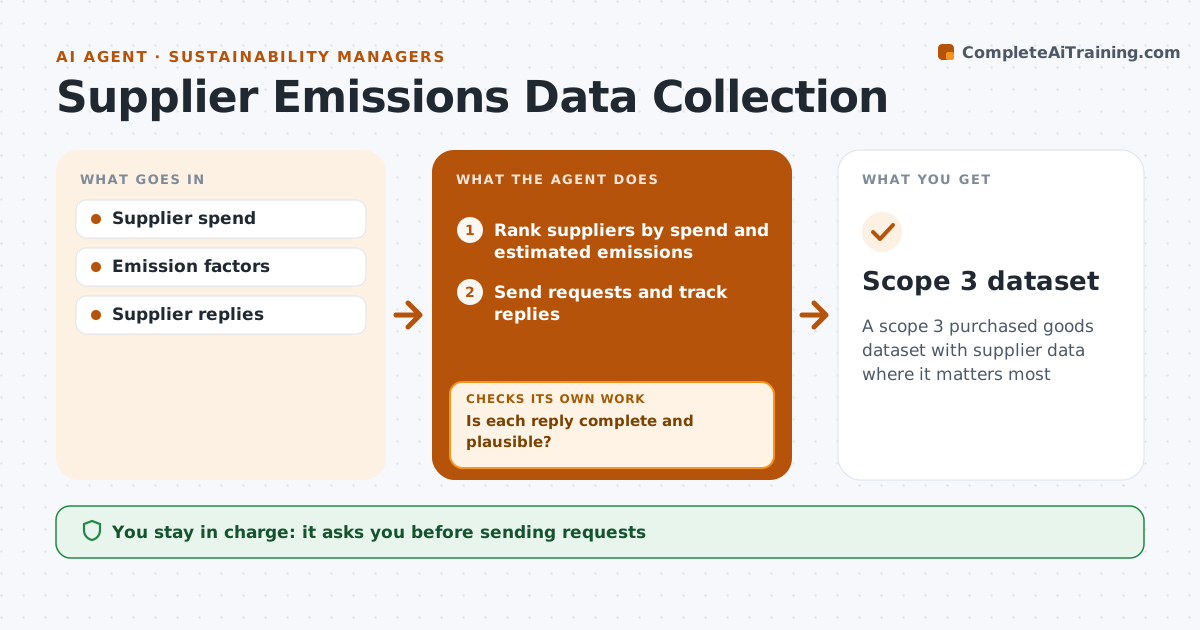
A scope 3 purchased goods dataset with supplier data where it matters most
What it does
Emissions from purchased goods are often the largest part of a company footprint, but supplier data comes back late and incomplete after one yearly email. This agent ranks suppliers by spend and estimated emissions, then prepares data requests with a clear form for the top ones. It tracks replies and checks each for completeness and plausibility, such as emissions per unit within a sensible range for that industry. If a reply is missing data or looks wrong, it asks again with a specific question. A supplier may report company totals, so it asks for the share linked to your purchases. For suppliers that never reply, it uses spend-based estimates and marks them clearly. The sustainability manager approves requests before sending and approves the final dataset.
How it works
Follow the arrows from top to bottom. The orange dashed arrow is the loop: when a check fails, the agent goes back and tries again.
Read the steps as a list
- Data collection opens
- Rank suppliers by spend and estimated emissions
- Manager approves requestsThe agent waits here for your OK.
- Send requests and track replies
- Is each reply complete and plausible?If not: ask again with specific questions. Back to step 4.
- Use spend estimates for non-replies
- Manager approves final datasetThe agent waits here for your OK.
- Scope 3 dataset
How it decides
It requests data from suppliers that cover the top share of spend and checks replies against industry ranges.
- Cover top 80% of spend
- Check per-unit ranges
- Mark estimated values
Make it yours
Every agent is a starting point. You choose these settings for your own situation.
- Spend coverage
- Request form
- Reminder schedule
- Emission factors
What keeps you in control
It always asks you first
- Sending requests
- Final dataset
Hard limits
- Never publishes data
It stops when
- Done: dataset approved
- Stop: deadline; use estimates
Set it up
We guide you through the set-up, step by step
Members get the full set-up guide for this agent. No technical skills needed: you copy, paste and upload.
- One set of instructions to paste into your AI, with the clicks for ChatGPT, Claude, Microsoft 365 Copilot, Gemini and Grok
- The agent then walks you through connecting your own data, one source at a time
- A downloadable copy with the flow chart, the rules and the full guide