AI agent for sustainability analysts
Supplier ESG Data Request Agent
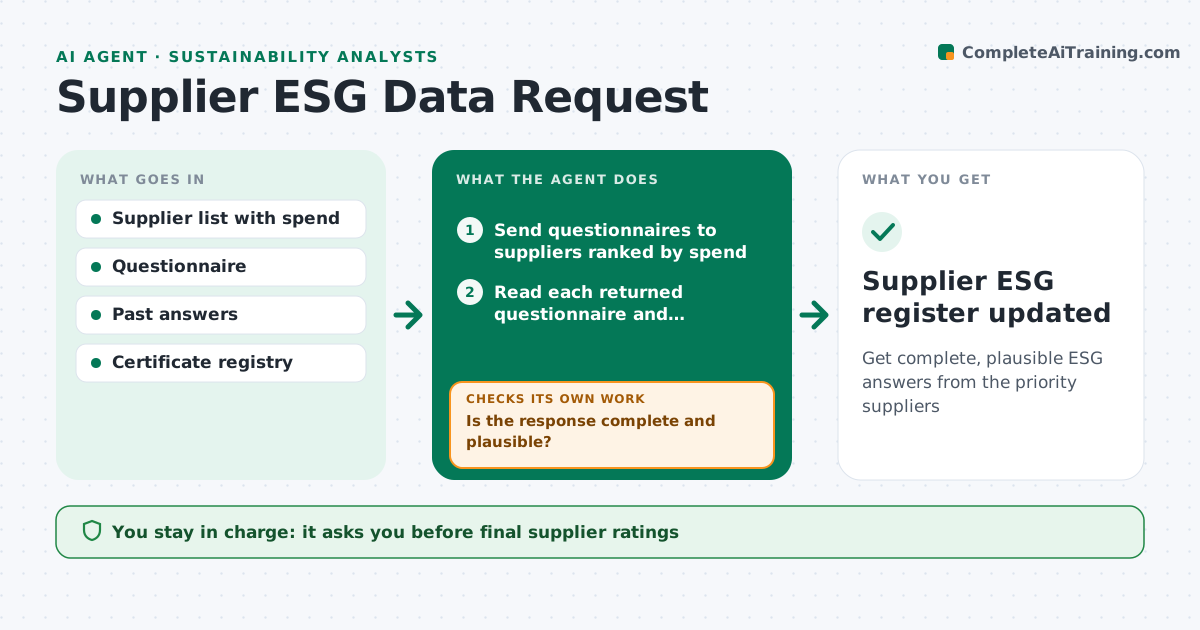
Get complete, plausible ESG answers from the priority suppliers
What it does
Green supply chain work depends on suppliers answering questionnaires about emissions, certifications and labor practices, and chasing them is slow. This agent sends the questionnaire to suppliers ranked by spend, tracks who has answered and reads each response with its attachments. It scores each answer for completeness and plausibility. It looks for gaps, expired certificates and numbers that do not make sense, such as emissions far too low for the supplier's revenue and sector. When a response fails, it drafts a specific follow-up question and waits for the corrected answer before checking again. Suppliers covering the top 80% of spend must respond before the cycle closes. It then rates each supplier against the policy criteria. The analyst approves follow-up emails above a set count and every supplier rating. Edge case: a certificate issued to a different legal entity is flagged, not accepted.
How it works
Follow the arrows from top to bottom. The orange dashed arrow is the loop: when a check fails, the agent goes back and tries again.
Read the steps as a list
- Survey cycle opens
- Send questionnaires to suppliers ranked by spend
- Read each returned questionnaire and attachments
- Score completeness and plausibility
- Is the response complete and plausible?If not: draft a targeted follow-up question and wait for the reply. Back to step 3.
- Rate supplier against the policy criteria
- Analyst approves supplier ratingsThe agent waits here for your OK.
- Supplier ESG register updated
How it decides
Suppliers are ranked by spend and risk category. Answers are checked for missing fields, expired documents and intensity figures outside a plausible range for the sector.
- Top 80% of spend must respond before the cycle closes
- Expired certificates count as missing
- Intensity outside sector range needs the supplier to explain their method
Make it yours
Every agent is a starting point. You choose these settings for your own situation.
- Spend coverage target (default 80%)
- Questionnaire version per supplier category
- Reminder schedule
- Plausibility ranges per sector
What keeps you in control
It always asks you first
- Final supplier ratings
- Escalation to procurement for non-responders
Hard limits
- Never threaten contract consequences in messages
- Ratings are drafts until the analyst approves
It stops when
- Done: priority suppliers rated
- Stop: supplier refuses to answer, hand to procurement
Set it up
We guide you through the set-up, step by step
Members get the full set-up guide for this agent. No technical skills needed: you copy, paste and upload.
- One set of instructions to paste into your AI, with the clicks for ChatGPT, Claude, Microsoft 365 Copilot, Gemini and Grok
- The agent then walks you through connecting your own data, one source at a time
- A downloadable copy with the flow chart, the rules and the full guide