AI agent for procurement specialists
Supplier Price Increase Validation Agent
A fact-based response to every price increase request
What it does
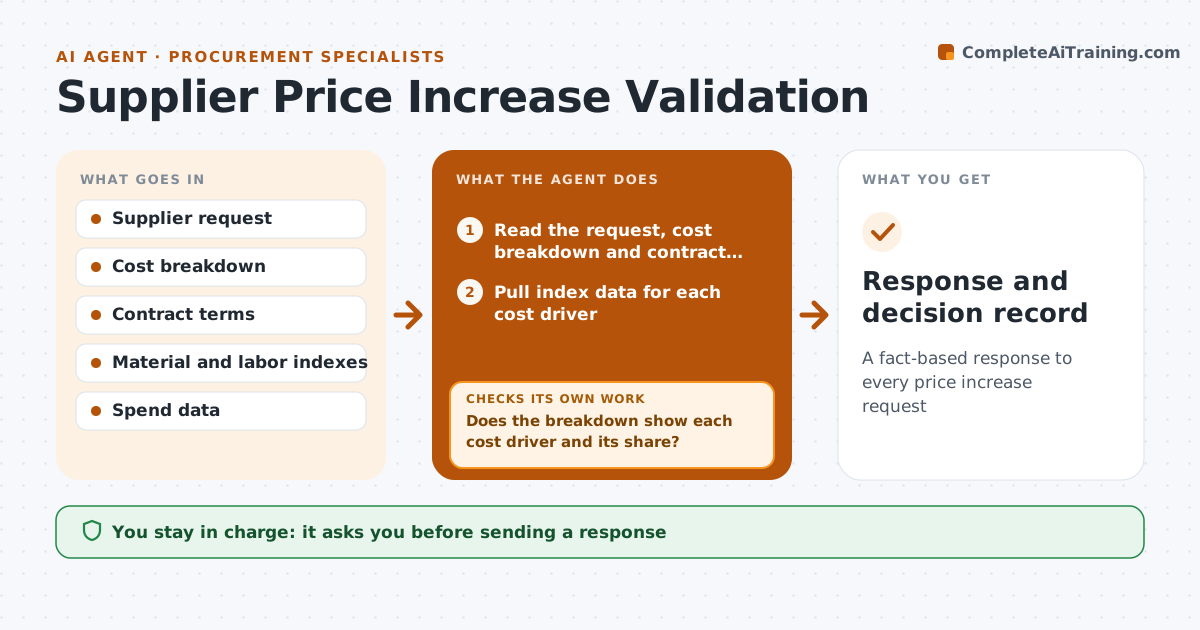
Suppliers often ask for higher prices citing material or labor costs, and accepting without checking adds up fast. This agent reads the request, the supplier's cost breakdown and the contract's price adjustment clause. It first checks that the breakdown shows each cost driver and its share of the price. If it does not, it drafts a request for one and waits. It then pulls published index data for each driver and region and calculates what increase the data supports, counting only each driver's share and staying within any contract cap. It drafts a counter proposal with negotiation notes that show the math. The manager approves any response before it goes to the supplier, and the final decision stays with them. Edge case: if the index has already fallen since the request was sent, the agent uses the latest data, which can support a smaller increase or none.
How it works
Follow the arrows from top to bottom. The orange dashed arrow is the loop: when a check fails, the agent goes back and tries again.
Read the steps as a list
- Price increase request received
- Read the request, cost breakdown and contract price clause
- Does the breakdown show each cost driver and its share?If not: draft a request for a full breakdown and wait for it. Back to step 2.
- Pull index data for each cost driver
- Calculate the supported increase within the contract cap
- Draft counter proposal
- Manager approves responseThe agent waits here for your OK.
- Response and decision record
How it decides
It accepts only the share of the increase supported by index movement on the cost share of each driver.
- Use the latest index data
- Contract caps apply
- Only cost share of each driver counts
Make it yours
Every agent is a starting point. You choose these settings for your own situation.
- Indexes used
- Contract terms
- Negotiation tone
- Approval limits
What keeps you in control
It always asks you first
- Sending a response
- Accepting a price change
Hard limits
- Never accepts a price change
It stops when
- Done: response sent
- Stop: supplier refuses to share data; escalate
Set it up
We guide you through the set-up, step by step
Members get the full set-up guide for this agent. No technical skills needed: you copy, paste and upload.
- One set of instructions to paste into your AI, with the clicks for ChatGPT, Claude, Microsoft 365 Copilot, Gemini and Grok
- The agent then walks you through connecting your own data, one source at a time
- A downloadable copy with the flow chart, the rules and the full guide