AI agent for construction estimators
Supplier Quote Expiry Watch Agent
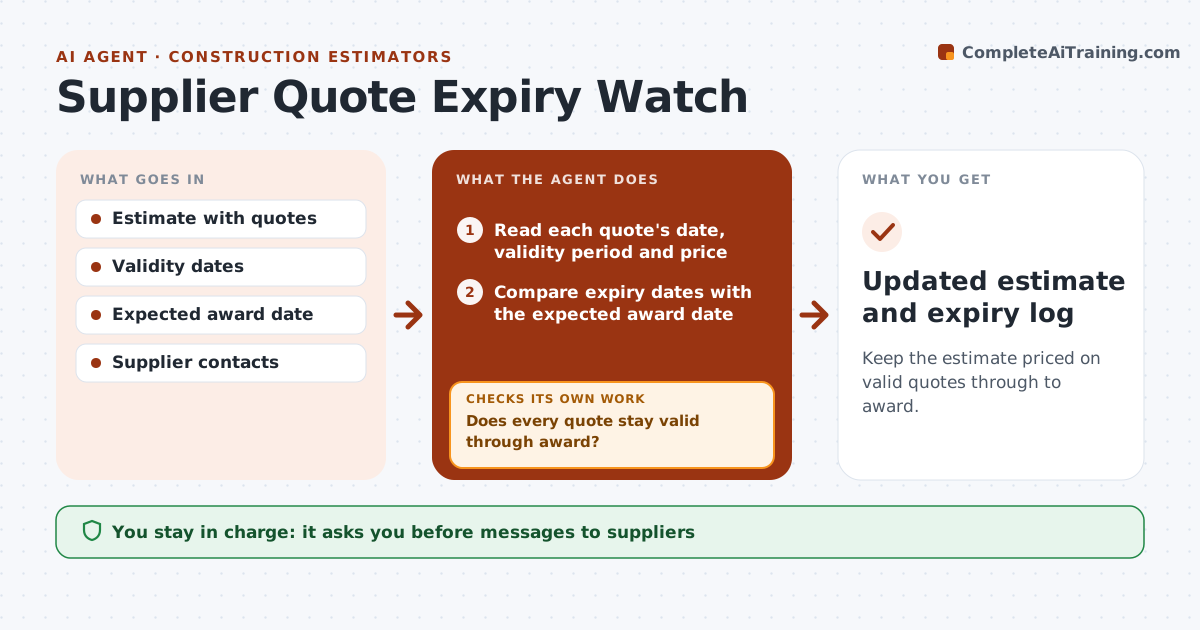
Keep the estimate priced on valid quotes through to award.
What it does
Between bid day and award, supplier quotes quietly expire. This agent tracks every quote in the estimate with its date, validity period and price, and flags the ones that will expire before the expected award. It sends refresh requests to the suppliers, reads the new quotes, and updates the estimate. It then compares the new total with the bid and shows which items moved most. If the change is above your threshold, it prepares a note on how it affects the number you gave. You approve the revised number before anything is sent. Edge case: lumber is quoted valid for 14 days and the award is in 30, and the agent requests a refresh at day 12.
How it works
Follow the arrows from top to bottom. The orange dashed arrow is the loop: when a check fails, the agent goes back and tries again.
Read the steps as a list
- Bid has been submitted
- Read each quote's date, validity period and price
- Compare expiry dates with the expected award date
- Does every quote stay valid through award?If not: List quotes that expire first. Back to step 3.
- Draft refresh requests to those suppliers
- Estimator approves the requestsThe agent waits here for your OK.
- Send requests and log the new quotes
- Update the estimate and compare the new total with the submitted bid
- Is the change within the threshold?If not: Prepare a note on the cost change and the largest items. Back to step 8.
- Estimator approves the revised numberThe agent waits here for your OK.
- Updated estimate and expiry log
How it decides
It flags a quote when its expiry date falls before the expected award plus a buffer. It compares the refreshed price with the original and the bid.
- Flag a quote expiring within 7 days of the expected award (default)
- A price change over 2% of the bid needs a note (default)
- Refresh requests start 5 days before expiry
- Missing validity period counts as 30 days
Make it yours
Every agent is a starting point. You choose these settings for your own situation.
- Expiry buffer (default 7 days)
- Price change threshold (default 2%)
- Refresh timing
- Supplier contacts
- Award date source
What keeps you in control
It always asks you first
- Messages to suppliers
- The revised number
Hard limits
- Never sends a revised price to the owner
- Never accepts a quote without approval
- Keeps the original quote record
It stops when
- Done: all quotes valid through award
- Stop: supplier will not extend; estimator picks another source
Set it up
We guide you through the set-up, step by step
Members get the full set-up guide for this agent. No technical skills needed: you copy, paste and upload.
- One set of instructions to paste into your AI, with the clicks for ChatGPT, Claude, Microsoft 365 Copilot, Gemini and Grok
- The agent then walks you through connecting your own data, one source at a time
- A downloadable copy with the flow chart, the rules and the full guide