AI agent for surgeons
Surgeon Preference Card Update Agent
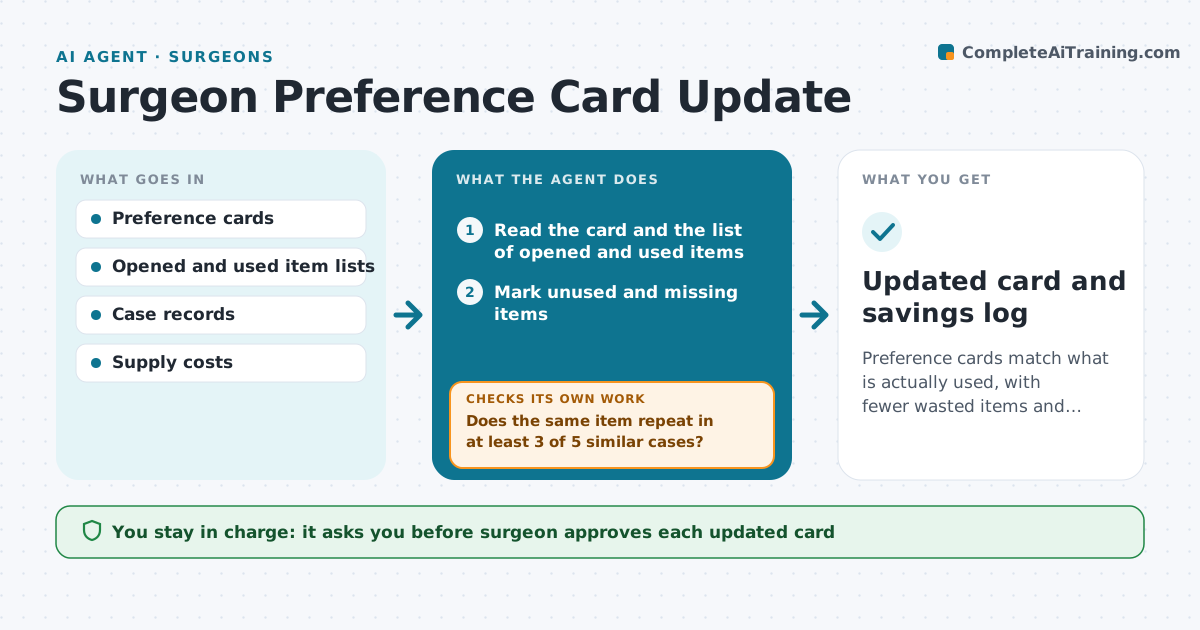
Preference cards match what is actually used, with fewer wasted items and fewer missing ones.
What it does
Preference cards list what each surgeon wants for each procedure, but they go out of date, so supplies are wrong or wasted. After each case, the agent compares the items opened with the card and finds items that were unused or missing from the card. It checks several cases before proposing a change so that a one-off request does not change the card. It drafts the edit and shows the cost effect. The surgeon approves each updated card. Edge case: an item used only when a complication occurs, which the agent keeps as an on-request item.
How it works
Follow the arrows from top to bottom. The orange dashed arrow is the loop: when a check fails, the agent goes back and tries again.
Read the steps as a list
- Case finished
- Read the card and the list of opened and used items
- Mark unused and missing items
- Store the case in the surgeon's history
- Does the same item repeat in at least 3 of 5 similar cases?If not: Hold the item and wait for more cases. Back to step 3.
- Draft the card edit with the cost effect
- Surgeon approves each updated cardThe agent waits here for your OK.
- Update the card
- Review the next cases using the new card
- Is the waste or the missing item gone?If not: Draft another edit and recheck. Back to step 5.
- Updated card and savings log
How it decides
It proposes a change only when the same item is wasted or missing in at least 3 of the last 5 similar cases.
- Change a card only after 3 of 5 matching cases
- Keep complication items as on-request items
- Show the cost of waste per case
- Never remove safety items
Make it yours
Every agent is a starting point. You choose these settings for your own situation.
- Number of cases needed to change (default 3 of 5)
- Procedures covered
- Items always kept
- How often cards are reviewed
What keeps you in control
It always asks you first
- Surgeon approves each updated card
Hard limits
- Never change a card without the surgeon
- Do not remove implants or safety items
It stops when
- Done: cards reflect usual use
- Stop: the surgeon asks to keep a card unchanged
Set it up
We guide you through the set-up, step by step
Members get the full set-up guide for this agent. No technical skills needed: you copy, paste and upload.
- One set of instructions to paste into your AI, with the clicks for ChatGPT, Claude, Microsoft 365 Copilot, Gemini and Grok
- The agent then walks you through connecting your own data, one source at a time
- A downloadable copy with the flow chart, the rules and the full guide