AI agent for surgeons
Surgical Site Infection Surveillance Agent
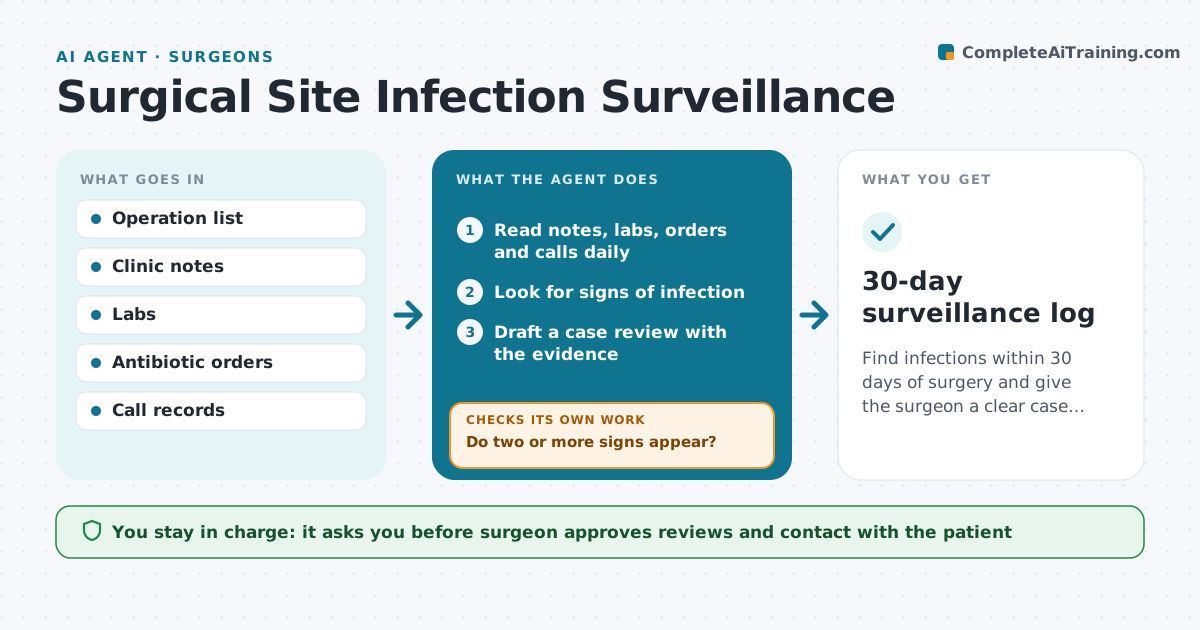
Find infections within 30 days of surgery and give the surgeon a clear case review.
What it does
Many surgical site infections appear after the patient goes home, and clinic notes, labs and calls are scattered. This agent follows each operated patient for 30 days. It reads clinic notes, labs, antibiotic orders and phone call records, and looks for signs of infection, such as fever, wound drainage, new antibiotics or a positive culture. It scores the evidence and drafts a case review for any patient who meets the criteria. It rechecks as new notes arrive. The surgeon approves the review and decides on any action. Edge case: a patient was given antibiotics by another clinic, so the agent asks for the outside record before classifying.
How it works
Follow the arrows from top to bottom. The orange dashed arrow is the loop: when a check fails, the agent goes back and tries again.
Read the steps as a list
- Operation date logged
- Read notes, labs, orders and calls daily
- Look for signs of infection
- Do two or more signs appear?If not: continue daily until day 30. Back to step 2.
- Draft a case review with the evidence
- Request outside records if needed
- Is the review complete and consistent with the new records?If not: update the review and recheck. Back to step 6.
- Surgeon approves the review and any actionThe agent waits here for your OK.
- Record the case for infection control
- 30-day surveillance log
How it decides
A patient is flagged when two or more signs appear. The case is reviewed as new data arrive.
- Flag two or more signs
- Count new antibiotics as a sign
- Request outside records for care elsewhere
- Alert the surgeon the same day for a flagged case
Make it yours
Every agent is a starting point. You choose these settings for your own situation.
- Signs counted
- Surveillance days (default 30)
- Alert recipients
- Procedures included
What keeps you in control
It always asks you first
- Surgeon approves reviews and contact with the patient
Hard limits
- Never diagnose
- Never contact patients without the surgeon
It stops when
- Done: day 30 passed or case reviewed
- Stop: patient lost to follow-up, record it
Set it up
We guide you through the set-up, step by step
Members get the full set-up guide for this agent. No technical skills needed: you copy, paste and upload.
- One set of instructions to paste into your AI, with the clicks for ChatGPT, Claude, Microsoft 365 Copilot, Gemini and Grok
- The agent then walks you through connecting your own data, one source at a time
- A downloadable copy with the flow chart, the rules and the full guide