AI agent for surgeons
Surgical Consent Completeness Agent
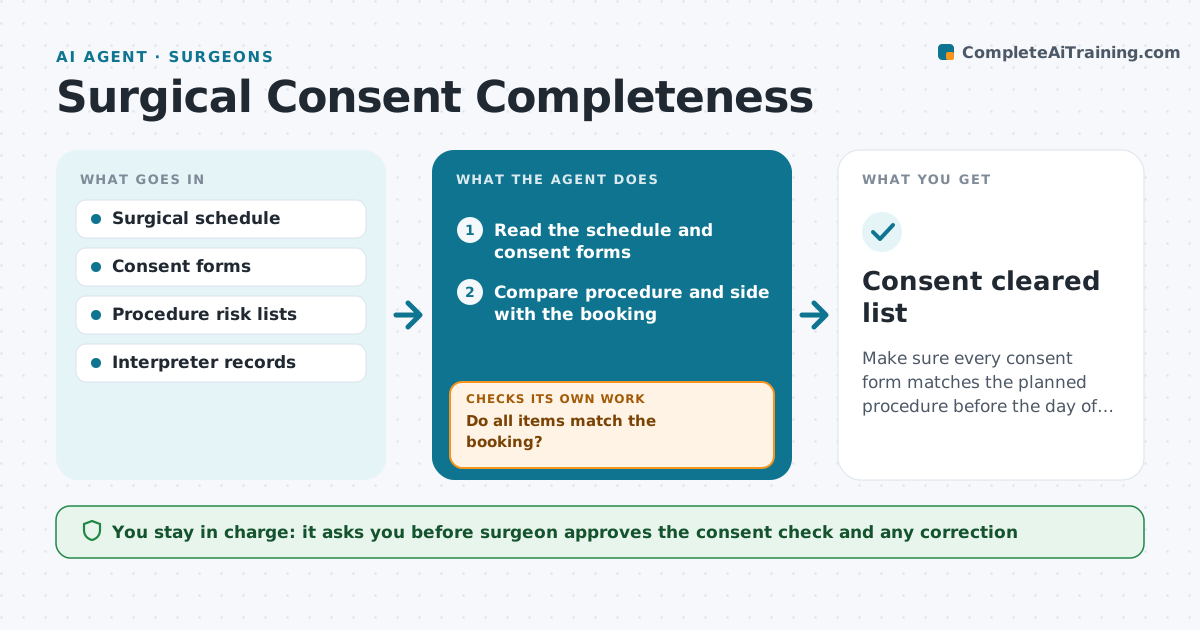
Make sure every consent form matches the planned procedure before the day of surgery.
What it does
A consent form with the wrong side, wrong procedure or missing risks can stop a case or cause harm. The day before surgery this agent compares each consent form with the booked procedure, the side and the risks listed for that operation. It flags mismatches, missing signatures or dates, and missing interpreter notes. A mismatch in side or procedure goes back to the team for correction and is rechecked before the case starts. The surgeon approves the final check. Edge case: the booking says 'left knee' but the consent says 'knee', so the agent asks for the side to be written.
How it works
Follow the arrows from top to bottom. The orange dashed arrow is the loop: when a check fails, the agent goes back and tries again.
Read the steps as a list
- Day before surgery
- Read the schedule and consent forms
- Compare procedure and side with the booking
- Check risks, signatures, dates and interpreter notes
- Do all items match the booking?If not: send the mismatch list to the team for correction. Back to step 3.
- Recheck the corrected form
- Is the correction complete and signed?If not: escalate to the surgeon. Back to step 3.
- Surgeon approves the final checkThe agent waits here for your OK.
- Consent cleared list
How it decides
A consent passes only when procedure, side, risks, signatures and dates all match the booking.
- Treat a missing side as a mismatch
- Check that risks include the common ones for the procedure
- Require a signature and date
- Flag a case with no consent by noon the day before
Make it yours
Every agent is a starting point. You choose these settings for your own situation.
- Check time (default day before, noon)
- Risks by procedure
- Who receives the list
- Languages and interpreters
What keeps you in control
It always asks you first
- Surgeon approves the consent check and any correction
Hard limits
- Never edit a consent form
- Never clear a case with a mismatch
It stops when
- Done: every consent matches
- Stop: consent cannot be corrected before the case
Set it up
We guide you through the set-up, step by step
Members get the full set-up guide for this agent. No technical skills needed: you copy, paste and upload.
- One set of instructions to paste into your AI, with the clicks for ChatGPT, Claude, Microsoft 365 Copilot, Gemini and Grok
- The agent then walks you through connecting your own data, one source at a time
- A downloadable copy with the flow chart, the rules and the full guide