AI agent for surgeons
Surgical Case Log and Registry Agent
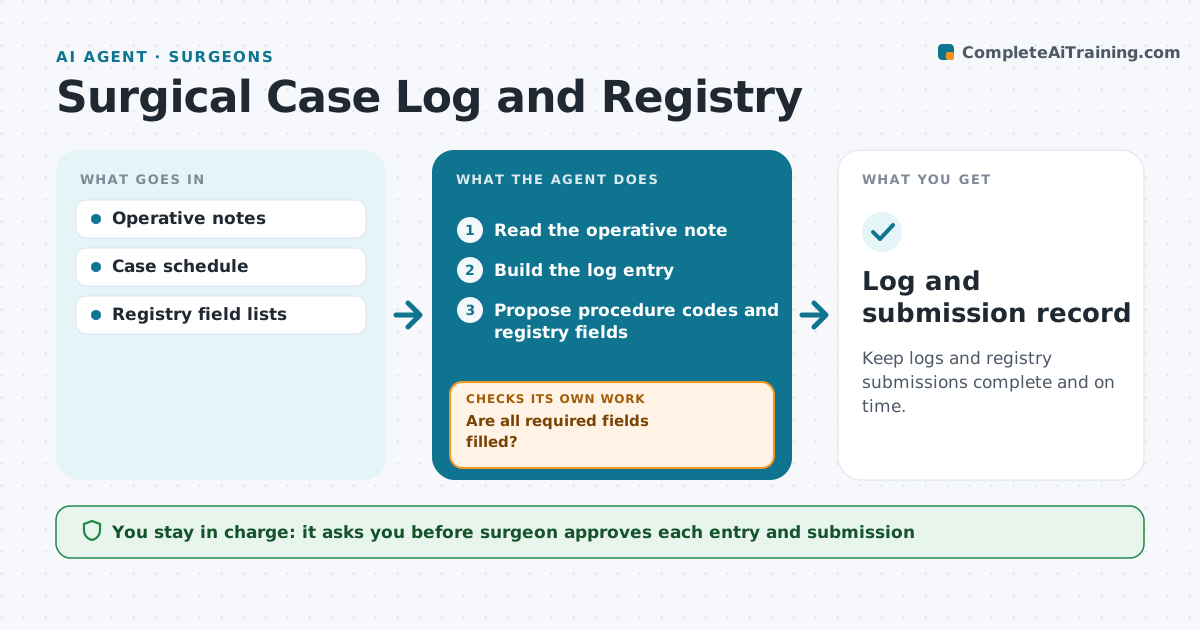
Keep logs and registry submissions complete and on time.
What it does
Surgeons must log cases for training and send data to registries, but it is left for later. After each case, this agent reads the operative note and builds the log entry: procedure, role, date and details. It checks the data for gaps, such as missing implant details or complications, and drafts the registry submission. Incomplete entries go back to the surgeon with the missing fields listed. When the surgeon approves, the agent files them. It rechecks monthly for entries that were not submitted. Edge case: the operative note uses a nonstandard name, so the agent proposes the closest code and asks the surgeon to confirm.
How it works
Follow the arrows from top to bottom. The orange dashed arrow is the loop: when a check fails, the agent goes back and tries again.
Read the steps as a list
- A case ends
- Read the operative note
- Build the log entry
- Are all required fields filled?If not: send the surgeon the missing fields. Back to step 3.
- Propose procedure codes and registry fields
- Surgeon approves the entriesThe agent waits here for your OK.
- File the log and submit to the registry
- Did the registry accept the submission?If not: fix the field and resubmit. Back to step 5.
- Monthly check for cases not submitted
- Log and submission record
How it decides
An entry is ready only when all required fields are present. Gaps go to the surgeon.
- Remind the surgeon after 3 days with incomplete fields
- Propose a code only with a confirm step
- Submit within the registry deadline
- Flag cases with no note after 2 days
Make it yours
Every agent is a starting point. You choose these settings for your own situation.
- Required fields
- Reminder days (default 3)
- Registries
- Monthly check date
What keeps you in control
It always asks you first
- Surgeon approves each entry and submission
Hard limits
- Never invent a field
- Never submit without approval
It stops when
- Done: entries filed and accepted
- Stop: registry unavailable, retry later
Set it up
We guide you through the set-up, step by step
Members get the full set-up guide for this agent. No technical skills needed: you copy, paste and upload.
- One set of instructions to paste into your AI, with the clicks for ChatGPT, Claude, Microsoft 365 Copilot, Gemini and Grok
- The agent then walks you through connecting your own data, one source at a time
- A downloadable copy with the flow chart, the rules and the full guide