AI agent for billing specialists
Survey Progress Billing Agent
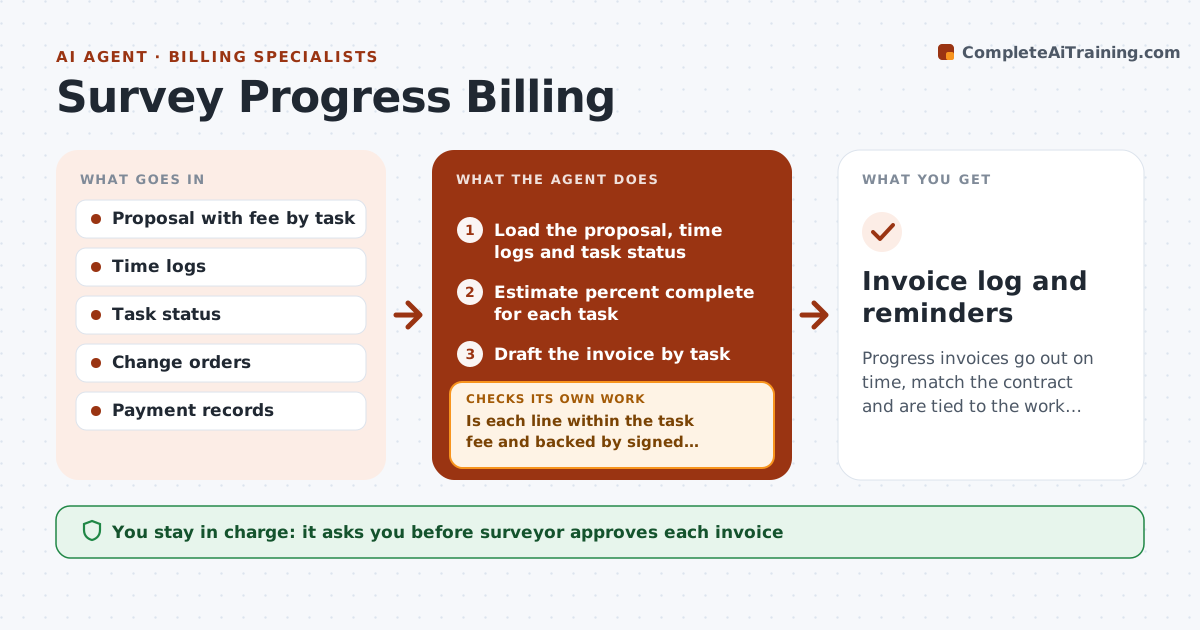
Progress invoices go out on time, match the contract and are tied to the work done.
What it does
A project runs for four months and you invoice only at the end, then the client disputes hours and scope. This agent drafts progress invoices as work happens. It compares logged hours and completed tasks with the proposal, drafts a progress invoice by task, and checks it against the fee and change orders. If the invoice exceeds the percent complete or includes work outside scope, it corrects the draft and rechecks. It tracks payment and drafts reminders. You approve each invoice. Edge case: extra work requested by phone with no signed change order is held back and listed for your decision.
How it works
Follow the arrows from top to bottom. The orange dashed arrow is the loop: when a check fails, the agent goes back and tries again.
Read the steps as a list
- Billing date or milestone
- Load the proposal, time logs and task status
- Estimate percent complete for each task
- Draft the invoice by task
- Is each line within the task fee and backed by signed change orders?If not: Cap the line or remove extra work and list it for the surveyor. Back to step 4.
- Does the invoice total equal the sum of lines?If not: Recalculate the total. Back to step 4.
- Surveyor approves the invoiceThe agent waits here for your OK.
- Track payment and due dates
- Draft reminders for overdue invoices
- Invoice log and reminders
How it decides
It bills each task by percent complete from logs, capped at the task fee, and adds only signed change orders.
- Never bill above the task fee without a signed change order
- Use logged hours to support percent complete
- Remind 7 days after the due date
- Hold unsigned extra work for a decision
Make it yours
Every agent is a starting point. You choose these settings for your own situation.
- Billing schedule
- Reminder days (default 7)
- Task structure
- Invoice format
What keeps you in control
It always asks you first
- Surveyor approves each invoice
- Surveyor approves each reminder
Hard limits
- Never send invoices itself
- Never add unapproved work to bills
It stops when
- Done: invoice paid
- Stop: contract missing
Set it up
We guide you through the set-up, step by step
Members get the full set-up guide for this agent. No technical skills needed: you copy, paste and upload.
- One set of instructions to paste into your AI, with the clicks for ChatGPT, Claude, Microsoft 365 Copilot, Gemini and Grok
- The agent then walks you through connecting your own data, one source at a time
- A downloadable copy with the flow chart, the rules and the full guide