AI agent for hr consultants
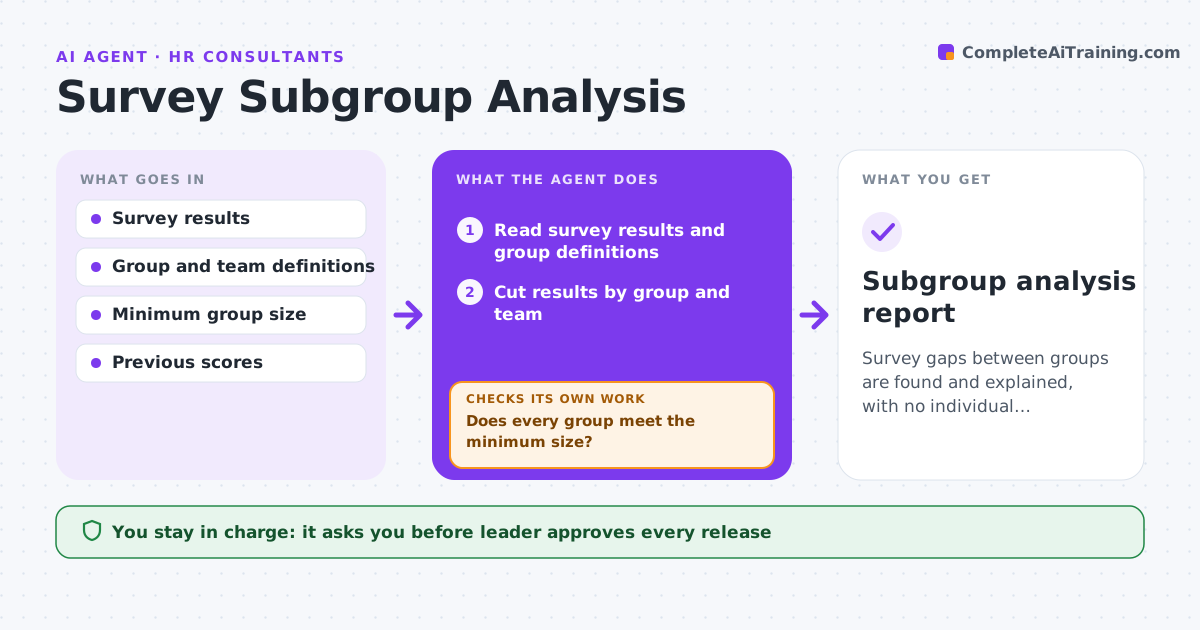
Survey Subgroup Analysis Agent
Survey gaps between groups are found and explained, with no individual identifiable.
What it does
Engagement scores hide big differences between groups, and the average looks fine. The agent cuts the survey results by group and team, applies the minimum group sizes so no one can be identified, finds significant gaps, and checks previous scores for a trend. It drafts follow-up questions for focus groups and checks that suppressed groups cannot be worked out from the totals. The leader approves what is released. Edge case: a team of 9 people where one score would reveal a single person, so the agent suppresses it and merges it with a nearby team.
How it works
Follow the arrows from top to bottom. The orange dashed arrow is the loop: when a check fails, the agent goes back and tries again.
Read the steps as a list
- Survey closes
- Read survey results and group definitions
- Cut results by group and team
- Does every group meet the minimum size?If not: Merge or suppress the group. Back to step 3.
- Compare groups and find gaps
- Compare with previous surveys
- Check that suppressed values cannot be worked out
- Can any suppressed value be derived from totals?If not: Suppress another cell or merge groups and rescan. Back to step 4.
- Draft focus group questions and a summary
- Leader approves what is releasedThe agent waits here for your OK.
- Subgroup analysis report
How it decides
It reports a group only when it meets the minimum size, and a gap only when the difference is both large and consistent across questions.
- Minimum group size of 10
- Flag gaps of 8 points or more
- Check at least two questions before calling a gap a pattern
- Never release comments with names
Make it yours
Every agent is a starting point. You choose these settings for your own situation.
- Minimum group size (default 10)
- Gap threshold (default 8 points)
- Groups compared
- Release audience
What keeps you in control
It always asks you first
- Leader approves every release
Hard limits
- Never report groups under the minimum size
- Do not identify respondents
It stops when
- Done: report approved and released
- Stop: group sizes are too small for any reliable view
Set it up
We guide you through the set-up, step by step
Members get the full set-up guide for this agent. No technical skills needed: you copy, paste and upload.
- One set of instructions to paste into your AI, with the clicks for ChatGPT, Claude, Microsoft 365 Copilot, Gemini and Grok
- The agent then walks you through connecting your own data, one source at a time
- A downloadable copy with the flow chart, the rules and the full guide