AI agent for chemists
Synthesis Route Planning Agent
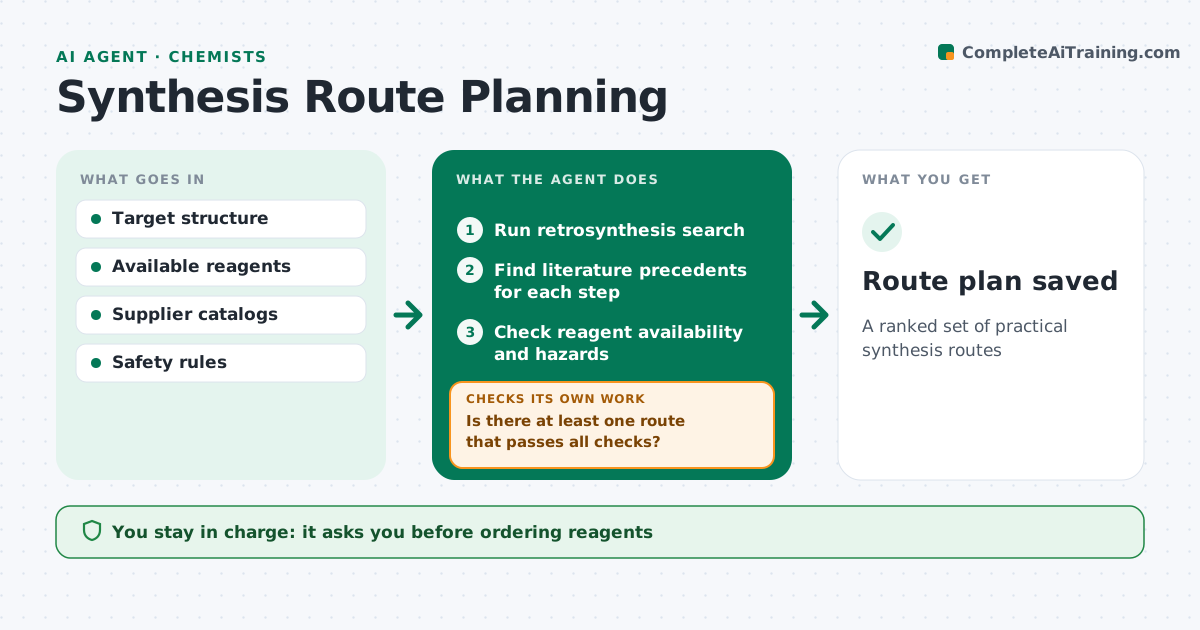
A ranked set of practical synthesis routes
What it does
Planning a synthesis means choosing steps, reagents and conditions that work together, and a route that looks good on paper can fail on a missing reagent. When a new target is requested, this agent runs a retrosynthesis search and finds literature precedents for each step. It checks reagent availability and price with the chemist's suppliers, flags hazardous or restricted reagents, and catches steps that clash with protecting groups. It then checks whether at least one route passes every check. If none does, it relaxes only the constraints the chemist allows and searches again. It ranks routes by number of steps, cost and strength of precedent, preferring in-stock reagents, and writes a summary. The chemist chooses the route. Edge case: a step backed by only one weak literature example is labeled risky.
How it works
Follow the arrows from top to bottom. The orange dashed arrow is the loop: when a check fails, the agent goes back and tries again.
Read the steps as a list
- New target requested
- Run retrosynthesis search
- Find literature precedents for each step
- Check reagent availability and hazards
- Is there at least one route that passes all checks?If not: relax allowed constraints and search again. Back to step 2.
- Rank routes and write summary
- Chemist chooses routeThe agent waits here for your OK.
- Route plan saved
How it decides
It ranks routes by step count, reagent availability, cost, hazards and strength of precedent.
- Label steps with weak precedent as risky
- Flag reagents on the restricted list
- Prefer routes with in-stock reagents
Make it yours
Every agent is a starting point. You choose these settings for your own situation.
- Max steps
- Restricted reagents list
- Suppliers
- Cost weight
What keeps you in control
It always asks you first
- Ordering reagents
- Using restricted reagents
Hard limits
- Never orders reagents
It stops when
- Done: routes delivered
- Stop: no route found; report
Set it up
We guide you through the set-up, step by step
Members get the full set-up guide for this agent. No technical skills needed: you copy, paste and upload.
- One set of instructions to paste into your AI, with the clicks for ChatGPT, Claude, Microsoft 365 Copilot, Gemini and Grok
- The agent then walks you through connecting your own data, one source at a time
- A downloadable copy with the flow chart, the rules and the full guide