AI agent for fraud analysts
Synthetic Identity Review Agent
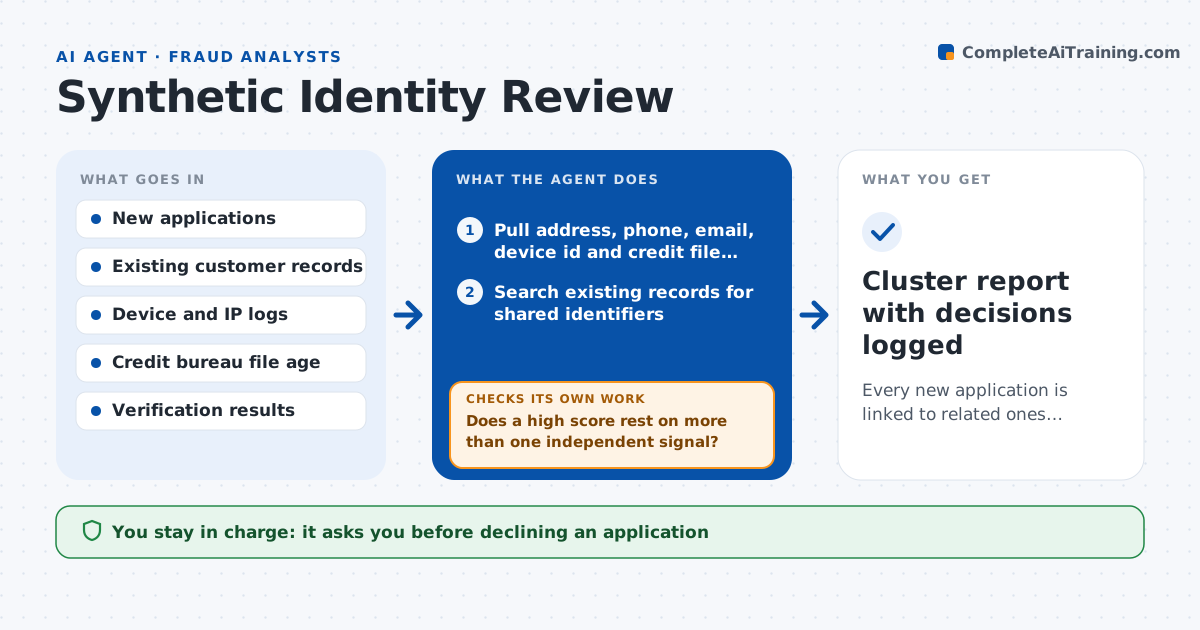
Every new application is linked to related ones, scored for network risk, and either cleared or sent to the analyst with evidence
What it does
A synthetic identity mixes real and made-up details, so every field passes on its own. The analyst sees only the single application in front of them. This agent looks at each new application against everything else on file. It pulls shared addresses, phone numbers, device ids, emails and the age of the credit file, and links applications that share more than one of them. It scores each cluster for network risk, then asks for extra verification on the flagged ones, such as a document check or a callback. When the new evidence arrives it rescores the cluster and re-checks that the score changed for a reason. It never declines an applicant or closes an account. The analyst approves every decline. Edge case: a college dorm address shared by 30 real students looks like a ring, so the agent tests for ages and file history before flagging.
How it works
Follow the arrows from top to bottom. The orange dashed arrow is the loop: when a check fails, the agent goes back and tries again.
Read the steps as a list
- A batch of new applications arrives
- Pull address, phone, email, device id and credit file age for each application
- Search existing records for shared identifiers
- Link applications that share two or more identifiers into clusters
- Score each cluster for network risk
- Does a high score rest on more than one independent signal?If not: drop clusters built on a single shared identifier such as a common address and relink with stricter rules. Back to step 4.
- Request extra verification for flagged applicants
- Rescore clusters with the new verification results
- Did the verification resolve or confirm the risk?If not: request a second verification type and rescore, then escalate unresolved clusters as unclear. Back to step 7.
- Analyst approves each decline or account closureThe agent waits here for your OK.
- Cluster report with decisions logged
How it decides
It scores a cluster higher when several identifiers are shared and credit files are thin or recently created, and lower when file history and ages vary naturally. It rescores after every new verification result.
- Flag a cluster when three or more applications share two or more identifiers
- Treat a credit file under 12 months old as a risk signal only when paired with another signal
- Never flag on a shared address alone
- Mark clusters unclear after two failed verification attempts
Make it yours
Every agent is a starting point. You choose these settings for your own situation.
- Number of shared identifiers needed to link applications (default 2)
- Risk score that triggers extra verification (default 70)
- Verification types allowed (default document check and callback)
- Credit file age counted as thin (default under 12 months)
What keeps you in control
It always asks you first
- Declining an application
- Closing an account
Hard limits
- Never declines or closes anything on its own
- Never uses protected traits such as race or nationality as a signal
- Logs the evidence for every flag
It stops when
- Done: every cluster is cleared, confirmed or escalated with evidence
- Stop: identity data cannot be read or the bureau lookup is unavailable
Set it up
We guide you through the set-up, step by step
Members get the full set-up guide for this agent. No technical skills needed: you copy, paste and upload.
- One set of instructions to paste into your AI, with the clicks for ChatGPT, Claude, Microsoft 365 Copilot, Gemini and Grok
- The agent then walks you through connecting your own data, one source at a time
- A downloadable copy with the flow chart, the rules and the full guide