AI agent for tax analysts
Tax Credit Eligibility Documentation Agent
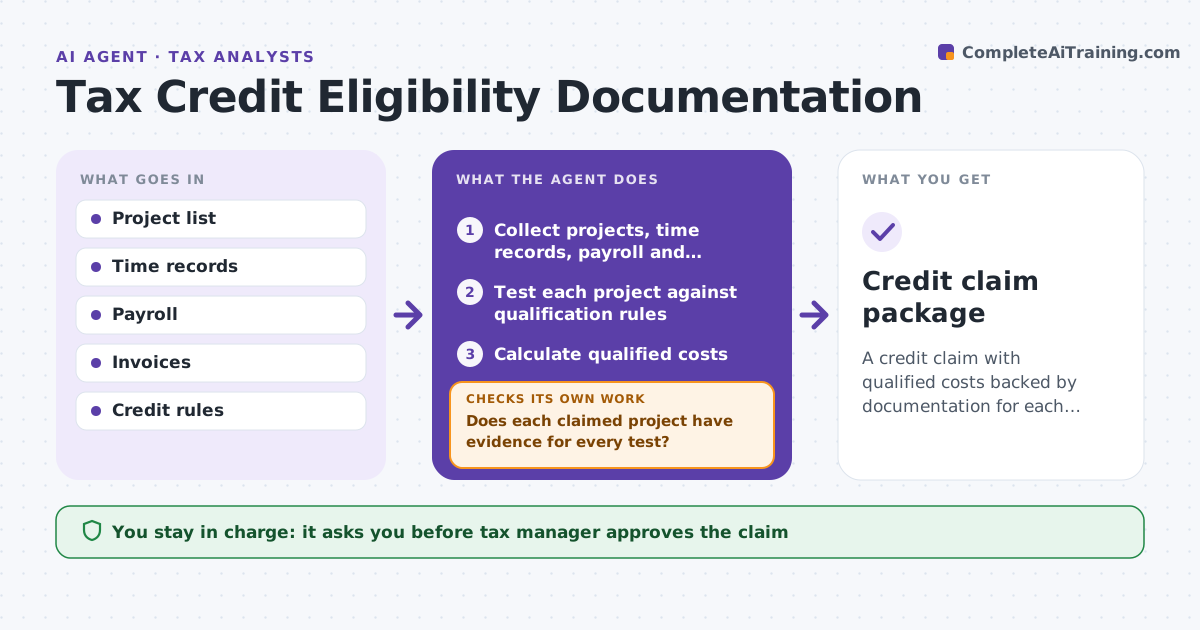
A credit claim with qualified costs backed by documentation for each project
What it does
Tax credits such as the research credit require proof that activities and costs qualify, and that proof is scattered across project files. During the credit study, this agent collects project lists, time records, payroll and contractor invoices. It tests each project against every qualification rule; all tests must be met. If a project lacks evidence for a test, it sends questions to the project lead and waits, then tests again. It calculates qualified costs, using time records to support wage costs, and builds a documentation file per project. Contractor costs count only if the company keeps rights to the results. The tax manager approves the claim. Edge case: contractor costs where the vendor keeps the rights are excluded and the reason is noted in the file.
How it works
Follow the arrows from top to bottom. The orange dashed arrow is the loop: when a check fails, the agent goes back and tries again.
Read the steps as a list
- Credit study period
- Collect projects, time records, payroll and invoices
- Test each project against qualification rules
- Does each claimed project have evidence for every test?If not: send questions to project leads and wait. Back to step 3.
- Calculate qualified costs
- Build documentation files
- Tax manager approves the claimThe agent waits here for your OK.
- Credit claim package
How it decides
A project qualifies only if it meets every test with evidence. Costs follow the credit rules.
- All qualification tests needed
- Contractor rights must stay with the company
- Time records support wage costs
Make it yours
Every agent is a starting point. You choose these settings for your own situation.
- Credit types
- Evidence types
- Interview questions
- Calculation method
What keeps you in control
It always asks you first
- Tax manager approves the claim
Hard limits
- Never files claims
- Never inflates costs
It stops when
- Done: claim ready
- Stop: no projects qualify
Set it up
We guide you through the set-up, step by step
Members get the full set-up guide for this agent. No technical skills needed: you copy, paste and upload.
- One set of instructions to paste into your AI, with the clicks for ChatGPT, Claude, Microsoft 365 Copilot, Gemini and Grok
- The agent then walks you through connecting your own data, one source at a time
- A downloadable copy with the flow chart, the rules and the full guide