AI agent for tax advisors
Tax Law Change Client Impact Agent
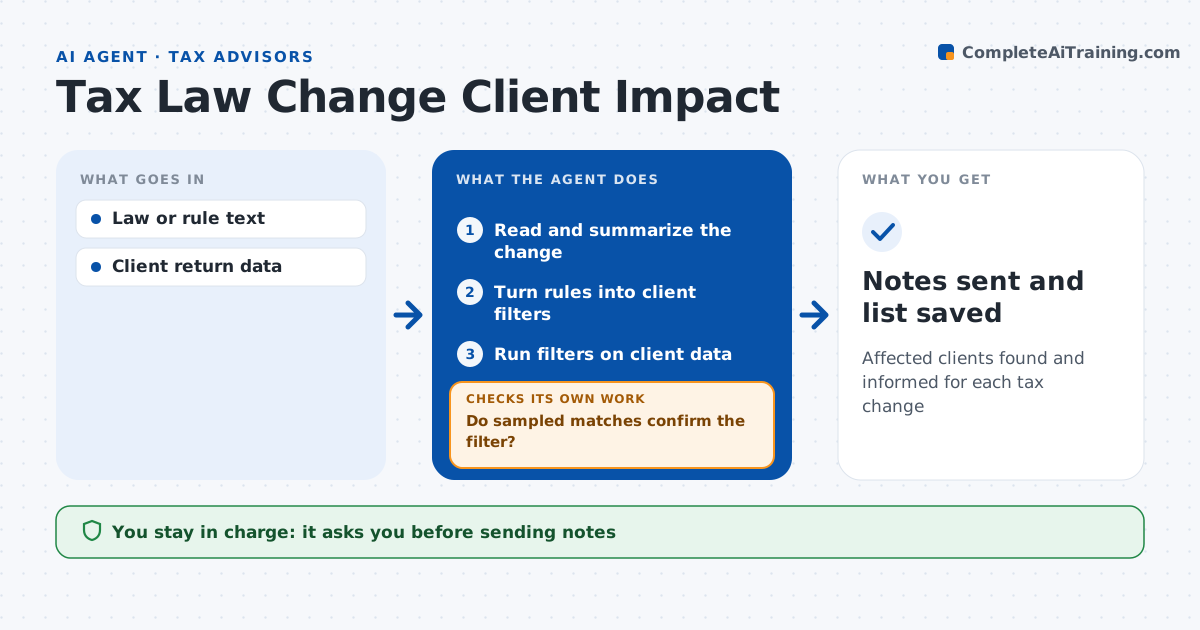
Affected clients found and informed for each tax change
What it does
When tax rules change, advisors need to know quickly which clients are affected and by how much. When a change is published, this agent reads it and lists what changed, who it applies to and when it takes effect. It turns those rules into filters and runs them against the client list using return data. It lists affected clients with the estimated effect. It then checks a sample of matched clients against their actual returns to confirm the filter worked. If the sample shows mistakes, it refines the filter and reruns. Clients with an effect over 1,000 dollars get an individual note; smaller effects get a group note; uncertain cases go to the advisor. The advisor approves every note and the client list before anything is sent. Edge case: a change applies only above an income limit, so the agent uses modified income rather than wages.
How it works
Follow the arrows from top to bottom. The orange dashed arrow is the loop: when a check fails, the agent goes back and tries again.
Read the steps as a list
- Tax change published
- Read and summarize the change
- Turn rules into client filters
- Run filters on client data
- Do sampled matches confirm the filter?If not: refine the filter and rerun. Back to step 3.
- Draft client notes by group
- Advisor approves notes and listThe agent waits here for your OK.
- Notes sent and list saved
How it decides
It filters clients by the rule's conditions and confirms with sample checks.
- Effect over $1,000: individual note
- Smaller effect: group note
- Uncertain applicability: advisor review
Make it yours
Every agent is a starting point. You choose these settings for your own situation.
- Effect thresholds
- Note templates
- Client groups
- Sample size
What keeps you in control
It always asks you first
- Sending notes
Hard limits
- Never gives final advice without the advisor
- Never shares client data
It stops when
- Done: notes sent
- Stop: change not final
Set it up
We guide you through the set-up, step by step
Members get the full set-up guide for this agent. No technical skills needed: you copy, paste and upload.
- One set of instructions to paste into your AI, with the clicks for ChatGPT, Claude, Microsoft 365 Copilot, Gemini and Grok
- The agent then walks you through connecting your own data, one source at a time
- A downloadable copy with the flow chart, the rules and the full guide