AI agent for finance and accounting specialists
Tax Law Change Impact Monitoring Agent
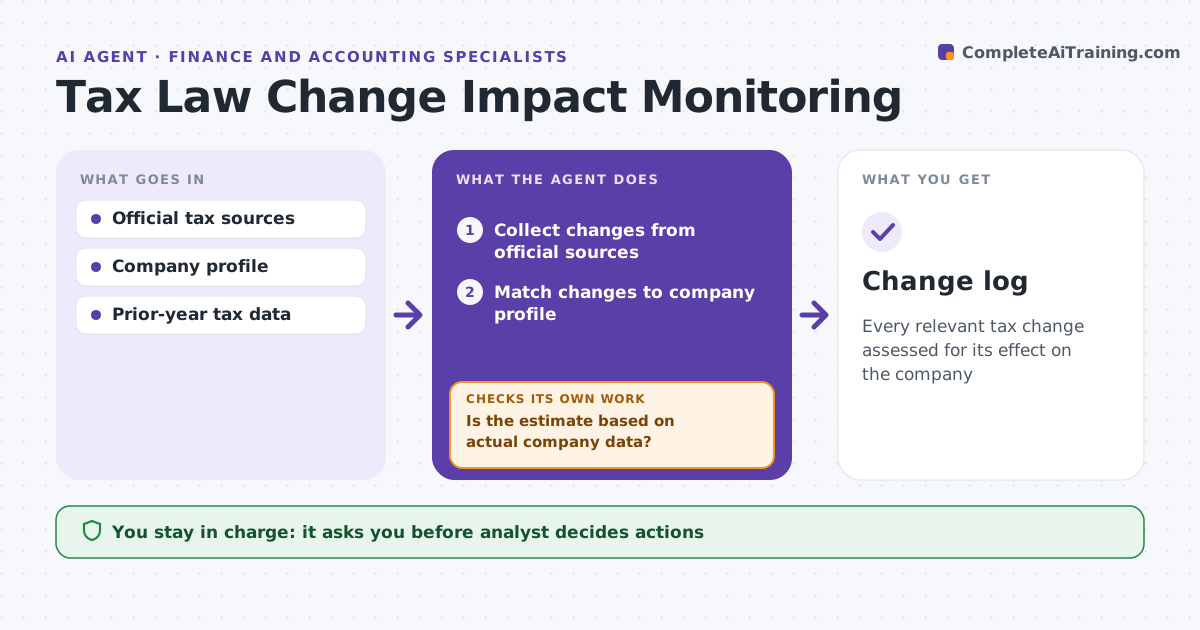
Every relevant tax change assessed for its effect on the company
What it does
Tax rules change constantly through new laws, regulations, rulings and rate changes, and missing one affects the books. This agent scans official tax authority sources daily for the company's jurisdictions and tax types and matches each change to the company's entities and positions. It estimates the financial effect using the company's own prior-year data. It checks whether each estimate rests on actual company data or on assumptions. If key data such as apportionment factors is missing, it lists what is needed and asks the analyst before finalizing. Effects over the materiality threshold are marked urgent, and effective dates are noted. It drafts a short impact note. The analyst decides next steps. Edge case: proposed changes are tracked on a separate list from enacted ones and are never booked.
How it works
Follow the arrows from top to bottom. The orange dashed arrow is the loop: when a check fails, the agent goes back and tries again.
Read the steps as a list
- Daily scan
- Collect changes from official sources
- Match changes to company profile
- Estimate financial effect with company data
- Is the estimate based on actual company data?If not: list missing data and ask the analyst. Back to step 4.
- Draft impact note
- Analyst decides next stepsThe agent waits here for your OK.
- Change log
How it decides
A change applies when it matches the company's jurisdictions, entity types or tax positions.
- Enacted versus proposed tracked separately
- Effects over the materiality threshold are urgent
- Effective dates noted
Make it yours
Every agent is a starting point. You choose these settings for your own situation.
- Jurisdictions and tax types
- Materiality threshold
- Sources
- Digest frequency
What keeps you in control
It always asks you first
- Analyst decides actions
Hard limits
- Uses official sources
- Never gives tax advice externally
It stops when
- Done: daily scan complete
- Stop: source unavailable
Set it up
We guide you through the set-up, step by step
Members get the full set-up guide for this agent. No technical skills needed: you copy, paste and upload.
- One set of instructions to paste into your AI, with the clicks for ChatGPT, Claude, Microsoft 365 Copilot, Gemini and Grok
- The agent then walks you through connecting your own data, one source at a time
- A downloadable copy with the flow chart, the rules and the full guide