
Learning path
Learning AI as a Tax Advisor
Tax rules shift, clients expect quick answers, and your day is full. This path shows you how to use AI to handle the routine work and keep your judgment where it matters.

Your path
Everything in the Tax Advisor AI kit, in the order that makes sense. Members tick off each step and see their progress.
Set up your AI
We guide you through each click.
Let skills do your everyday tasks
Connect your apps and pick your AI apps
Hand whole tasks to AI agents
Build your own tools
Keep growing
Everything for tax advisors
All the courses, certifications, AI tools, MCP servers and apps for tax advisors, most relevant first. Open any list to see more.
Take the prompt courses
A short framework course to learn how to ask, then 9 lessons with ready-to-use prompts for tax advisors.
Start with this framework: how to talk to AI
Tax advisors need precise do and don't rules, so TIDD-EC helps draft client emails about deductibility without risky wording.
Then your prompt course for tax advisors- 1Explaining Tax Rules To Clients3 prompts
- 2Drafting Client Emails And Letters3 prompts
- 3Organizing Client Records2 prompts
- 4Preparing And Reviewing Returns3 prompts
- 5Estimating Quarterly Payments2 prompts
- 6Researching Tax Legislation3 prompts
- 7Tax Planning Scenarios4 prompts
- 8Audit And Notice Response2 prompts
- 9Firm Admin And Onboarding2 prompts
Watch the video courses or add them to your Favorites for later
107 video courses our AI picked for tax advisors, most useful first. Save the ones you want to watch later with the heart.
Favorites are saved to your account: sign in or get your AI kit first.
Show all 107 video courses
Get certified, or add certifications to your Favorites
Every course ends in an exam and a certificate you can add to LinkedIn. Save the certifications you are aiming for with the heart.
Favorites are saved to your account: sign in or get your AI kit first.
More certifications for tax advisorsShow all 24 certifications
Try the AI tools for tax advisors
24 AI tools our AI matched to the work of tax advisors, best fit first. Each review shows what it does, its alternatives and the jobs it suits.
Favorites are saved to your account: sign in or get your AI kit first.
Show all 24 AI tools
Connect your AI to the apps tax advisors use
MCP servers let ChatGPT, Claude or Copilot look things up and get work done in other apps, like your email, calendar or bookkeeping software. These 12 fit the work of tax advisors best, well-known apps first.

CryptoTaxEdge MCP server
by sturs49Ask your AI to look up the US tax category and treatment of any crypto transaction hash.
Finance and crypto Official
Box MCP server
by boxLet your AI search your Box files, answer questions about them, and pull out details for you.
Productivity Official
Outlook Attachment Reader MCP server
by ZacccckLet your AI open and read the files attached to your Outlook emails, and send local files as drafts.

Central Bank Rates MCP server
by AllRates-TodayLets your AI look up official exchange rates from central banks and tax authorities, like the ECB or HMRC.
Finance and cryptoNo install
EU VIES VAT checker MCP server
by bartosz-kucCheck any EU VAT number with your AI and get a proof number you can keep for your records.
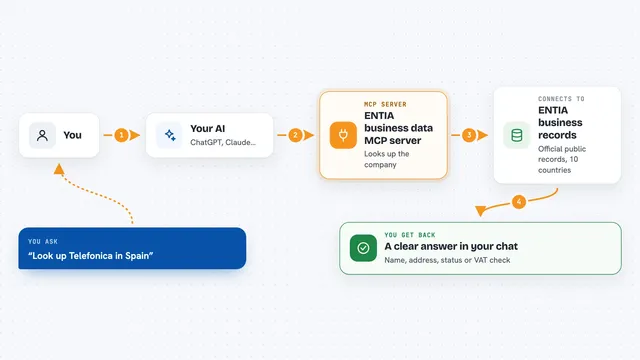
ENTIA business data MCP server
by ENTIA-IALook up companies, VAT numbers and business details across 10 countries right from your AI chat.
Research OfficialShow all 12 MCP servers

Normativa Colombia MCP server
by AngelthebestoneConsulta leyes y sentencias colombianas desde tu asistente de IA, sin abrir el navegador.

MCP Emails server
by AlbretsenLet your AI read, search, send and organize email in your own mailbox.
EmailNo install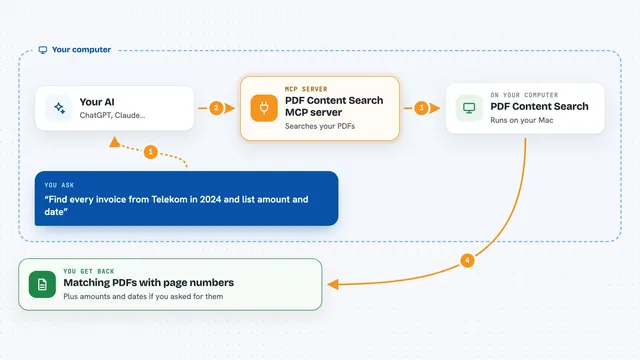
PDF Content Search MCP server
by juergenkoller-softwareLet your AI search all your PDFs, including scanned ones, and pull out dates, senders and amounts.

GST e-invoice MCP server
by 411sstTurn an Indian GST tax invoice into the government's INV-01 e-invoice JSON, with every value checked against the document.

VAT number checker MCP server
by vatnodeCheck European VAT rates and validate EU VAT numbers right inside your AI chat.

Excel MCP server
by sbroenneLet your AI assistant open and work inside real Microsoft Excel on your Windows PC.






































































































About this learning path
6 topicsA practical AI path for tax advisors
Tax advising is a job of details and trust. You read rules, ask for documents, prepare returns, and explain what it all means to people who are worried about getting it wrong.
This learning path teaches you how to bring AI into that work without losing the care that makes you good at it. You will set up your tools, learn prompts for the tasks you do every week, and watch short videos made for tax professionals.
Why AI matters for tax work now
Clients send questions faster than ever, and tax laws change often. When you are juggling returns, emails, and research, it is easy to fall behind.
AI can help you sort information, draft messages, and check your work. It does not replace your judgment. It gives you a faster starting point so you can focus on the parts that need a human.
What the path includes
You start with setup questions that help you pick the right AI tool for your firm. Then you connect your AI, learn skills for tax work, and go through this prompt course. You also get video courses chosen for tax advisors, and you can earn certificates from those courses to show what you learned.
How it saves you time
The prompts in this course are built for the tasks that eat your day: explaining rules, asking clients for documents, organizing messy records, and estimating quarterly payments. When you have a reliable first draft, you spend less time staring at a blank screen and more time on the advice clients pay for.
How it protects your career
Using AI well is becoming a basic skill in professional services. When you know how to check its work, keep client data safe, and stay within the rules, you become more valuable, not less. This path shows you where to draw the line and how to use AI as a tool, not a replacement.
How to start
Begin with the setup questions. They take a few minutes and help you choose a tool that fits how you work. Then move through the lessons in order. Each one builds on the last, and you can practice with real tasks from your own practice as you go.
Frequently asked questions
Do I need to be technical to use this?
No. The path is made for tax advisors who use computers for work but do not write code. If you can send an email and open a spreadsheet, you can follow along.Will AI give wrong tax advice?
AI can make mistakes, so you always check its work against the actual law and your own knowledge. The course teaches you how to spot errors and what to verify yourself.Is my client data safe?
The course covers safety and privacy for tax work, including what not to paste into AI tools. You will learn how to use AI without exposing sensitive client information.How long does the path take?
Most people move through the lessons in a few weeks, fitting them around client work. You can go faster or slower depending on your schedule.