AI agent for director of its
Technology Standard Exception Agent
Every exception decided with evidence, tracked, and reviewed before it expires
What it does
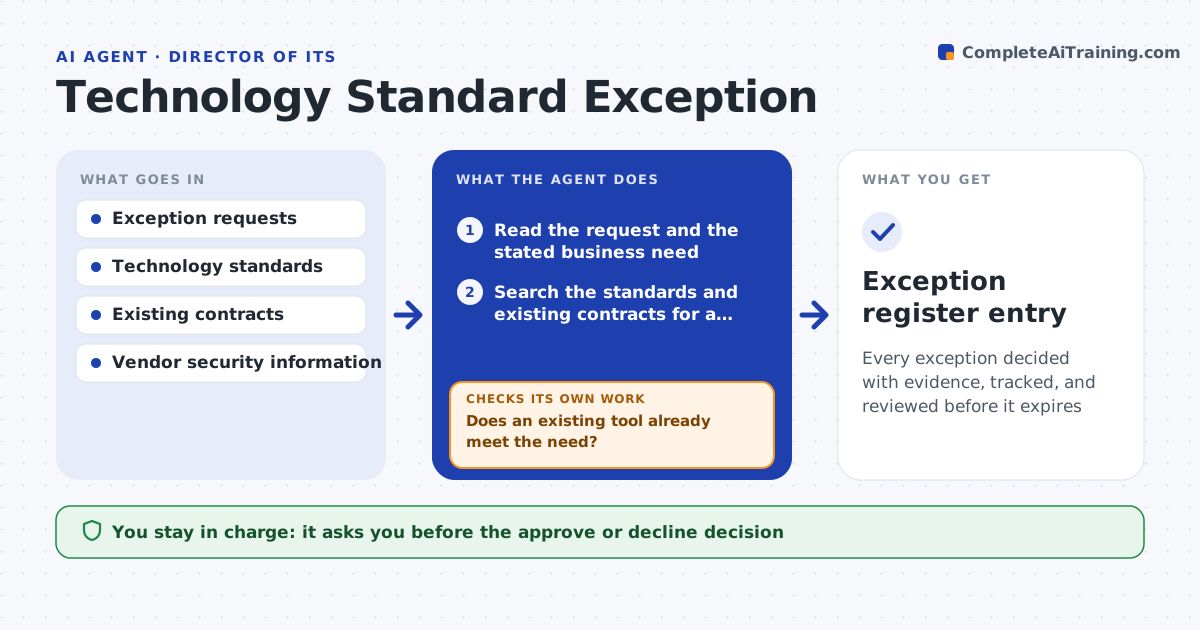
A local team buys its own project tool, and a year later nobody knows why it exists or what it costs. This agent collects exception requests, then compares each with the technology standard and the existing contracts to see whether a standard tool already does the job. It checks the security of the proposed tool, such as data handling and sign-in options, and the cost against a standard alternative. It drafts an approve or decline recommendation with the evidence and a proposed expiry date for any approval. When the date approaches, it follows up with the owner to renew or retire the exception. The leader decides. Edge case: a request that duplicates a tool the company already pays for, in another region, is routed to that contract first.
How it works
Follow the arrows from top to bottom. The orange dashed arrow is the loop: when a check fails, the agent goes back and tries again.
Read the steps as a list
- Exception request submitted
- Read the request and the stated business need
- Search the standards and existing contracts for a tool that fits
- Does an existing tool already meet the need?If not: compare the options with the request and note the gaps. Back to step 2.
- Check the vendor's security and data handling
- Compare costs with a standard alternative
- Draft an approve or decline recommendation with an expiry
- IT leader decidesThe agent waits here for your OK.
- Record the decision and set the review date
- Is any exception within 30 days of expiry?If not: ask the owner to renew with evidence or retire the tool. Back to step 8.
- Exception register entry
How it decides
A request is recommended for approval only if no standard tool meets the need, security checks pass and the cost is justified. Approvals carry an expiry date.
- Decline when an existing tool covers 80 percent or more of the need
- Require a security check for any tool holding company data
- Set approvals to expire after 12 months
- Route duplicates of regional contracts to the contract owner first
Make it yours
Every agent is a starting point. You choose these settings for your own situation.
- Overlap level that triggers decline (default 80 percent)
- Approval length (default 12 months)
- Security checks required
- Who receives expiry reminders
What keeps you in control
It always asks you first
- The approve or decline decision
- Any renewal of an exception
Hard limits
- Never signs or cancels contracts
- Never approves an exception itself
It stops when
- Done: every request has a recorded decision
- Stop: the requester cannot explain the business need
Set it up
We guide you through the set-up, step by step
Members get the full set-up guide for this agent. No technical skills needed: you copy, paste and upload.
- One set of instructions to paste into your AI, with the clicks for ChatGPT, Claude, Microsoft 365 Copilot, Gemini and Grok
- The agent then walks you through connecting your own data, one source at a time
- A downloadable copy with the flow chart, the rules and the full guide