AI agent for psychologists
Therapy Homework Adherence Review Agent
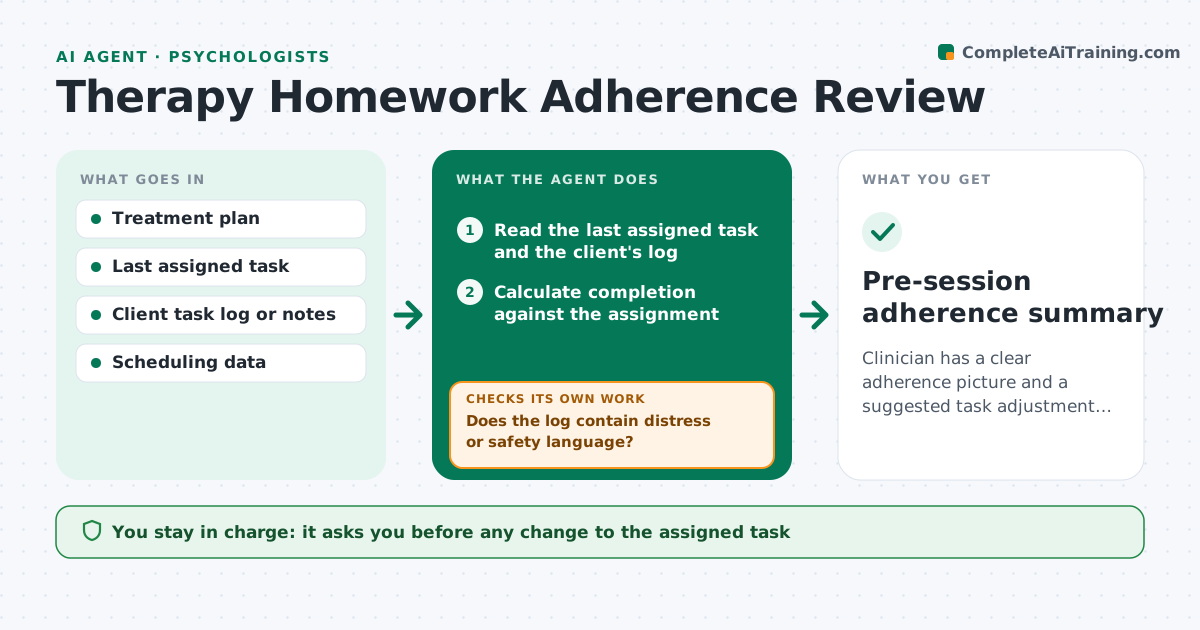
Clinician has a clear adherence picture and a suggested task adjustment before each session
What it does
Between-session exercises often go untracked, so the next session starts without knowing what happened. Before each session, this agent reads the client's task log or notes, the assignment given last time and any messages the client sent. It flags low adherence and looks for obstacles in the client's own words, such as no time, anxiety or confusion about the task. It proposes a simpler or different task and drafts a summary for the clinician. After the next session it checks whether the change helped. The clinician approves any task change. Edge case: a client logs nothing but writes that the exercise made them feel worse, so the agent flags clinician review rather than suggesting an easier task.
How it works
Follow the arrows from top to bottom. The orange dashed arrow is the loop: when a check fails, the agent goes back and tries again.
Read the steps as a list
- Session scheduled for tomorrow
- Read the last assigned task and the client's log
- Calculate completion against the assignment
- Does the log contain distress or safety language?If not: stop and flag the note for the clinician before any suggestion. Back to step 3.
- Identify obstacles stated by the client
- Propose a simpler or different task
- Clinician approves any task changeThe agent waits here for your OK.
- Read the log after the next session
- Did adherence improve after the change?If not: propose a different adjustment and flag it for the next session. Back to step 5.
- Update the summary for the clinician
- Pre-session adherence summary
How it decides
Adherence is low when fewer than half of the assigned tasks were done. Distress language triggers clinician review before any task suggestion.
- Call adherence low below 50% completion
- Send any distress or safety language to the clinician at once
- Suggest only one change at a time
- Keep the original task if adherence is high
Make it yours
Every agent is a starting point. You choose these settings for your own situation.
- Adherence threshold (default 50%)
- Task types tracked
- Summary timing
- Words that trigger clinician review
What keeps you in control
It always asks you first
- Any change to the assigned task
- Any message to the client
Hard limits
- Never makes a clinical judgment
- Never contacts the client directly
It stops when
- Done: summary delivered and task decided
- Stop: log contains safety concerns
Set it up
We guide you through the set-up, step by step
Members get the full set-up guide for this agent. No technical skills needed: you copy, paste and upload.
- One set of instructions to paste into your AI, with the clicks for ChatGPT, Claude, Microsoft 365 Copilot, Gemini and Grok
- The agent then walks you through connecting your own data, one source at a time
- A downloadable copy with the flow chart, the rules and the full guide