AI agent for payroll administrators
Time and Attendance Exception Agent
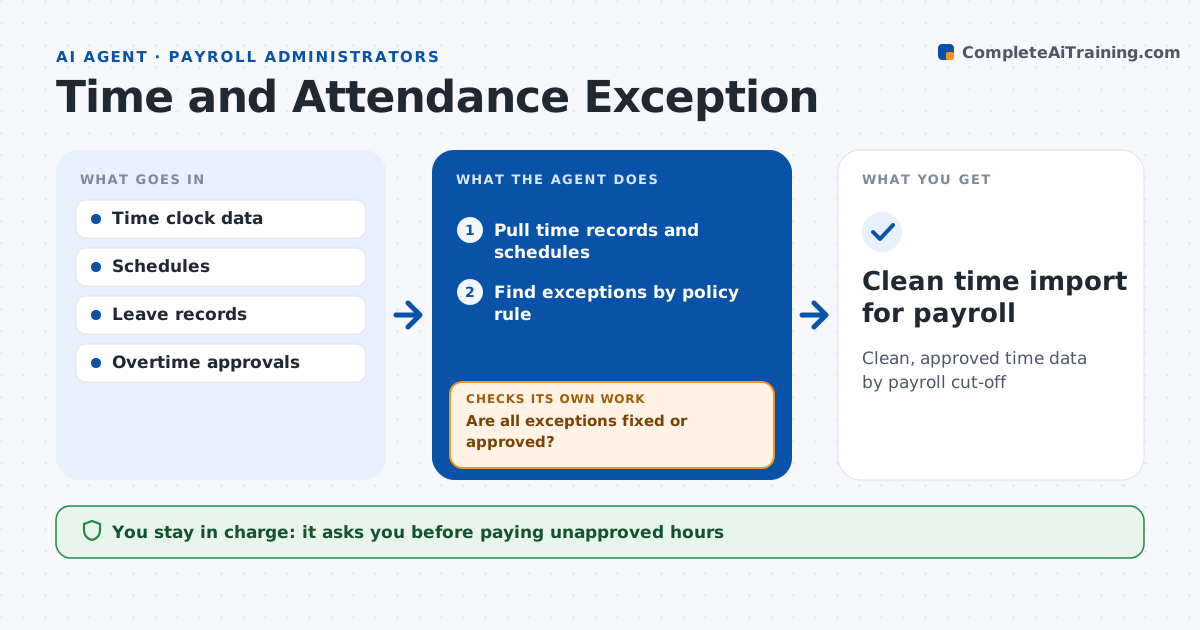
Clean, approved time data by payroll cut-off
What it does
Missing punches and unapproved overtime found at payroll cut-off cause late nights and wrong paychecks. Two days before each cut-off, this agent reviews time data against schedules. It finds missing punches, shifts over policy length, overtime without approval, and hours logged on days off or leave. It sends each manager a list of their team's exceptions and what is needed. Every few hours it checks whether managers fixed or approved the items and sends reminders to those who have not. At cut-off it lists what is still open with a suggested handling for each. The administrator decides how to handle open items. Edge case: an employee clocked in at two sites the same day, so the agent checks for a transfer before flagging a duplicate.
How it works
Follow the arrows from top to bottom. The orange dashed arrow is the loop: when a check fails, the agent goes back and tries again.
Read the steps as a list
- Two days before cut-off
- Pull time records and schedules
- Find exceptions by policy rule
- Send managers their exception lists
- Are all exceptions fixed or approved?If not: send reminders and recheck in 4 hours. Back to step 4.
- Administrator decides on items open at cut-offThe agent waits here for your OK.
- Clean time import for payroll
How it decides
It flags any record breaking a policy rule and treats it as open until a manager fixes or approves it.
- Missing punch: needs manager fix
- Overtime over 2 hours without pre-approval: needs approval
- Hours logged on approved leave day: flag
Make it yours
Every agent is a starting point. You choose these settings for your own situation.
- Exception rules
- Reminder frequency
- Escalation to manager's manager
- Cut-off time
What keeps you in control
It always asks you first
- Paying unapproved hours
- Changing time records
Hard limits
- Never edits punches
- Never approves overtime
It stops when
- Done: no open exceptions
- Stop: cut-off reached, list handed to administrator
Set it up
We guide you through the set-up, step by step
Members get the full set-up guide for this agent. No technical skills needed: you copy, paste and upload.
- One set of instructions to paste into your AI, with the clicks for ChatGPT, Claude, Microsoft 365 Copilot, Gemini and Grok
- The agent then walks you through connecting your own data, one source at a time
- A downloadable copy with the flow chart, the rules and the full guide