AI agent for police officers
Traffic Crash Report Paperwork Agent
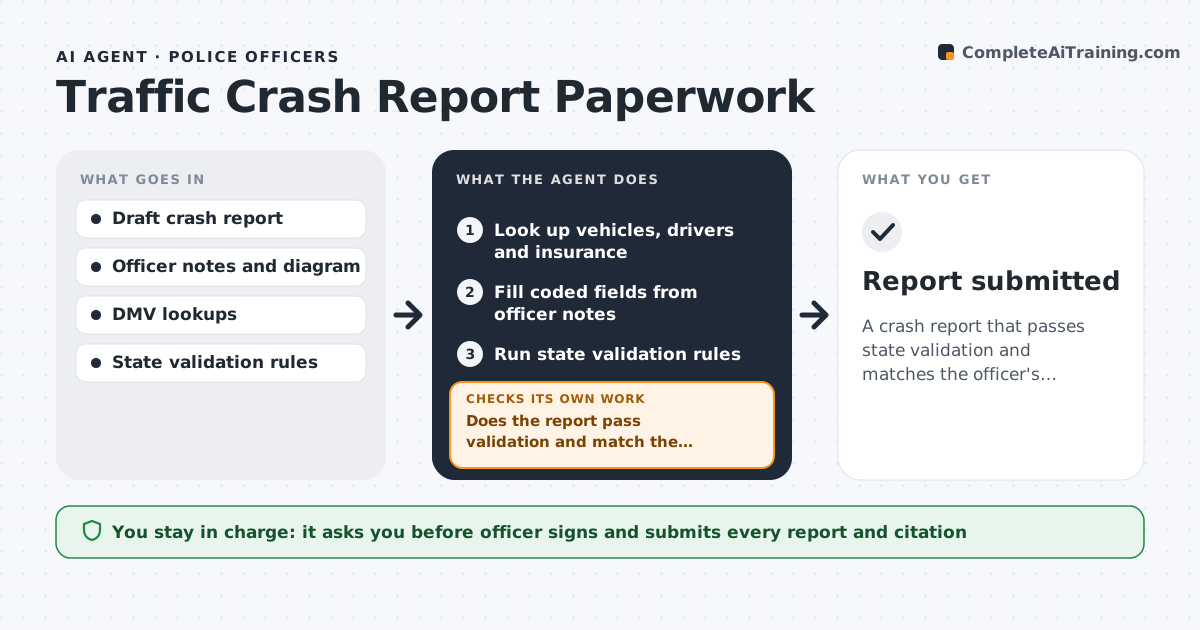
A crash report that passes state validation and matches the officer's account
What it does
Crash reports have many coded fields for vehicles, drivers, insurance, road conditions and contributing factors, and rejected reports come back days later. This agent reads the officer's draft and looks up vehicles, drivers and insurance in state systems. It fills coded fields from the officer's notes and runs the state's validation rules. If a field fails or conflicts with the narrative, it lists it for the officer to fix and re-runs validation until the report passes. When a lookup differs from the officer's data, the officer verifies it; the agent never swaps it in. Citations are checked against the elements of the statute cited. The officer signs and submits. Edge case: if a VIN lookup returns a different make than the officer recorded, the agent asks the officer to verify rather than replacing it.
How it works
Follow the arrows from top to bottom. The orange dashed arrow is the loop: when a check fails, the agent goes back and tries again.
Read the steps as a list
- Crash report draft saved
- Look up vehicles, drivers and insurance
- Fill coded fields from officer notes
- Run state validation rules
- Does the report pass validation and match the narrative?If not: list failing fields for the officer to fix and re-run. Back to step 3.
- Check citations against the cited statute
- Officer signs and submitsThe agent waits here for your OK.
- Report submitted
How it decides
It applies the state validation rule set and compares coded fields with the narrative.
- State validation rules must pass
- Lookups that differ from officer data are verified by the officer
- Citations must match the statute elements
Make it yours
Every agent is a starting point. You choose these settings for your own situation.
- State rule set
- Fields auto-filled from lookups
- Citation statute list
- Report templates
What keeps you in control
It always asks you first
- Officer signs and submits every report and citation
Hard limits
- Never submits reports itself
- Never changes officer-recorded facts
It stops when
- Done: report accepted
- Stop: lookup systems down
Set it up
We guide you through the set-up, step by step
Members get the full set-up guide for this agent. No technical skills needed: you copy, paste and upload.
- One set of instructions to paste into your AI, with the clicks for ChatGPT, Claude, Microsoft 365 Copilot, Gemini and Grok
- The agent then walks you through connecting your own data, one source at a time
- A downloadable copy with the flow chart, the rules and the full guide