AI agent for urban planners
Traffic Impact Study Review Agent
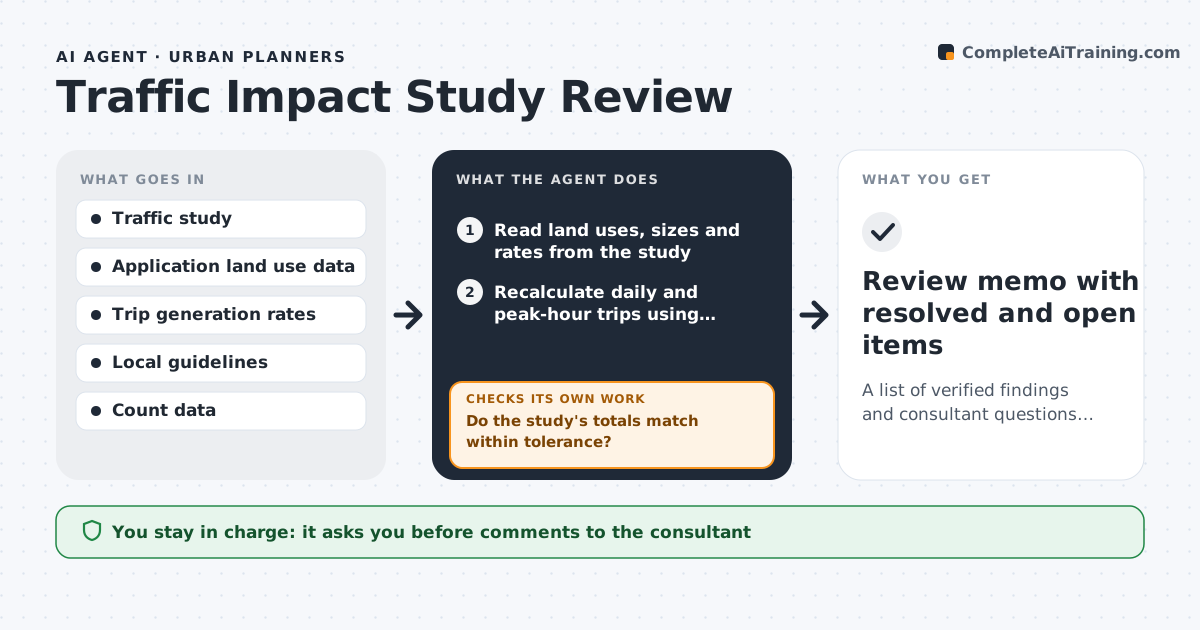
A list of verified findings and consultant questions about trip generation and key assumptions
What it does
A traffic impact study can run to hundreds of pages, and a wrong trip generation number early on changes every conclusion. This agent recalculates trip generation from the land use data in the application using the standard rates, and compares its results with the consultant's. It checks assumptions such as pass-by reductions, mode shares, growth rates and the study area, and flags those outside normal ranges. If its figures differ, it identifies which input or rate explains the difference and tests how the intersection results change. It drafts questions for the consultant, then rechecks the updated numbers when the answers arrive. The reviewer approves the comments. Edge case: a mixed-use site with shared parking gets an internal capture reduction, and the agent checks that the reduction does not exceed the allowed cap.
How it works
Follow the arrows from top to bottom. The orange dashed arrow is the loop: when a check fails, the agent goes back and tries again.
Read the steps as a list
- Traffic study submitted
- Read land uses, sizes and rates from the study
- Recalculate daily and peak-hour trips using standard rates
- Do the study's totals match within tolerance?If not: find the input, rate or reduction causing the difference. Back to step 3.
- Check pass-by, mode share, internal capture and growth assumptions
- Test how intersection results change with the corrected numbers
- Draft questions and comments for the consultant
- Reviewer approves the commentsThe agent waits here for your OK.
- Send comments and read the revised study
- Do the revised numbers resolve each comment?If not: keep the comment open and note the remaining difference. Back to step 3.
- Review memo with resolved and open items
How it decides
A figure is accepted when the agent's recalculation is within 5% using the same rates. Assumptions outside the local guideline ranges become questions.
- Accept trip totals within 5% of the recalculation
- Flag pass-by reductions above the local cap
- Limit internal capture to the guideline maximum
- Test intersection results again when trip numbers change by more than 10%
Make it yours
Every agent is a starting point. You choose these settings for your own situation.
- Rate source
- Tolerance (default 5%)
- Pass-by and capture caps
- Comment format
What keeps you in control
It always asks you first
- Comments to the consultant
Hard limits
- Never approves or denies the project
- Does not accept consultant numbers without a check
It stops when
- Done: all comments are resolved or open items are listed
- Stop: the study lacks land use data
Set it up
We guide you through the set-up, step by step
Members get the full set-up guide for this agent. No technical skills needed: you copy, paste and upload.
- One set of instructions to paste into your AI, with the clicks for ChatGPT, Claude, Microsoft 365 Copilot, Gemini and Grok
- The agent then walks you through connecting your own data, one source at a time
- A downloadable copy with the flow chart, the rules and the full guide