AI agent for policy analysts
Regulatory Comment Docket Agent
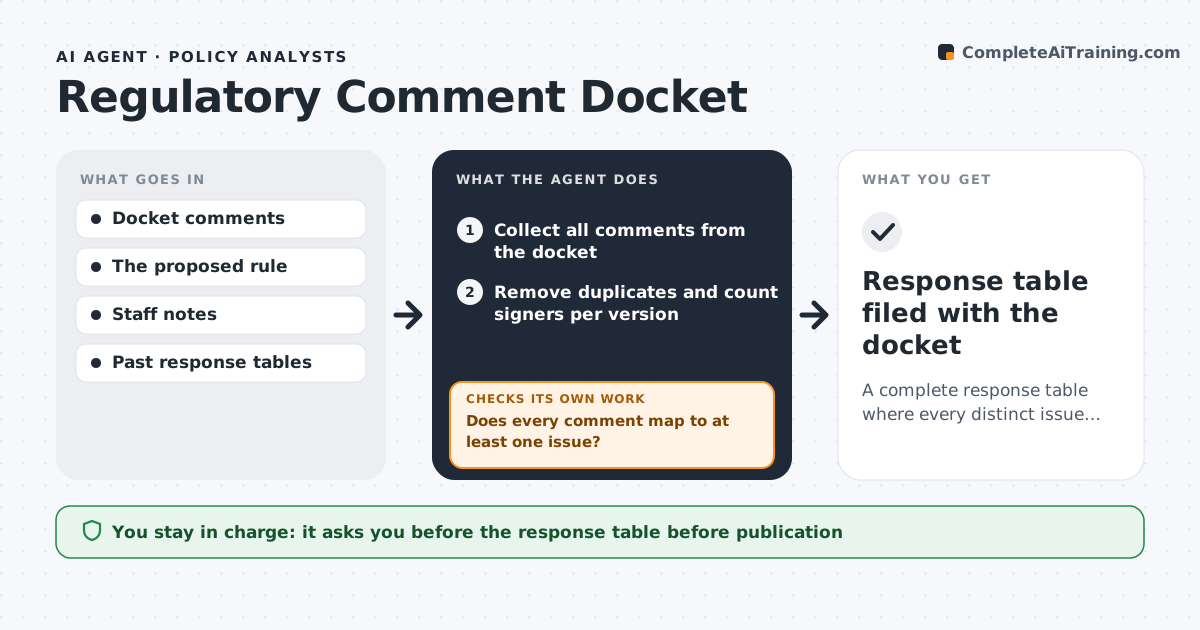
A complete response table where every distinct issue in the comments has a counted entry and a drafted answer
What it does
A proposed rule can draw hundreds or thousands of comments, many of them copies of the same form letter, and the agency must respond to every distinct issue. This agent collects the comments from the docket and removes exact and near duplicates, keeping a count of how many people signed each version. It groups the rest by issue, notes who the commenters are, such as residents, businesses or associations, and extracts the specific requests. It drafts a response table with each issue, how many raised it and the agency's answer from the draft rule and staff notes. Before finishing, it checks that every distinct issue has a response and that no comment is left out. If one is missed, it adds it and rebuilds the table. The analyst approves the table. Edge case: a long letter with one new point hidden on page nine is not discarded as a duplicate.
How it works
Follow the arrows from top to bottom. The orange dashed arrow is the loop: when a check fails, the agent goes back and tries again.
Read the steps as a list
- Comment period closes or weekly interim run
- Collect all comments from the docket
- Remove duplicates and count signers per version
- Group comments by issue and note commenter type
- Does every comment map to at least one issue?If not: create a new issue group or flag the comment for the analyst. Back to step 3.
- Draft the response table with counts and proposed answers
- Check each answer against the rule text and staff notes
- Does every distinct issue have a sourced response?If not: mark the gap and ask the analyst for the agency's position. Back to step 6.
- Analyst approves the response tableThe agent waits here for your OK.
- Response table filed with the docket
How it decides
Comments are duplicates when their text matches above a set similarity. Each distinct issue gets its own row, and an issue is answered only from the rule text or staff notes.
- Treat comments above 90% text similarity as duplicates
- Read the full text of long letters for hidden new points
- Give each distinct issue its own row
- Answer only from the rule or staff notes, never from guesses
Make it yours
Every agent is a starting point. You choose these settings for your own situation.
- Duplicate similarity threshold (default 90%)
- Issue categories
- Commenter types
- Table format
What keeps you in control
It always asks you first
- The response table before publication
Hard limits
- Never publishes the table
- Does not decide the agency's position
It stops when
- Done: all issues have responses and the table is approved
- Stop: docket export is incomplete
Set it up
We guide you through the set-up, step by step
Members get the full set-up guide for this agent. No technical skills needed: you copy, paste and upload.
- One set of instructions to paste into your AI, with the clicks for ChatGPT, Claude, Microsoft 365 Copilot, Gemini and Grok
- The agent then walks you through connecting your own data, one source at a time
- A downloadable copy with the flow chart, the rules and the full guide