AI agent for police officers
Training and Certification Currency Agent
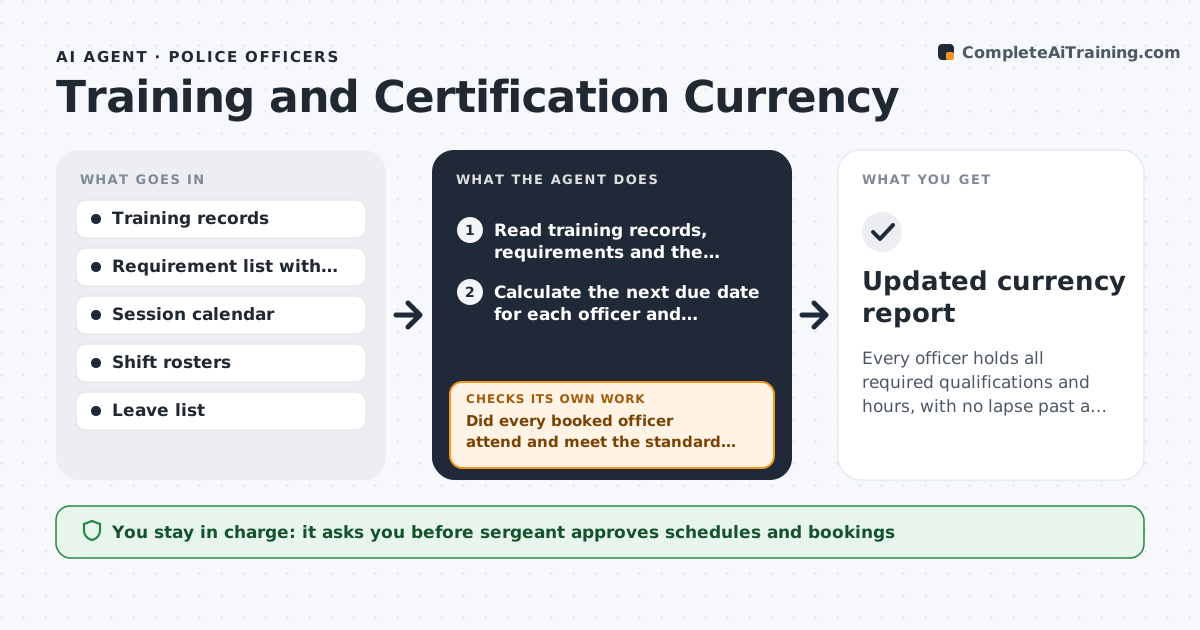
Every officer holds all required qualifications and hours, with no lapse past a due date.
What it does
Firearms qualification, medical certification and mandated in-service hours each have their own due date, and they lapse because nobody sees all of them together. The agent reads the training records for every officer, works out the next due date for each requirement and lists who is due in the next 90 days. It then checks the open sessions on the training calendar, matches officers to seats that fit their shift pattern, and drafts a booking plan. After each session, it reads the attendance and score sheets to confirm the record was updated and the requirement is now met. If an officer missed or failed, it finds the next seat and replans. The sergeant approves every schedule. Edge case: an officer on leave has the due date paused, and the agent asks for a restart date.
How it works
Follow the arrows from top to bottom. The orange dashed arrow is the loop: when a check fails, the agent goes back and tries again.
Read the steps as a list
- Monthly run or session finished
- Read training records, requirements and the session calendar
- Calculate the next due date for each officer and requirement
- Find officers due within 90 days and rank by days left
- Match officers to open seats that fit their shifts
- Sergeant approves the schedule and bookingsThe agent waits here for your OK.
- Book seats and send notices through the approved channel
- After each session read attendance and results
- Did every booked officer attend and meet the standard, with the record updated?If not: Find the next seat for each miss, update the plan and flag any officer within 14 days of expiry. Back to step 3.
- Is anyone still within 30 days of expiry without a seat?If not: Raise it to the sergeant with options such as an external course. Back to step 4.
- Updated currency report
How it decides
It ranks officers by days to expiry and fills the earliest open seat that does not clash with the shift roster or leave.
- Due within 90 days goes on the schedule
- Anyone within 30 days of expiry with no seat is flagged urgent
- Do not book a seat that clashes with a rostered shift
- A failed qualification needs a remedial slot before a retest
Make it yours
Every agent is a starting point. You choose these settings for your own situation.
- Look-ahead window in days (default 90)
- Requirements and renewal intervals
- Urgent flag threshold (default 30 days)
- Who gets the weekly report
- Shift pattern rules for booking
What keeps you in control
It always asks you first
- Sergeant approves schedules and bookings
- Sergeant approves any exception past a due date
Hard limits
- Never alter a training record, only flag it
- Never book without sergeant approval
- Never mark a requirement met without a result in the record
It stops when
- Done: no officer is past due and all booked sessions are confirmed
- Stop: records conflict and the sergeant has not resolved them
Set it up
We guide you through the set-up, step by step
Members get the full set-up guide for this agent. No technical skills needed: you copy, paste and upload.
- One set of instructions to paste into your AI, with the clicks for ChatGPT, Claude, Microsoft 365 Copilot, Gemini and Grok
- The agent then walks you through connecting your own data, one source at a time
- A downloadable copy with the flow chart, the rules and the full guide