AI agent for real estate agents
Transaction Deadline Tracking Agent
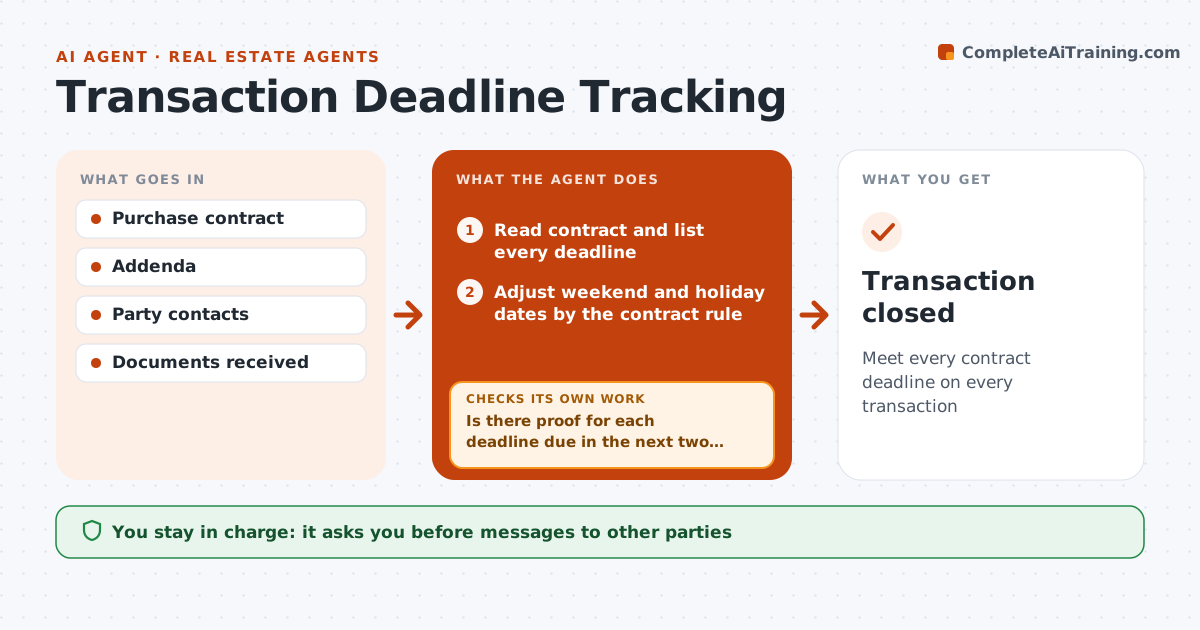
Meet every contract deadline on every transaction
What it does
Each purchase contract carries deadlines that can cost a client their deposit or the home if missed. This agent reads the signed contract and builds a timeline of every deadline: earnest money, inspection, appraisal, financing, title review and closing. Weekend and holiday dates follow the contract's rule for moving dates. It sends reminders to the right parties ahead of each date and looks for proof that each item happened, such as an inspection report or loan approval letter. If proof is missing two days before a deadline, it alerts the agent and drafts an extension request for review. Addenda update the timeline right away, and the agent checks the new dates against the contract. The agent approves all messages to other parties. Edge case: a deadline falling on a holiday moves according to the contract's rule.
How it works
Follow the arrows from top to bottom. The orange dashed arrow is the loop: when a check fails, the agent goes back and tries again.
Read the steps as a list
- Contract signed
- Read contract and list every deadline
- Adjust weekend and holiday dates by the contract rule
- Send reminders ahead of each date
- Is there proof for each deadline due in the next two days?If not: alert the agent and draft an extension request. Back to step 4.
- Agent approves messages and extension requestsThe agent waits here for your OK.
- Update the timeline from any addenda
- Do updated dates match the signed addenda?If not: correct the timeline and notify the agent. Back to step 7.
- Transaction closed
How it decides
Each deadline needs proof by its date. No proof two days before triggers an alert.
- Alert two days before an unproven deadline
- Weekend dates follow the contract rule
- Addenda update the timeline right away
Make it yours
Every agent is a starting point. You choose these settings for your own situation.
- Reminder lead time
- Parties to remind
- Alert channel
- Deadline types tracked
What keeps you in control
It always asks you first
- Messages to other parties
- Extension requests
Hard limits
- Never signs or sends addenda
- Never gives legal advice
It stops when
- Done: closed
- Stop: contract terminated
Set it up
We guide you through the set-up, step by step
Members get the full set-up guide for this agent. No technical skills needed: you copy, paste and upload.
- One set of instructions to paste into your AI, with the clicks for ChatGPT, Claude, Microsoft 365 Copilot, Gemini and Grok
- The agent then walks you through connecting your own data, one source at a time
- A downloadable copy with the flow chart, the rules and the full guide