AI agent for paramedics
Transport Billing Documentation Agent
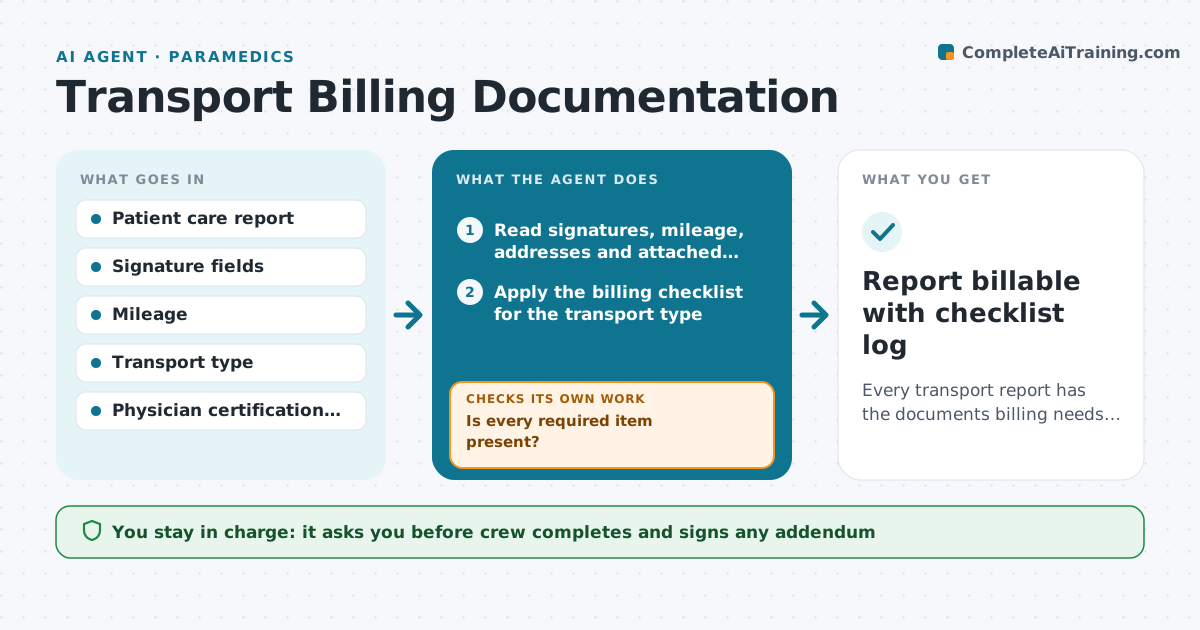
Every transport report has the documents billing needs within 48 hours of the call
What it does
EMS billing can only bill a transport when the patient care report has the right signatures, mileage and, for scheduled transports, a medical necessity form. Crews finish reports in a hurry, and billing finds the gaps weeks later. This agent reviews each closed transport report within hours. It checks for patient or authorized signature, the reason a patient could not sign, loaded mileage, pickup and destination addresses and, for non-emergency transfers, a signed physician certification. It lists missing items per crew and drafts a short fix request. After the crew updates the report, it checks again. Items still missing after 48 hours go to the supervisor. It does not change clinical narrative. Edge case: an unconscious patient with no family present needs the crew's documented reason and a facility representative signature instead.
How it works
Follow the arrows from top to bottom. The orange dashed arrow is the loop: when a check fails, the agent goes back and tries again.
Read the steps as a list
- Transport report closed
- Read signatures, mileage, addresses and attached forms
- Apply the billing checklist for the transport type
- Is every required item present?If not: move on to drafting fix requests. Back to step 3.
- Draft a fix request listing the missing items
- Crew completes the addendum in the report systemThe agent waits here for your OK.
- Are all items complete within 48 hours?If not: send a reminder and tell the supervisor. Back to step 5.
- Release the report to the billing queue
- Report billable with checklist log
How it decides
It applies the billing checklist for the transport type and sends anything missing to the crew who wrote the report.
- Non-emergency transfers need a signed physician certification
- Patients unable to sign need the crew's reason plus a facility signature
- Mileage above 50 or zero is double-checked
- 48 hours without a fix goes to the supervisor
Make it yours
Every agent is a starting point. You choose these settings for your own situation.
- Fix deadline (default 48 hours)
- Mileage limits that trigger a check
- Transport types in scope
- Reminder channel for crews
What keeps you in control
It always asks you first
- Crew completes and signs any addendum
- Supervisor handles overdue items
Hard limits
- Never edits the clinical narrative
- Never signs on behalf of a crew member
- Never sends patient details outside the agency
It stops when
- Done: report released to billing
- Stop: report under clinical review; billing waits
Set it up
We guide you through the set-up, step by step
Members get the full set-up guide for this agent. No technical skills needed: you copy, paste and upload.
- One set of instructions to paste into your AI, with the clicks for ChatGPT, Claude, Microsoft 365 Copilot, Gemini and Grok
- The agent then walks you through connecting your own data, one source at a time
- A downloadable copy with the flow chart, the rules and the full guide