AI agent for travel agents
Travel Insurance Claim Support Agent
Submit a complete claim packet that matches the policy terms and proves each cost
What it does
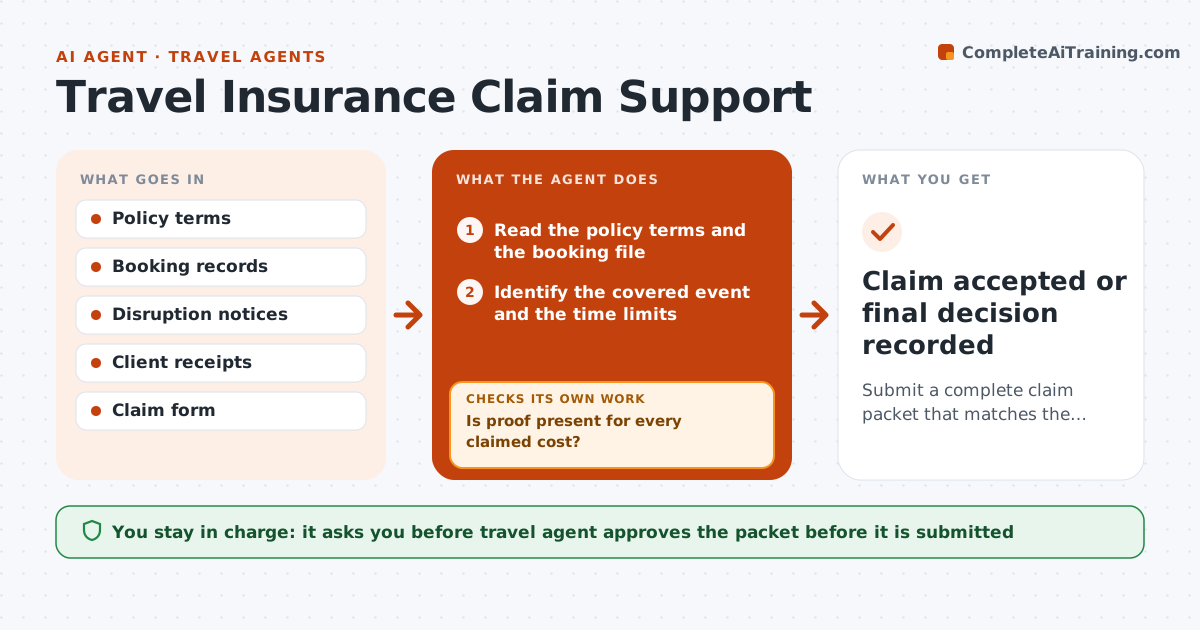
A client's flight is cancelled, the hotel is non-refundable and they send a claim with half the proof. The insurer rejects it and the client blames the agent. This agent builds the claim properly. After a disruption it collects documents from the booking file and the client, such as itineraries, cancellation notices and receipts, matches them to the policy terms, lists missing proof and drafts the claim packet with a clear summary and a list of costs. If the insurer asks for more, it updates the packet and checks it again. The agent approves before the client submits. Edge case: the delay was shorter than the policy minimum. The agent shows which cost is covered and which is not.
How it works
Follow the arrows from top to bottom. The orange dashed arrow is the loop: when a check fails, the agent goes back and tries again.
Read the steps as a list
- Client reports a disruption
- Read the policy terms and the booking file
- Identify the covered event and the time limits
- Collect notices and receipts from the supplier and client
- Match each cost to a coverage item and limit
- Is proof present for every claimed cost?If not: List missing items and ask the client or supplier for them. Back to step 4.
- Draft the claim summary and cost table
- Travel agent approves the packet before the client submitsThe agent waits here for your OK.
- Track the insurer's response
- Did the insurer ask for more information?If not: If more is requested, update the packet and resubmit with the agent's approval. Back to step 5.
- Claim accepted or final decision recorded
How it decides
It maps each cost to a covered event and its limit. A cost is included only if the policy covers it and proof exists.
- Include only costs covered by the policy and within limits
- Delay under the policy minimum is shown as not covered
- Claim deadlines are tracked from the event date
- Originals or clear scans are required for receipts
Make it yours
Every agent is a starting point. You choose these settings for your own situation.
- Policies and insurers handled
- Document checklist
- Claim deadline reminders
- Tone toward the client
- Who submits the claim
What keeps you in control
It always asks you first
- Travel agent approves the packet before it is submitted
- Travel agent approves any reply to the insurer
Hard limits
- Never submits a claim itself
- Does not promise the insurer will pay
It stops when
- Done: claim paid or finally declined with reasons
- Stop: policy lapsed or event excluded, tell the client
Set it up
We guide you through the set-up, step by step
Members get the full set-up guide for this agent. No technical skills needed: you copy, paste and upload.
- One set of instructions to paste into your AI, with the clicks for ChatGPT, Claude, Microsoft 365 Copilot, Gemini and Grok
- The agent then walks you through connecting your own data, one source at a time
- A downloadable copy with the flow chart, the rules and the full guide