AI agent for executive assistants
Travel Itinerary Assembly Agent
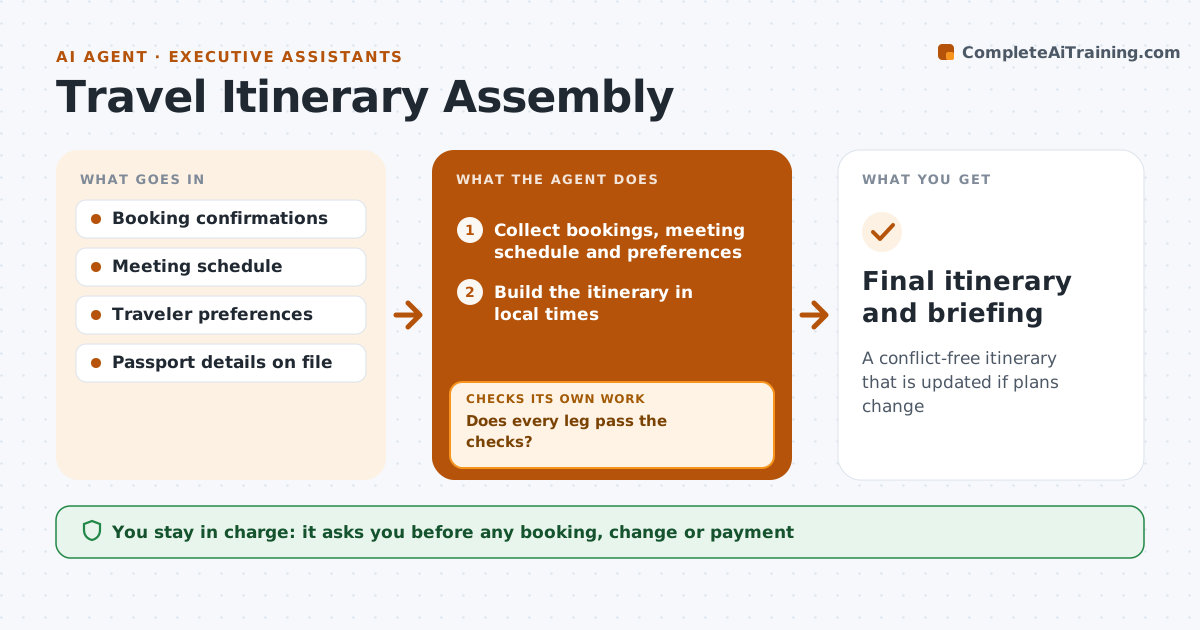
A conflict-free itinerary that is updated if plans change
What it does
A business trip involves flights, hotels, ground transport and meetings, and one bad connection or missing hotel night can derail the whole schedule. When a travel request or booking confirmation arrives, this agent collects the bookings, the meeting schedule and the executive's preferences, such as aisle seats. It builds one itinerary in local times. It then checks every leg: minimum connection times, a 90-minute buffer between landing and the first meeting, hotel dates against nights needed, and passport and visa needs for each country. If a check fails, it drafts an alternative. The assistant approves every booking or change. During the trip it watches for flight changes and reruns all the checks. Edge case: a meeting placed less than 90 minutes after landing is flagged even when the flight is on time.
How it works
Follow the arrows from top to bottom. The orange dashed arrow is the loop: when a check fails, the agent goes back and tries again.
Read the steps as a list
- Travel request or booking confirmation
- Collect bookings, meeting schedule and preferences
- Build the itinerary in local times
- Check connections, buffers, hotel nights and entry requirements
- Does every leg pass the checks?If not: draft an alternative and update the itinerary. Back to step 3.
- Assistant approves bookings or changesThe agent waits here for your OK.
- Watch flight status during the trip
- Does the itinerary still pass after any flight change?If not: draft new options for affected meetings and transfers. Back to step 4.
- Final itinerary and briefing
How it decides
Each leg is checked against minimum connection times, a 90-minute buffer after landing and entry requirements for the destination.
- 90-minute buffer after landing
- Entry requirements checked for each country
- Preferences such as aisle seats are applied
Make it yours
Every agent is a starting point. You choose these settings for your own situation.
- Buffer after landing
- Traveler preferences
- Flight watch on or off
- Itinerary format
What keeps you in control
It always asks you first
- Any booking, change or payment
Hard limits
- Never books or pays
- Never shares passport data
It stops when
- Done: trip complete
- Stop: entry requirement cannot be met in time, alert the assistant
Set it up
We guide you through the set-up, step by step
Members get the full set-up guide for this agent. No technical skills needed: you copy, paste and upload.
- One set of instructions to paste into your AI, with the clicks for ChatGPT, Claude, Microsoft 365 Copilot, Gemini and Grok
- The agent then walks you through connecting your own data, one source at a time
- A downloadable copy with the flow chart, the rules and the full guide