AI agent for receptionists
Office Event and RSVP Agent
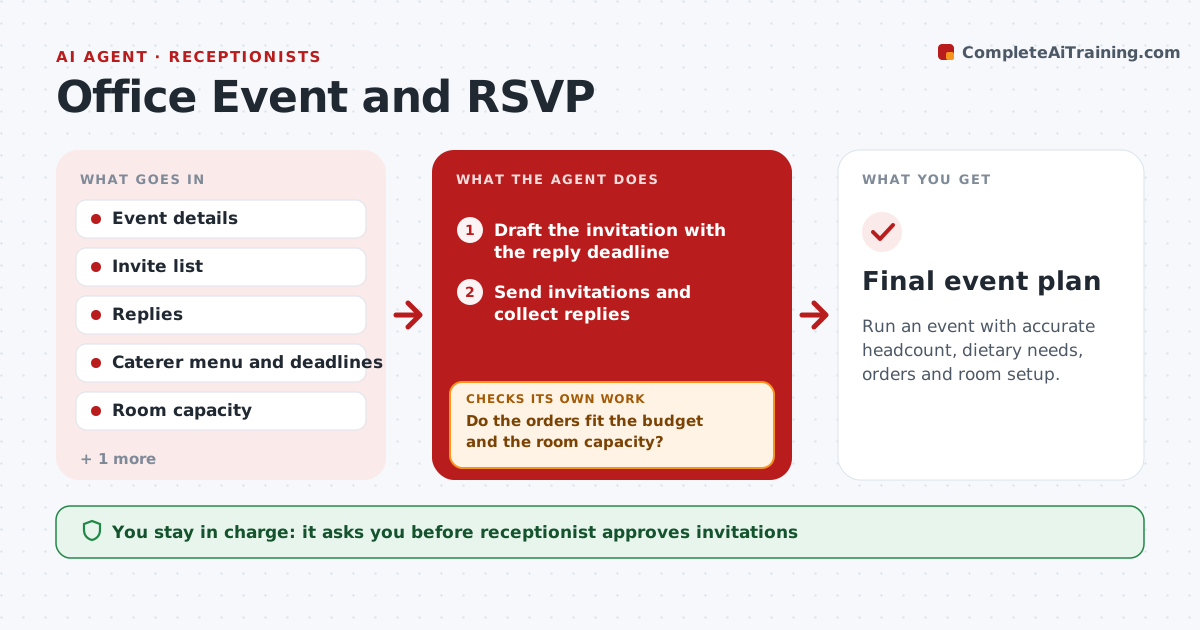
Run an event with accurate headcount, dietary needs, orders and room setup.
What it does
For the quarterly lunch, replies come by email, chat and in the hallway, and on the day there is food for 30 for 42 people. This agent sends the invitations once approved, and collects the replies into a single list. It builds the counts and the dietary and access needs list, and chases non-responders with a reminder. It uses the counts to prepare orders for food, drinks and room setup, and checks them against the budget and room capacity. As numbers change, it updates the plan and orders, and rechecks that all details still match. After the deadline for changes, it freezes the numbers, checks the final counts against the orders and flags any difference. The receptionist approves invitations and orders. Edge case: someone's dietary needs arrive after the freeze, so the agent flags them to the caterer through the receptionist.
How it works
Follow the arrows from top to bottom. The orange dashed arrow is the loop: when a check fails, the agent goes back and tries again.
Read the steps as a list
- Event approved
- Draft the invitation with the reply deadline
- Receptionist approves the invitationsThe agent waits here for your OK.
- Send invitations and collect replies
- Build counts and the dietary and access list
- Chase non-responders with a reminder
- Prepare food and room setup orders
- Do the orders fit the budget and the room capacity?If not: adjust quantities or propose a larger room. Back to step 7.
- Receptionist approves the ordersThe agent waits here for your OK.
- Do final counts match the orders at the cutoff?If not: update the orders and flag late changes to the receptionist. Back to step 5.
- Final event plan
How it decides
It counts a person as attending only on a confirmed yes. It chases non-responders at set times and freezes the count at the caterer's cutoff.
- Count only confirmed yes replies
- Remind non-responders 5 and 2 days before the deadline
- Order for confirmed count plus 5%
- Freeze the numbers at the caterer's cutoff
Make it yours
Every agent is a starting point. You choose these settings for your own situation.
- Reminder timing
- Order buffer (default 5%)
- Budget per head
- Dietary categories
- Cutoff time
What keeps you in control
It always asks you first
- Receptionist approves invitations
- Receptionist approves orders and late changes
Hard limits
- Never send invitations or place orders without approval
- Never exceed the event budget
It stops when
- Done: final counts match orders and the setup is confirmed
- Stop: the caterer cannot meet the date
Set it up
We guide you through the set-up, step by step
Members get the full set-up guide for this agent. No technical skills needed: you copy, paste and upload.
- One set of instructions to paste into your AI, with the clicks for ChatGPT, Claude, Microsoft 365 Copilot, Gemini and Grok
- The agent then walks you through connecting your own data, one source at a time
- A downloadable copy with the flow chart, the rules and the full guide