AI agent for sales development representatives
Trigger Event Outreach Agent
Reach the right person at a target account soon after a relevant event
What it does
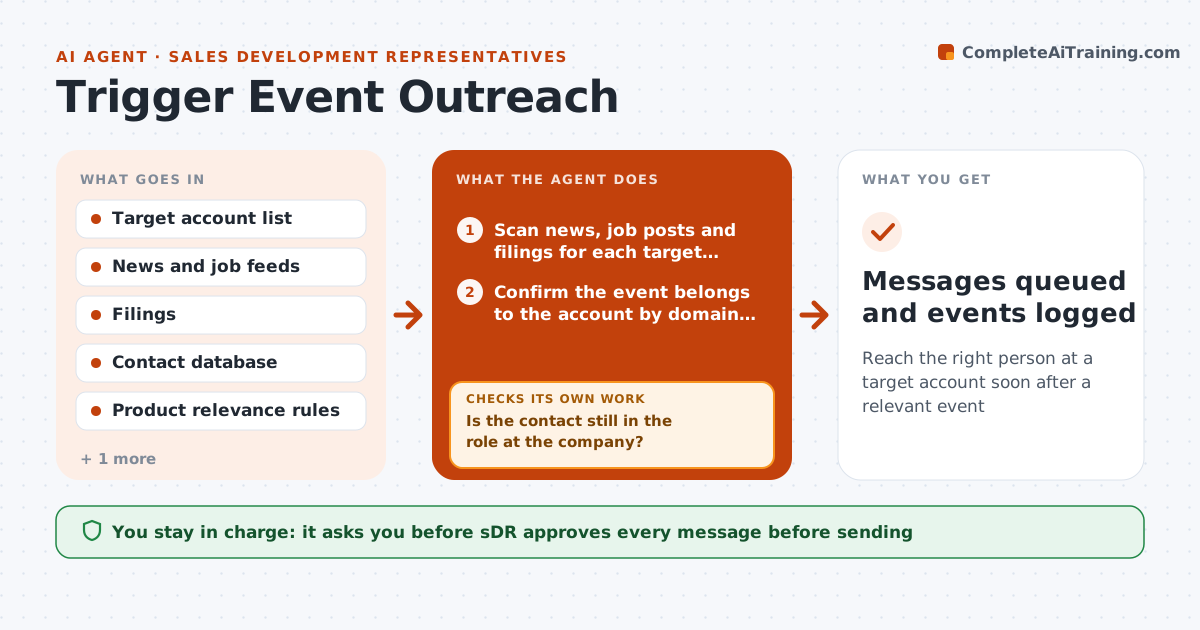
A target account raises a round, hires a new head of operations and posts ten jobs, and the SDR finds out two weeks later when a competitor is already in the inbox. This agent watches the accounts. Daily it scans news, job posts and filings for the target list, scores each event for relevance to what the company sells, finds the right contact and drafts a short note that references the event. If the contact has changed jobs, it finds the replacement. Each draft is checked for facts and dates. The SDR approves each message and decides what to send. Edge case: the news is about a different company with the same name. The agent checks the domain and drops it.
How it works
Follow the arrows from top to bottom. The orange dashed arrow is the loop: when a check fails, the agent goes back and tries again.
Read the steps as a list
- Daily scan starts
- Scan news, job posts and filings for each target account
- Confirm the event belongs to the account by domain and name
- Score the event for relevance and recency
- Find the right contact for the event in the contact database
- Is the contact still in the role at the company?If not: Find the replacement or the successor and recheck. Back to step 4.
- Draft a short note that references the event
- Are the facts and dates in the draft correct against the source?If not: Correct the draft from the source and recheck. Back to step 7.
- SDR approves each messageThe agent waits here for your OK.
- Messages queued and events logged
How it decides
It scores events by fit to what the company sells and by recency. A message is drafted only above a minimum score and only when the contact is current.
- Events older than 14 days are scored lower
- Only draft when the relevance score is above 60 out of 100
- One message per account per event
- Check the contact's role against a current source before drafting
Make it yours
Every agent is a starting point. You choose these settings for your own situation.
- Relevance threshold (default 60)
- Event age limit (default 14 days)
- Target account list
- Message length and tone
- Roles to target
What keeps you in control
It always asks you first
- SDR approves every message before sending
Hard limits
- Never sends without approval
- Uses only public sources
It stops when
- Done: messages drafted and queued for approval
- Stop: no relevant events today
Set it up
We guide you through the set-up, step by step
Members get the full set-up guide for this agent. No technical skills needed: you copy, paste and upload.
- One set of instructions to paste into your AI, with the clicks for ChatGPT, Claude, Microsoft 365 Copilot, Gemini and Grok
- The agent then walks you through connecting your own data, one source at a time
- A downloadable copy with the flow chart, the rules and the full guide