AI agent for mortgage brokers
Underwriting Condition Clearing Agent
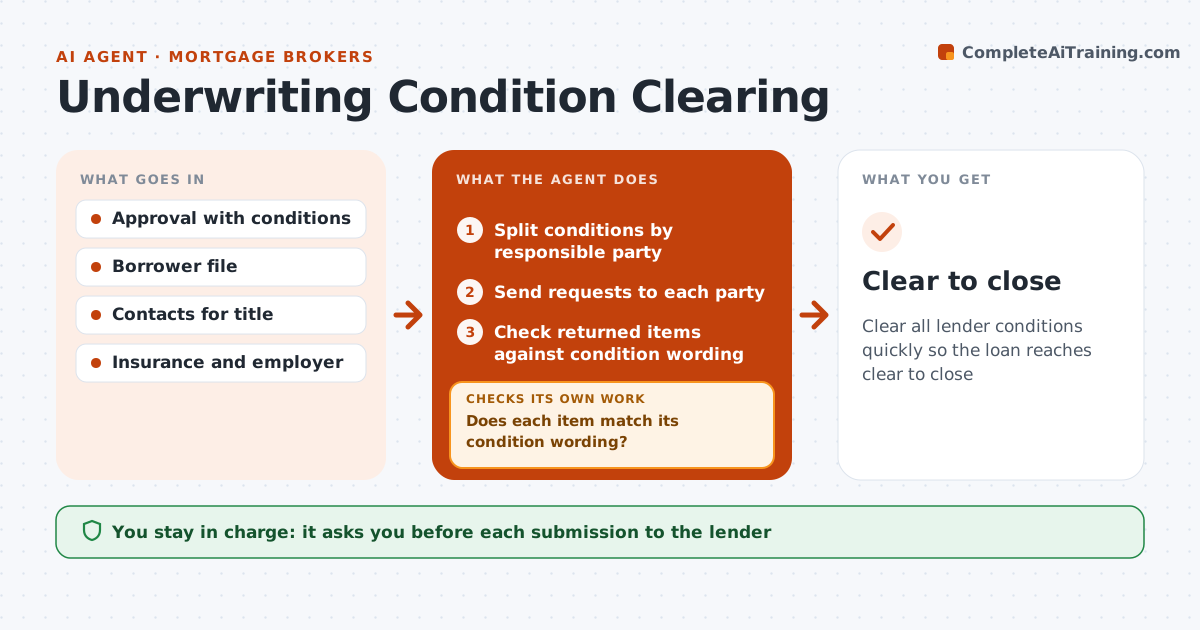
Clear all lender conditions quickly so the loan reaches clear to close
What it does
After conditional approval, the lender lists conditions that must clear before closing, and chasing them across several parties is slow. This agent reads the approval and splits conditions by who must provide them: borrower, title, insurance, employer or broker, with one owner each. It sends each party a clear request. As items arrive, it checks each against the exact condition wording before anything goes to the lender. The broker approves each submission. The agent reads the lender's response and reopens any condition not accepted, with the reason, and requests again. It keeps a daily list of what is still open. New conditions added after resubmission become new requests with their own owner. Edge case: a new condition after resubmission is treated as a separate request.
How it works
Follow the arrows from top to bottom. The orange dashed arrow is the loop: when a check fails, the agent goes back and tries again.
Read the steps as a list
- Conditional approval received
- Split conditions by responsible party
- Send requests to each party
- Check returned items against condition wording
- Does each item match its condition wording?If not: send the item back to the party with what is missing. Back to step 3.
- Broker approves submission to the lenderThe agent waits here for your OK.
- Did the lender accept every condition?If not: reopen rejected conditions with the reason and request again. Back to step 3.
- Update the daily open-conditions list
- Clear to close
How it decides
Each condition is assigned to the party who can provide it, and an item counts only when it matches the condition wording.
- Assign each condition to one owner
- Item must match the exact wording
- New conditions start their own request
Make it yours
Every agent is a starting point. You choose these settings for your own situation.
- Reminder frequency
- Party contacts
- Daily status format
- Escalation timing
What keeps you in control
It always asks you first
- Each submission to the lender
Hard limits
- Never alters borrower documents
- Never submits without approval
It stops when
- Done: clear to close
- Stop: loan denied
Set it up
We guide you through the set-up, step by step
Members get the full set-up guide for this agent. No technical skills needed: you copy, paste and upload.
- One set of instructions to paste into your AI, with the clicks for ChatGPT, Claude, Microsoft 365 Copilot, Gemini and Grok
- The agent then walks you through connecting your own data, one source at a time
- A downloadable copy with the flow chart, the rules and the full guide