AI agent for salesforce administrators
User Access Joiner Mover Leaver Agent
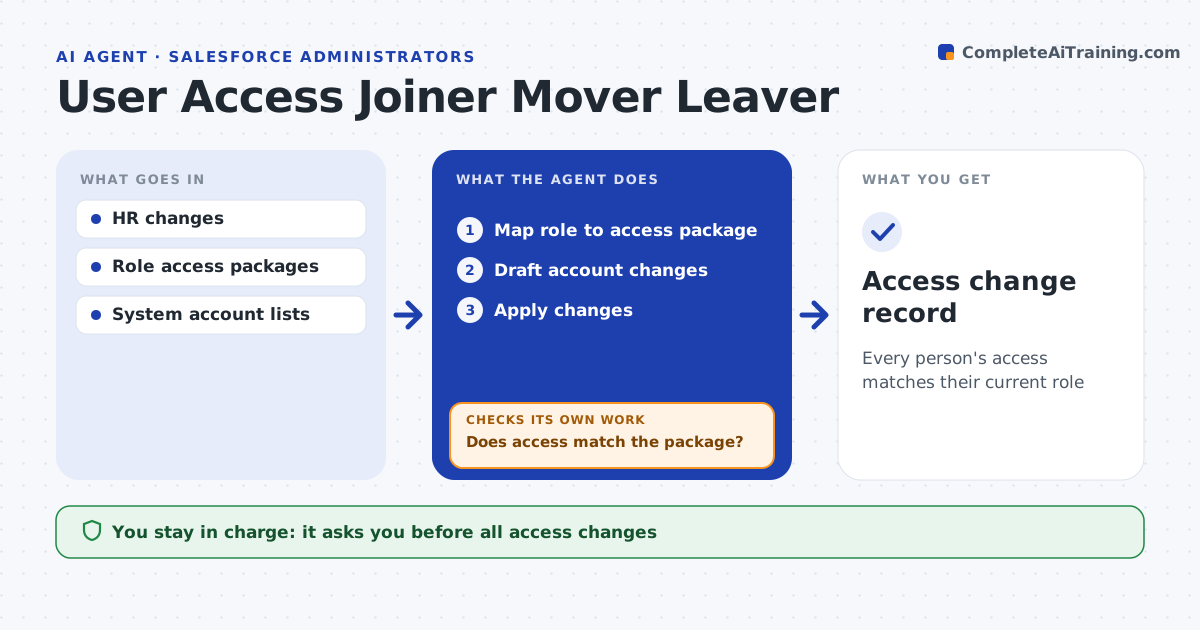
Every person's access matches their current role
What it does
When people join, change roles or leave, their access must change, and missed steps leave old accounts open or new staff waiting. This agent reads each HR change, maps the new role to the standard access package, and drafts the account changes across the directory, email and business apps. The admin approves every change before it is applied. After the changes are made, the agent reads access in each system and compares it with the package. If anything is left over or missing, it drafts the fix, sends it for approval and checks again until access matches. Movers keep old access for a short handover window, then lose it. Leavers are handled on their last day, never early. Decisions about exceptions stay with the admin. Edge case: a leaver who owns a shared mailbox gets ownership moved to their manager before the account is disabled.
How it works
Follow the arrows from top to bottom. The orange dashed arrow is the loop: when a check fails, the agent goes back and tries again.
Read the steps as a list
- HR change received
- Map role to access package
- Draft account changes
- Admin approves the changesThe agent waits here for your OK.
- Apply changes
- Read access in each system
- Does access match the package?If not: draft fixes for leftover or missing access. Back to step 3.
- Access change record
How it decides
It compares actual access with the role package and treats extra access as removal and missing access as an add.
- Leavers disabled on last day
- Movers lose old access after 14 days
- Owned resources transfer before disabling
Make it yours
Every agent is a starting point. You choose these settings for your own situation.
- Role packages
- Mover grace period
- Systems in scope
- Approvers
What keeps you in control
It always asks you first
- All access changes
Hard limits
- No deletion of accounts
- No changes without approval
It stops when
- Done: access matches
- Stop: system without admin access, ask owner
Set it up
We guide you through the set-up, step by step
Members get the full set-up guide for this agent. No technical skills needed: you copy, paste and upload.
- One set of instructions to paste into your AI, with the clicks for ChatGPT, Claude, Microsoft 365 Copilot, Gemini and Grok
- The agent then walks you through connecting your own data, one source at a time
- A downloadable copy with the flow chart, the rules and the full guide