AI agent for property managers
Vacancy Turnover Coordination Agent
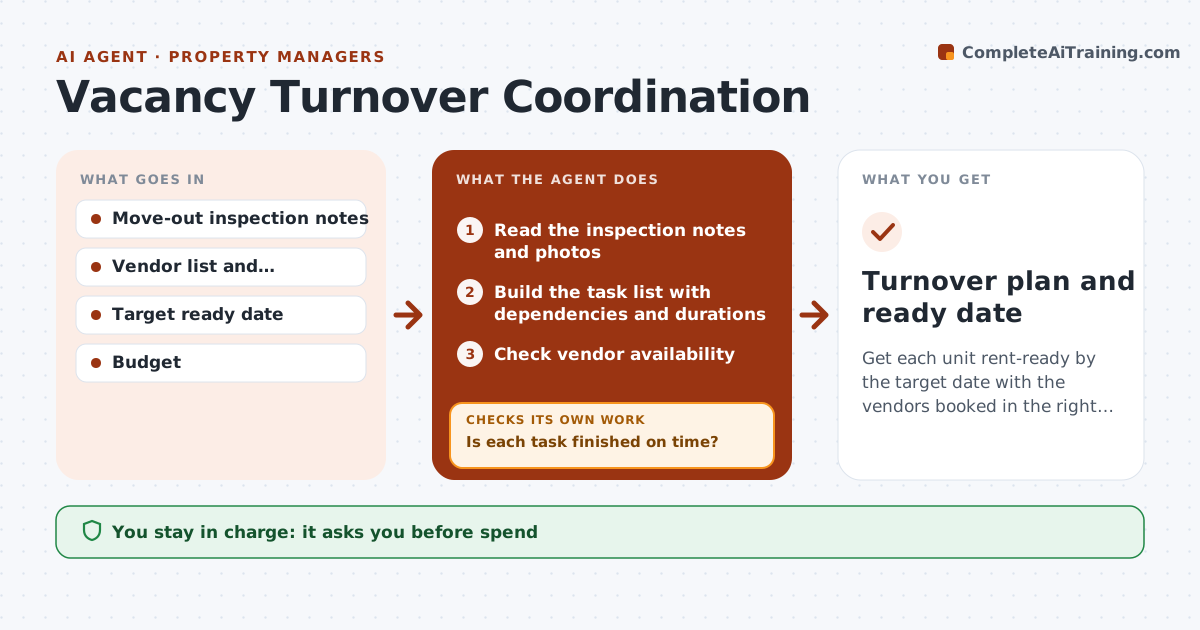
Get each unit rent-ready by the target date with the vendors booked in the right order.
What it does
Turnovers drag when the painter arrives before the repairs are done and the cleaner comes twice. After a move-out, this agent builds a task list for cleaning, repairs, painting and flooring, with the right order and the time each takes. It books vendors in sequence within their availability and checks completion by date. If a task is late, it rebooks the following steps and recalculates the ready date. You approve the spend and the ready date. Edge case: the plumber needs two extra days for a part, and the agent shifts the painter and the carpet fitter without double-booking.
How it works
Follow the arrows from top to bottom. The orange dashed arrow is the loop: when a check fails, the agent goes back and tries again.
Read the steps as a list
- Move-out is recorded
- Read the inspection notes and photos
- Build the task list with dependencies and durations
- Check vendor availability
- Book the vendors in sequence
- Manager approves the spend and ready date before bookings are sentThe agent waits here for your OK.
- Check the completion of each task by its date
- Is each task finished on time?If not: Rebook the following tasks and recalculate the ready date. Back to step 5.
- Compare the new ready date with the target
- Is the unit on track for the target date?If not: Offer a faster vendor or tell the manager the new date. Back to step 5.
- Turnover plan and ready date
How it decides
It orders tasks by dependency, books the earliest suitable slot for each vendor and recalculates the ready date after any delay.
- Repairs before paint, paint before flooring and final clean last
- Book the earliest slot that respects the order
- Spend over the limit needs approval (default $500)
- Report any delay within 1 day
Make it yours
Every agent is a starting point. You choose these settings for your own situation.
- Task order
- Target days
- Spend approval limit (default $500)
- Vendor list
- Delay alert time
What keeps you in control
It always asks you first
- Spend
- The ready date
- Vendor bookings
Hard limits
- Never commits spend without approval
- Never double-books a vendor
- Never changes the move-out record
It stops when
- Done: unit ready and inspected
- Stop: vendor unavailable; manager picks another
Set it up
We guide you through the set-up, step by step
Members get the full set-up guide for this agent. No technical skills needed: you copy, paste and upload.
- One set of instructions to paste into your AI, with the clicks for ChatGPT, Claude, Microsoft 365 Copilot, Gemini and Grok
- The agent then walks you through connecting your own data, one source at a time
- A downloadable copy with the flow chart, the rules and the full guide