
Learning path
Learning AI as a Vacation Rental Host
The learning path for vacation rental hosts shows you how to use AI for guest messages, listings, turnovers, maintenance, pricing, and reviews. It includes setup help, a prompt course, and video lessons with certificates, so you can host with less stress and more confidence.

Your path
Everything in the Vacation Rental Host AI kit, in the order that makes sense. Members tick off each step and see their progress.
Set up your AI
We guide you through each click.
Let skills do your everyday tasks
Connect your apps and pick your AI apps
Hand whole tasks to AI agents
Build your own tools
Keep growing
Everything for vacation rental hosts
All the courses, certifications, AI tools, MCP servers and apps for vacation rental hosts, most relevant first. Open any list to see more.
Take the prompt courses
A short framework course to learn how to ask, then 8 lessons with ready-to-use prompts for vacation rental hosts.
Start with this framework: how to talk to AI
ICIO and CIDI let you reuse prompts to classify guest messages and extract check-in dates for every booking.
Then your prompt course for vacation rental hostsWatch the video courses or add them to your Favorites for later
111 video courses our AI picked for vacation rental hosts, most useful first. Save the ones you want to watch later with the heart.
Favorites are saved to your account: sign in or get your AI kit first.
Show all 111 video courses
Get certified, or add certifications to your Favorites
Every course ends in an exam and a certificate you can add to LinkedIn. Save the certifications you are aiming for with the heart.
Favorites are saved to your account: sign in or get your AI kit first.
More certifications for vacation rental hostsShow all 24 certifications
Try the AI tools for vacation rental hosts
24 AI tools our AI matched to the work of vacation rental hosts, best fit first. Each review shows what it does, its alternatives and the jobs it suits.
Favorites are saved to your account: sign in or get your AI kit first.
Show all 24 AI tools
Connect your AI to the apps vacation rental hosts use
MCP servers let ChatGPT, Claude or Copilot look things up and get work done in other apps, like your email, calendar or bookkeeping software. These 12 fit the work of vacation rental hosts best, well-known apps first.

Partelisto MCP server
by TargetGrpsAsk your AI about Spanish rental bookings, guest forms, and police registration status.
ProductivityNo install
MCP Emails server
by AlbretsenLet your AI read, search, send and organize email in your own mailbox.
EmailNo install
Hostaway MCP server
by prosperkartikLets your AI look up your Hostaway listings, reservations, calendar, guest messages and owner statements.

Fluxmail MCP server
by churichardLet your AI read, search, draft, send and organize email across your mailboxes.
Email Official
Gmail MCP server
by A1-x-TechLet your AI read, search, draft and send your Gmail, and keep labels and trash tidy, from the chat.

Chatmaid WhatsApp MCP server
by chatmaidLet your AI send WhatsApp messages, read replies and check delivery for your business number.
Customer communication OfficialShow all 12 MCP servers

GigaMail MCP server
by adecubedLet your AI read, search and draft your email, with you approving every send or delete.
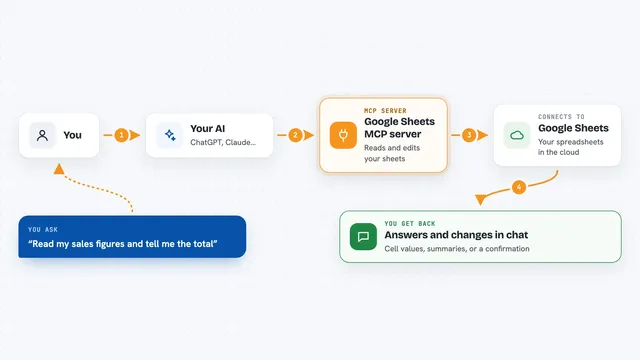
Google Sheets MCP server
by freemaLets your AI read, write, and format your Google Sheets for you, right from the chat.

Email MCP server
by marlinjaiLets your AI read, search, send and tidy up your email across Gmail, Outlook and iCloud.

Mail MCP server
by tecnologicachileLets your AI read, search, send, reply to and forward email across several accounts for you.

iCloud Mail MCP server
by JulienRabaultLet your AI search, read, file and draft replies in your iCloud Mail, without marking anything as read.
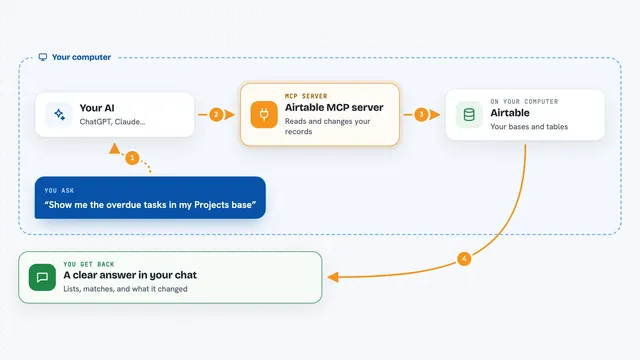
Airtable MCP server
by domdomeggLets your AI read, search, add, update and delete records in your Airtable bases for you.
Build your own AI apps for vacation rental hosts
Apps you build yourself with your own AI, no coding needed and no monthly fee. Our AI picked the 3 that fit the work of vacation rental hosts.
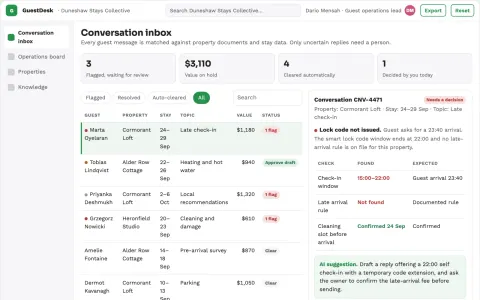
Short-term rental guest communication and operations portal
Reduce repetitive guest messaging and coordination work while keeping the host's own tone and property rules.
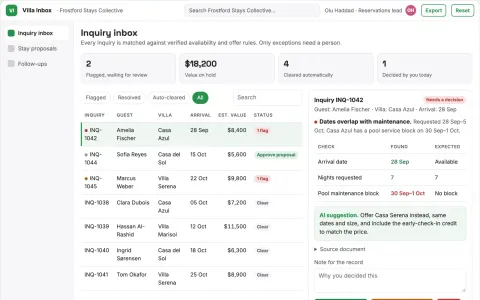
Villa inquiry conversion service
Property matching and complete stay proposals in one inquiry workflow.
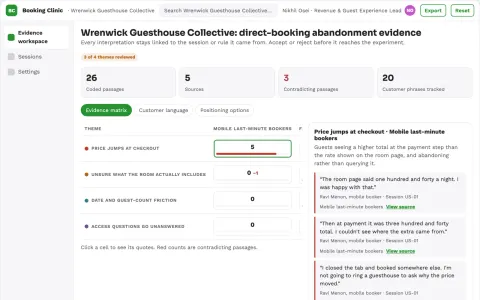
Hospitality direct-booking abandonment clinic
Recover bookings by fixing demonstrated friction.









































































































About this learning path
6 topicsUse AI To Make Vacation Rental Hosting Easier
Hosting a vacation rental means juggling guest messages, cleaning schedules, maintenance, pricing, and reviews. It can feel like a second job. This path shows you how AI can take the repetitive parts off your plate, so you can focus on giving guests a great stay.
You do not need to be technical. We start with simple setup questions, help you connect your AI tools, and then walk through prompts made for the real tasks you do every day. You will also find video courses picked for hosts, with certificates you can earn.
Why AI Matters For Hosts Now
Guests expect fast, friendly answers. Platforms reward hosts who reply quickly and keep their calendars full. AI helps you write those replies, plan rates, and organize tasks without spending your whole day on admin. It also helps you spot patterns in bookings and reviews that you might miss when you are busy.
New tools are getting easier to use. You can talk to them in plain language, like you would talk to a helpful assistant. That means you can get real help today, not someday.
What This Path Includes
You begin with setup questions that help you choose the right AI tool for your needs. Then you connect your AI and learn skills for the job inside your AI, like writing guest messages or planning turnovers. The heart of the path is a prompt course with lessons for every big hosting task. You also get video courses picked for vacation rental hosts, and each one comes with a certification you can add to your profile.
How This Path Saves Time
Instead of rewriting the same guest replies, you use a prompt to get a friendly draft in seconds. Instead of guessing at pricing, you ask for help based on your booking patterns and local events. Instead of texting your cleaner a long explanation, you send a clear checklist. Small time savings add up across every booking, turnover, and review.
How This Protects Your Career
Short replies and missed maintenance can hurt your ratings. Lower ratings mean fewer bookings. This path helps you stay consistent, even when you are busy or tired. You learn to handle reviews well, keep good records, and make decisions that protect your reputation and your income.
How To Get Started
Start with the first lesson in the path. Answer the setup questions honestly. Then connect your AI tool and try one prompt from the course. Pick a task you do often, like replying to a guest inquiry. Once you see how it works, add one more task each day.
You can move at your own pace. The video courses are short and practical. Certificates are there to show what you have learned, but the real reward is a smoother hosting day.
Frequently asked questions
Do I need to be technical to use AI for hosting?
No. If you can send a text message or write an email, you can use these tools. The path starts with simple setup questions and plain language prompts. You will be surprised how quickly it feels normal.Which AI tools will I use?
You can use popular tools like ChatGPT, Claude, or Gemini. The path helps you connect whichever one you choose. The prompts work across them, so you are not locked into one option.How long does the learning path take?
Most hosts can move through the core lessons in a few sittings. You can go faster or slower depending on your schedule. The video courses are short, and you can revisit any lesson when you need it.Will this help me get more bookings?
It can help you respond faster, write better listings, and keep your calendar full. Better reviews and smoother stays often lead to more reservations over time. We cannot promise a specific number, but the habits you build here support a stronger hosting business.