AI agent for urban planners
Variance Request Precedent Review Agent
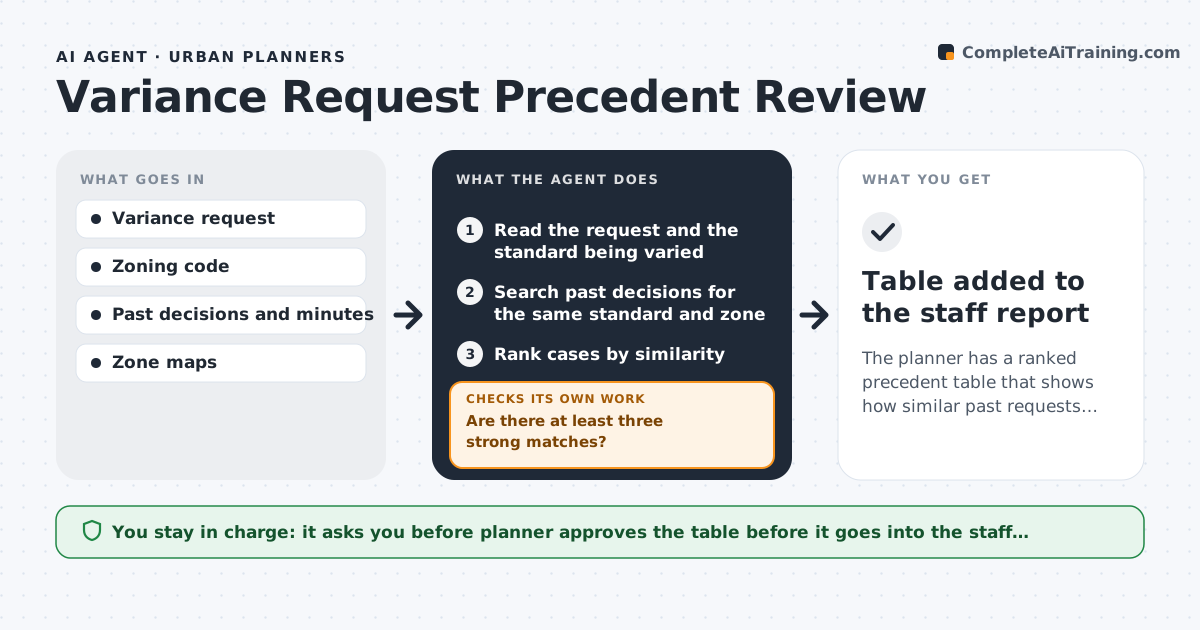
The planner has a ranked precedent table that shows how similar past requests were decided, ready for the staff report.
What it does
Boards need consistency, but staff rarely have time to compare a new variance request with past decisions. The agent reads the request and finds past variances with similar standards, zones and conditions. It compares the findings, conditions and outcomes of each. If the match is weak, it widens the search, for example to neighboring zones or a similar hardship. It drafts a precedent table showing the case, the decision and why it is or is not alike. The planner approves it before it is added to the staff report. Edge case: a past case that was approved with conditions the new request does not meet.
How it works
Follow the arrows from top to bottom. The orange dashed arrow is the loop: when a check fails, the agent goes back and tries again.
Read the steps as a list
- Variance request received
- Read the request and the standard being varied
- Search past decisions for the same standard and zone
- Rank cases by similarity
- Are there at least three strong matches?If not: Widen the search to nearby zones and similar hardships. Back to step 4.
- Compare findings, conditions and outcomes
- Note differences that might change the result
- Does each comparison cite the decision and its reasons?If not: Reread the minutes and complete the missing reasons. Back to step 3.
- Draft the precedent table
- Planner approves the tableThe agent waits here for your OK.
- Table added to the staff report
How it decides
It ranks past cases by same standard, zone type, size of relief and stated hardship, and widens the search if fewer than three good matches are found.
- Strong match needs the same standard and zone type
- Compare size of relief within 25%
- Always report decisions that went the other way
- Cite the file and date of each decision
Make it yours
Every agent is a starting point. You choose these settings for your own situation.
- Similarity criteria and weights
- Years of decisions searched (default 10)
- Minimum matches (default 3)
- Table format
What keeps you in control
It always asks you first
- Planner approves the table before it goes into the staff report
Hard limits
- Never recommend approval or denial
- Do not omit unfavorable precedents
It stops when
- Done: precedent table approved
- Stop: no similar decision exists and the planner decides how to proceed
Set it up
We guide you through the set-up, step by step
Members get the full set-up guide for this agent. No technical skills needed: you copy, paste and upload.
- One set of instructions to paste into your AI, with the clicks for ChatGPT, Claude, Microsoft 365 Copilot, Gemini and Grok
- The agent then walks you through connecting your own data, one source at a time
- A downloadable copy with the flow chart, the rules and the full guide