AI agent for accounts payable specialists
Vendor Credit Memo and Refund Tracker Agent
Apply or recover every vendor credit and overpayment instead of leaving it unapplied
What it does
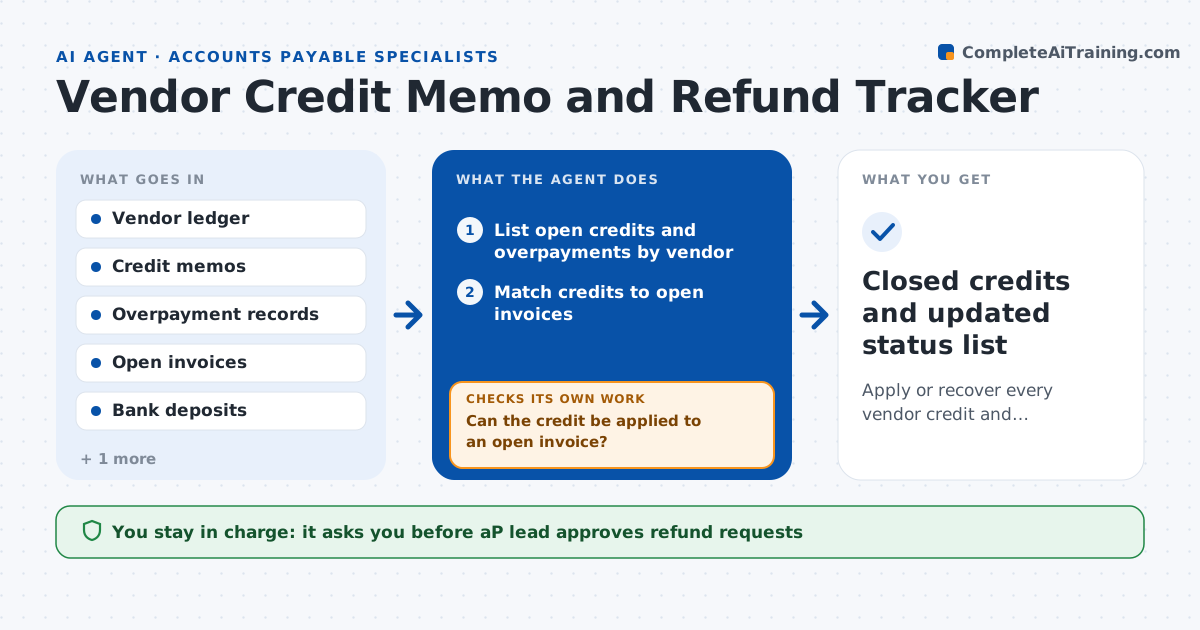
Several vendors owe the company credits, and nobody has looked at the aging report in months. This agent lists open credits and overpayments by vendor and checks whether each credit has been applied to an open invoice. When a credit can be applied, it prepares the application. For credits with no open invoice, it drafts a refund request with the amount, memo number and reason. It follows up at set dates, 14 and 30 days, and checks the bank for the refund. If a refund is not received, it escalates. It records the status for every credit. The AP lead approves refund requests and any write-off. Edge case: a vendor with a small balance under a set amount is flagged for netting against the next invoice.
How it works
Follow the arrows from top to bottom. The orange dashed arrow is the loop: when a check fails, the agent goes back and tries again.
Read the steps as a list
- Weekly review
- List open credits and overpayments by vendor
- Match credits to open invoices
- Can the credit be applied to an open invoice?If not: Draft a refund request or flag it for netting if the amount is small. Back to step 3.
- AP lead approves applications, refund requests and write-offsThe agent waits here for your OK.
- Send approved requests and log follow-up dates
- Check bank deposits at day 14 and day 30
- Has the refund been received?If not: Send a follow-up and escalate to the AP lead at day 30. Back to step 6.
- Update the credit aging report
- Closed credits and updated status list
How it decides
It applies a credit when a matching open invoice exists. Otherwise it requests a refund when the balance is above the minimum and nets small balances.
- Apply credits to open invoices first
- Request a refund when no invoice is open and the balance is over $100
- Net balances under $100 against the next invoice
- Escalate refunds not received after 30 days
Make it yours
Every agent is a starting point. You choose these settings for your own situation.
- Refund minimum (default $100)
- Follow-up days (default 14 and 30)
- Review frequency (default weekly)
- Escalation owner (default the AP lead)
What keeps you in control
It always asks you first
- AP lead approves refund requests
- AP lead approves any write-off
Hard limits
- Never apply credits or send requests without approval
- Never write off a balance without the AP lead
- Keep a log of every follow-up
It stops when
- Done: All credits applied, refunded or written off
- Stop: Vendor disputes the credit, so hand to the AP lead
Set it up
We guide you through the set-up, step by step
Members get the full set-up guide for this agent. No technical skills needed: you copy, paste and upload.
- One set of instructions to paste into your AI, with the clicks for ChatGPT, Claude, Microsoft 365 Copilot, Gemini and Grok
- The agent then walks you through connecting your own data, one source at a time
- A downloadable copy with the flow chart, the rules and the full guide